




Here's how it works



How to use or fill out Casino Licence Application 5420 - AGLC - aglc ab with our platform

- Click ‘Get Form’ to open the Casino Licence Application 5420 in the editor.
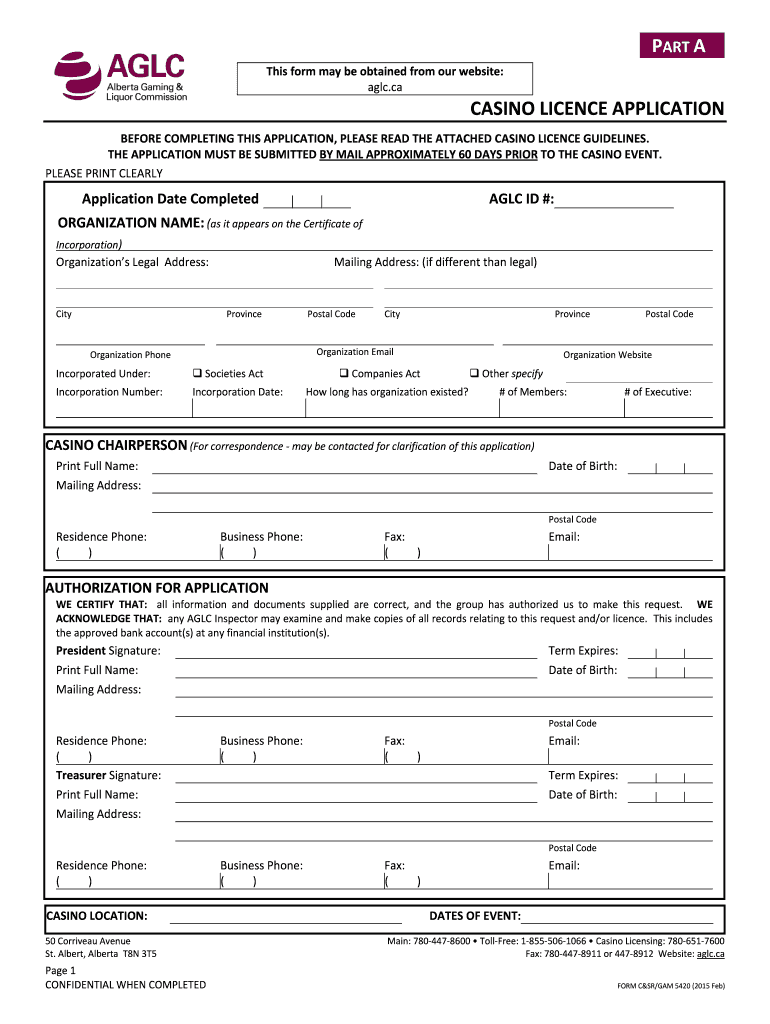
- Begin with Part A, where you will provide your organization’s legal name, address, and contact information. Ensure all fields are filled out clearly.
- In Part A, also include details about the Casino Chairperson and ensure their contact information is accurate for correspondence.
- Move to Part B, where you must complete the Casino Bank Account Declaration. Attach an original VOID cheque that matches your organization’s legal name.
- For volunteer positions, list at least five individuals in key roles and ensure each has a completed Volunteer Worker Application form.
- Finally, in Part C, specify how gaming proceeds will be used. This section requires careful attention to detail as it outlines your intended allocations.
- Review all sections using our platform's editing tools to ensure completeness before submission. Retain copies of all documents for your records.
Start filling out your Casino Licence Application today for free using our platform!
It's free
See more Casino Licence Application 5420 - AGLC - aglc ab versions
Got questions?
How can I create an electronic signature in my Casino Licence Application 5420 - AGLC - aglc ab on Android?
Signing paperwork on a mobile device is quick, straightforward, and doesn’t require software installation if you have an account with DocHub. Log in from any browser, fill in your blank fields with your information, and click on Sign → Create your signature. You can draw your electronic signature the same way you usually do on paper, add its image to your Casino Licence Application 5420 - AGLC - aglc ab, or type in your name and stylize its look. Whatever option you choose, your documentation will be valid.
How to complete and sign Casino Licence Application 5420 - AGLC - aglc ab online?
You can quickly fill out, edit, and even eSign your Casino Licence Application 5420 - AGLC - aglc ab using DocHub. Create a new account and start your free trial. After that, you can add the document with the form and easily make all the necessary edits. No need to print on paper or use a third-party application to sign it, as you can place your electronic signature on your document quicker through DocHub.
How long does it take to get a liquor license in Alberta?
Are casinos privately owned in Alberta?
How long does it take to get an Alberta license?
Security and compliance
At DocHub, your data security is our priority. We follow HIPAA, SOC2, GDPR, and other standards, so you can work on your documents with confidence.
Learn more




