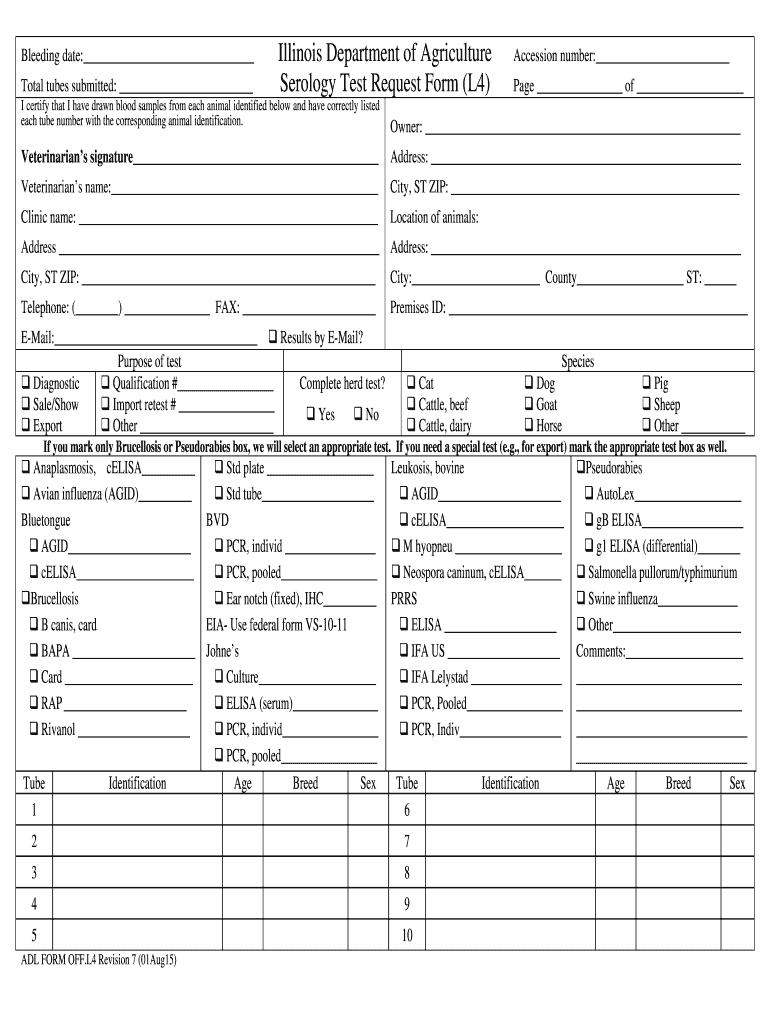
Il form serology test 2025

Get Form
serology form Preview on Page 1

Here's how it works

01. Edit your serology form online
Type text, add images, blackout confidential details, add comments, highlights and more.
02. Sign it in a few clicks
Draw your signature, type it, upload its image, or use your mobile device as a signature pad.
03. Share your form with others
Send it via email, link, or fax. You can also download it, export it or print it out.

How to use or fill out il form serology test with our platform

Form edit decoration
9.5
Ease of Setup
DocHub User Ratings on G2
9.0
Ease of Use
DocHub User Ratings on G2
  1. Click ‘Get Form’ to open the il form serology test in the editor.
  2. Begin by entering the 'Bleeding date' and 'Total tubes submitted' at the top of the form. This information is crucial for tracking your samples.
  3. Fill in the 'Accession number' and ensure you note the page number for reference. This helps maintain organization throughout your submission.
  4. Complete the 'Owner' and 'Veterinarian’s name' sections, along with their respective addresses and contact details. Accurate information here is essential for communication regarding test results.
  5. Indicate the purpose of the test by checking appropriate boxes, such as 'Diagnostic' or 'Sale/Show'. If applicable, provide additional details like qualification numbers.
  6. Select the species being tested from the provided options. Ensure that you mark any specific tests required for export or other purposes.
  7. For each tube, fill in identification details including age, breed, and sex of each animal. This ensures precise testing and reporting.

Start using our platform today to easily complete your il form serology test online for free!

See more il form serology test versions

We've got more versions of the il form serology test form. Select the right il form serology test version from the list and start editing it straight away!
Versions Form popularity Fillable & printable
2015 4.8 Satisfied (62 Votes)
be ready to get more

Complete this form in 5 minutes or less

Get form

Got questions?

We have answers to the most popular questions from our customers. If you can't find an answer to your question, please contact us.
Contact us

Yes, a typed name is accepted as a valid electronic signature when you add it to your paperwork using a compliant solution like DocHub. Simply upload your il form serology test to our editor, click Sign in the top tool pane → Create your signature → Type your name in the appropriate tab, and decide how it will look on your document.

You can find and modify your il form serology test online by using DocHub. Its straightforward but feature-rich design enables you to begin productive work right after you register your account. Create your profile and add your document, then our interface will guide you through our stress-free form completion experience.

A: A positive antibody test result could mean you previously had a SARS-CoV-2 infection or COVID-19. A positive antibody test could also mean the test is detecting antibodies in your blood in response to your COVID-19 vaccine.
Serology tests look for certain antibodies to see whether a person has been exposed to or infected with a virus or other infectious agent. Sometimes antibodies are made against the bodys own tissues.
All new syphilis cases must be reported within seven days of diagnosis to public health as required by law in Illinois. All positive blood tests, diagnosis, or treatment of syphilis should be reported.
be ready to get more

Complete this form in 5 minutes or less

Get form

People also ask

Applications of Serological Tests Detect pathogens responsible for infections such as , hepatitis, and tuberculosis. Monitor immune response during and after treatment. Identify autoantibodies and allergens impacting the body.
There are different types of serological testsfor example, flocculation tests, neutralization tests, hemagglutinin-inhibition tests, enzyme-linked immunosorbent assays (ELISAs), and chemiluminescence immunoassays.

Related links