Parent proctoring form 2026

Get Form
parent proctoring form Preview on Page 1

Here's how it works

01. Edit your parent proctoring form online
Type text, add images, blackout confidential details, add comments, highlights and more.
02. Sign it in a few clicks
Draw your signature, type it, upload its image, or use your mobile device as a signature pad.
03. Share your form with others
Send flhsmv parent proctoring form via email, link, or fax. You can also download it, export it or print it out.

How to use or fill out parent proctoring form with our platform

Form edit decoration
9.5
Ease of Setup
DocHub User Ratings on G2
9.0
Ease of Use
DocHub User Ratings on G2
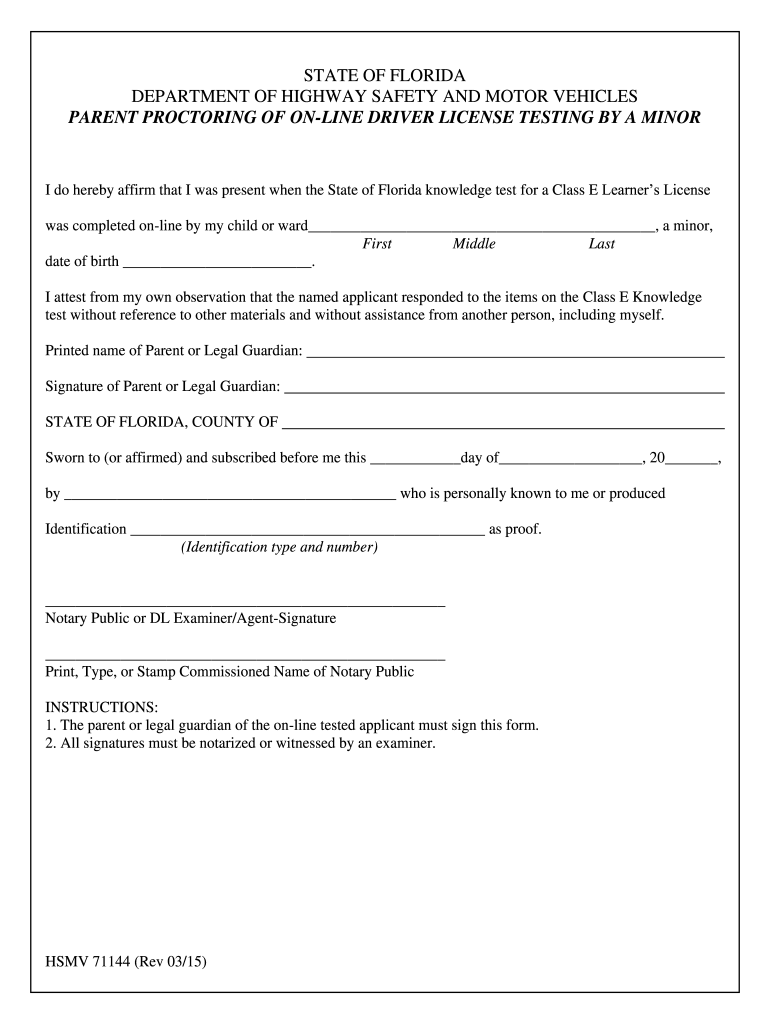
  1. Click ‘Get Form’ to open the parent proctoring form in the editor.
  2. Begin by entering your child's full name in the designated fields for First, Middle, and Last names.
  3. Next, input your child's date of birth in the provided space to confirm their identity.
  4. In the section affirming your presence during the test, ensure you accurately attest that your child completed the knowledge test independently.
  5. Print your name as the Parent or Legal Guardian in the specified area.
  6. Sign the form where indicated to validate your affirmation.
  7. Finally, ensure that a notary public or DL examiner signs and stamps the document for notarization.

Start using our platform today to easily complete and manage your documents for free!

See more parent proctoring form versions

We've got more versions of the parent proctoring form form. Select the right parent proctoring form version from the list and start editing it straight away!
Versions Form popularity Fillable & printable
2015 4.8 Satisfied (107 Votes)
be ready to get more

Complete this form in 5 minutes or less

Get form

Got questions?

We have answers to the most popular questions from our customers. If you can't find an answer to your question, please contact us.
Contact us
Yes, the form may require notarization depending on the relationship of the consenter.
Parent/Guardian On-line Test Proctoring Form (71144) must be completed if the minor child completed the Class E Knowledge Exam online through a third party administrator. This form must be completed and signed in the presence of a driver license examiner, or docHubd if parent or guardian will not be present.
Can I take the Permit Test on my own? No. The State of Florida requires the online test to be proctored by a parent or guardian. This means that your parent or guardian must monitor you while you take the test, but they are not allowed to assist you in any way.
Description Download the app and set permissions. Verify access to your phone number. Use your device camera to scan the front and back of your drivers license or ID card. Follow the apps registration steps to take a selfie. Set up app security and youre good to go!

Security and compliance

At DocHub, your data security is our priority. We follow HIPAA, SOC2, GDPR, and other standards, so you can work on your documents with confidence.

Learn more
ccpa2
pci-dss
gdpr-compliance
hipaa
soc-compliance
be ready to get more

Complete this form in 5 minutes or less

Get form