




Here's how it works

01. Edit your faa 7480 1 online
Type text, add images, blackout confidential details, add comments, highlights and more.

02. Sign it in a few clicks
Draw your signature, type it, upload its image, or use your mobile device as a signature pad.

03. Share your form with others
Send faa 8010 4 via email, link, or fax. You can also download it, export it or print it out.
How to use or fill out FAA Form 7480-1 with our platform

- Click ‘Get Form’ to open FAA Form 7480-1 in the editor.
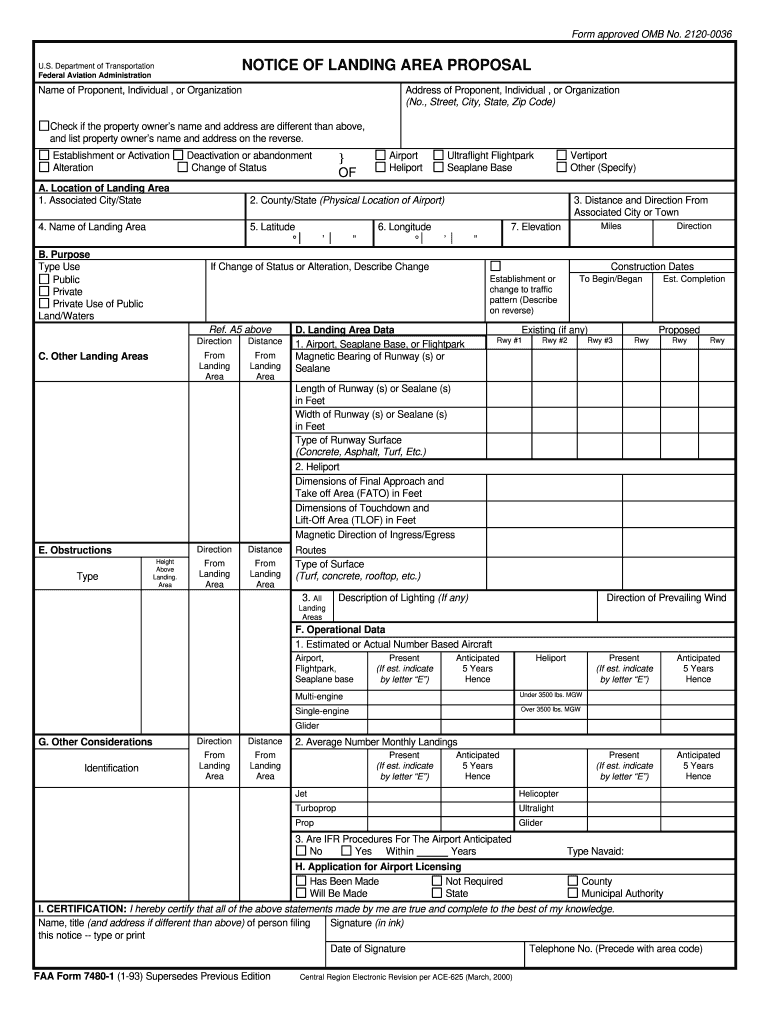
- Begin by filling out the proponent's name and address in the designated fields. If the property owner's information differs, check the box and provide their details on the reverse side.
- In Section A, specify the location of the landing area by selecting from options like Airport, Heliport, or Seaplane Base. Enter associated city/state and county/state.
- For Section B, indicate the purpose of use (Public, Private, etc.) and complete any additional fields regarding changes or alterations if applicable.
- Continue through Sections C to H, providing necessary data such as runway dimensions, operational data, and obstructions. Ensure all entries are clear and accurate.
- Finally, certify your submission by signing in Section I. Review all information for completeness before submitting.
Start using our platform today to easily fill out FAA Form 7480-1 for free!
Fill out FAA Form 7480-1 online
It's free
See more FAA Form 7480-1 versions
We've got more versions of the FAA Form 7480-1 form. Select the right FAA Form 7480-1 version from the list and start editing it straight away!
| Versions | Form popularity | Fillable & printable |
|---|---|---|
| 1993 | 4.8 Satisfied (62 Votes) |
Security and compliance
At DocHub, your data security is our priority. We follow HIPAA, SOC2, GDPR, and other standards, so you can work on your documents with confidence.
Learn more


