Type text, add images, blackout confidential details, add comments, highlights and more.
02. Sign it in a few clicks
Draw your signature, type it, upload its image, or use your mobile device as a signature pad.
03. Share your form with others
Send saccourt via email, link, or fax. You can also download it, export it or print it out.
How to use or fill out PR-E-LP-020 - VIDEO TAPE VERIFICATION 2 .doc - saccourt ca with our platform
Ease of Setup
DocHub User Ratings on G2
Ease of Use
DocHub User Ratings on G2
Click ‘Get Form’ to open the document in the editor.
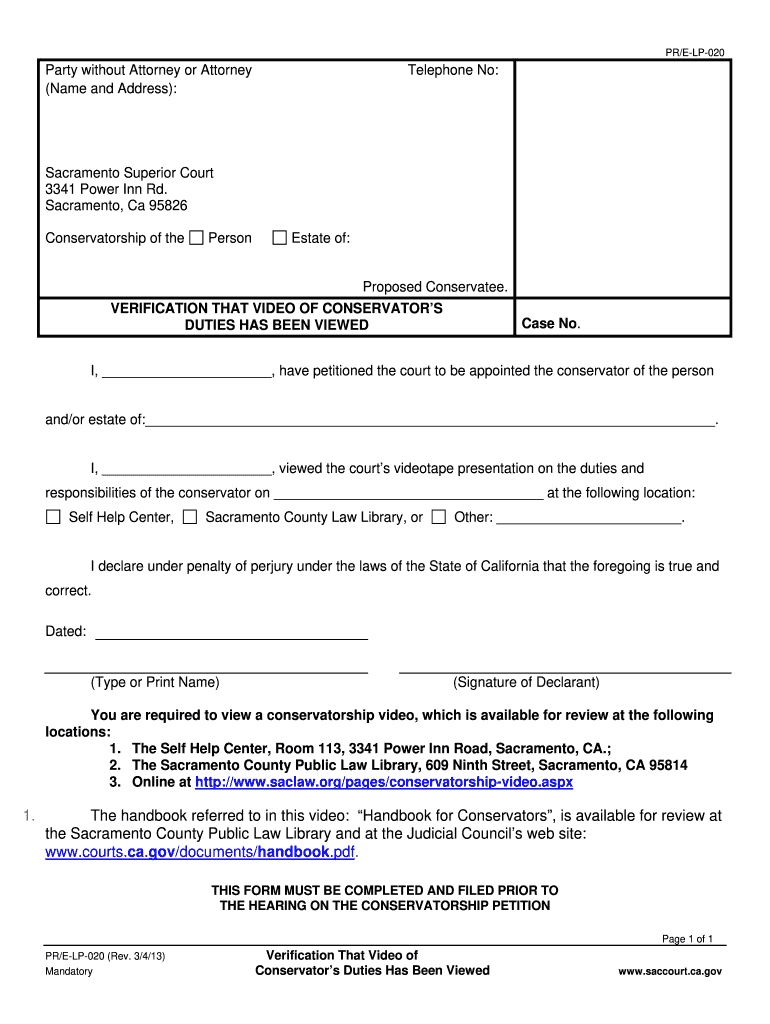
Begin by entering your name and address in the designated fields for 'Party without Attorney or Attorney'. Include your telephone number for contact purposes.
Fill in the case number related to your conservatorship petition. This is crucial for proper identification of your case.
In the section stating 'I, _______', type or print your name as the petitioner seeking conservatorship.
Indicate the date you viewed the court’s videotape presentation on conservator duties and select the location from where you accessed it, either from the Self Help Center or another specified location.
Complete the declaration by typing or printing your name again and providing your signature, affirming that all information is true under penalty of perjury.
Once completed, review all entries for accuracy. If you need to clear any information, click on the 'CLEAR FORM' button at the bottom before finalizing.
Start using our platform today to easily complete and manage your forms online for free!
Fill out PR-E-LP-020 - VIDEO TAPE VERIFICATION 2 .doc - saccourt ca online It's free
See more PR-E-LP-020 - VIDEO TAPE VERIFICATION 2 .doc - saccourt ca versions
We've got more versions of the PR-E-LP-020 - VIDEO TAPE VERIFICATION 2 .doc - saccourt ca form. Select the right PR-E-LP-020 - VIDEO TAPE VERIFICATION 2 .doc - saccourt ca version from the list and start editing it straight away!
sacramento county superior court case searchsacramento superior court remote appearancesacramento superior court drop box formsacramento superior court live streamsacramento county local formsjce 366sac courtsacramento family court request for order
Security and compliance
At DocHub, your data security is our priority. We follow HIPAA, SOC2, GDPR, and other standards, so you can work on your documents with confidence.
PR-E-LP-039, 07/21/10, Yes. Verification that Video of Conservators Duties Has Been Viewed, PR-E-LP-020, 08/26/24, Yes. Small Claims. Form Name, Form NumberRead more
Cookie consent notice
This site uses cookies to enhance site navigation and personalize your experience.
By using this site you agree to our use of cookies as described in our Privacy Notice.
You can modify your selections by visiting our Cookie and Advertising Notice.