Type text, add images, blackout confidential details, add comments, highlights and more.

02. Sign it in a few clicks
Draw your signature, type it, upload its image, or use your mobile device as a signature pad.

03. Share your form with others
Send it via email, link, or fax. You can also download it, export it or print it out.

How to use or fill out cizc with our platform
Ease of Setup
DocHub User Ratings on G2
Ease of Use
DocHub User Ratings on G2
Click ‘Get Form’ to open the cizc application in the editor.
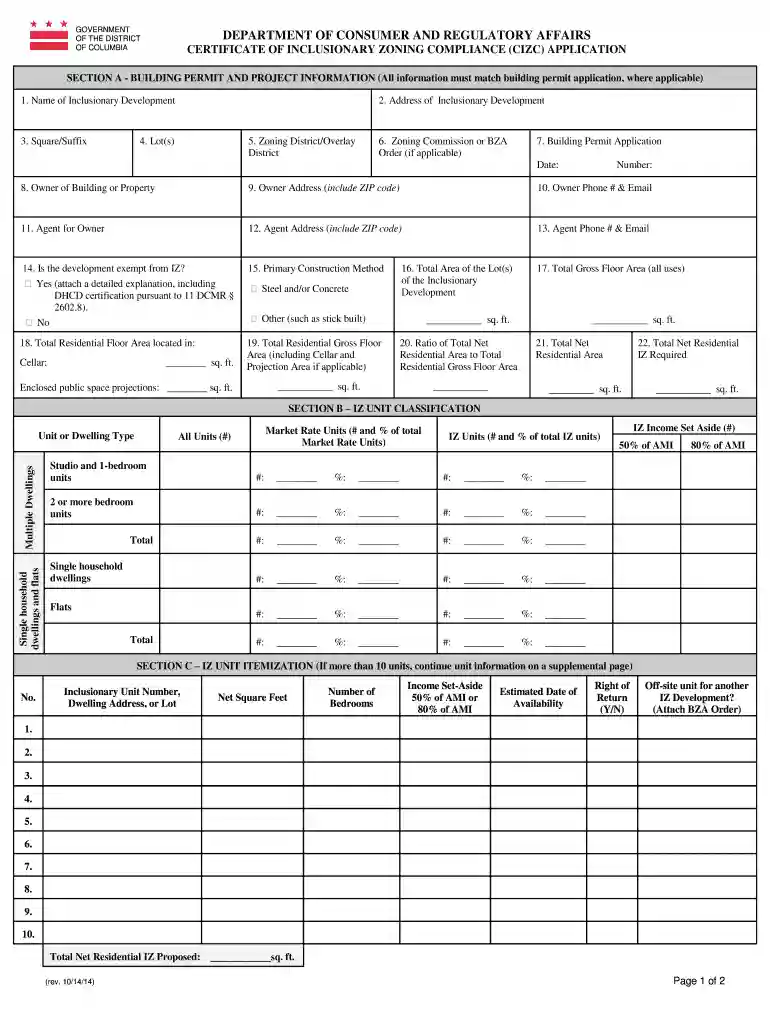
Begin with Section A, where you will input the building permit and project information. Ensure that all details match your building permit application, including the name and address of the inclusionary development.
Continue filling out the fields for zoning district, lot numbers, and owner information. Be sure to include contact details for both the owner and their agent.
In Section B, classify your IZ units by entering data on market rate units and IZ units. Specify unit types and their respective quantities.
Proceed to Section C for itemization of IZ units. If you have more than ten units, continue on a supplemental page as needed.
Complete Sections D through G by answering all required questions and providing necessary certifications. Ensure all signatures are present before submission.
Start using our platform today to streamline your cizc application process for free!
IZ program DC registration onlineCizc certificationCizc standardsCizc requirementsCizc pdfInclusionary Zoning DC registrationList of non lottery IZ units in DCInclusionary Zoning dc apartments for rent
Security and compliance
At DocHub, your data security is our priority. We follow HIPAA, SOC2, GDPR, and other standards, so you can work on your documents with confidence.
Certificate of Inclusionary Zoning Compliance (CIZC)
Nov 3, 2025 1. Does CIZC information match the building permit application? 2. Floor plans and elevations (with IZ units identified in the floor plans).Read more
Cookie consent notice
This site uses cookies to enhance site navigation and personalize your experience.
By using this site you agree to our use of cookies as described in our Privacy Notice.
You can modify your selections by visiting our Cookie and Advertising Notice.