Mass gov child support 2026

Get Form
mass child support login Preview on Page 1

Here's how it works

01. Edit your mass child support login online
Type text, add images, blackout confidential details, add comments, highlights and more.
02. Sign it in a few clicks
Draw your signature, type it, upload its image, or use your mobile device as a signature pad.
03. Share your form with others
Send child support ma login via email, link, or fax. You can also download it, export it or print it out.

How to use or fill out mass gov child support with our platform

Form edit decoration
9.5
Ease of Setup
DocHub User Ratings on G2
9.0
Ease of Use
DocHub User Ratings on G2
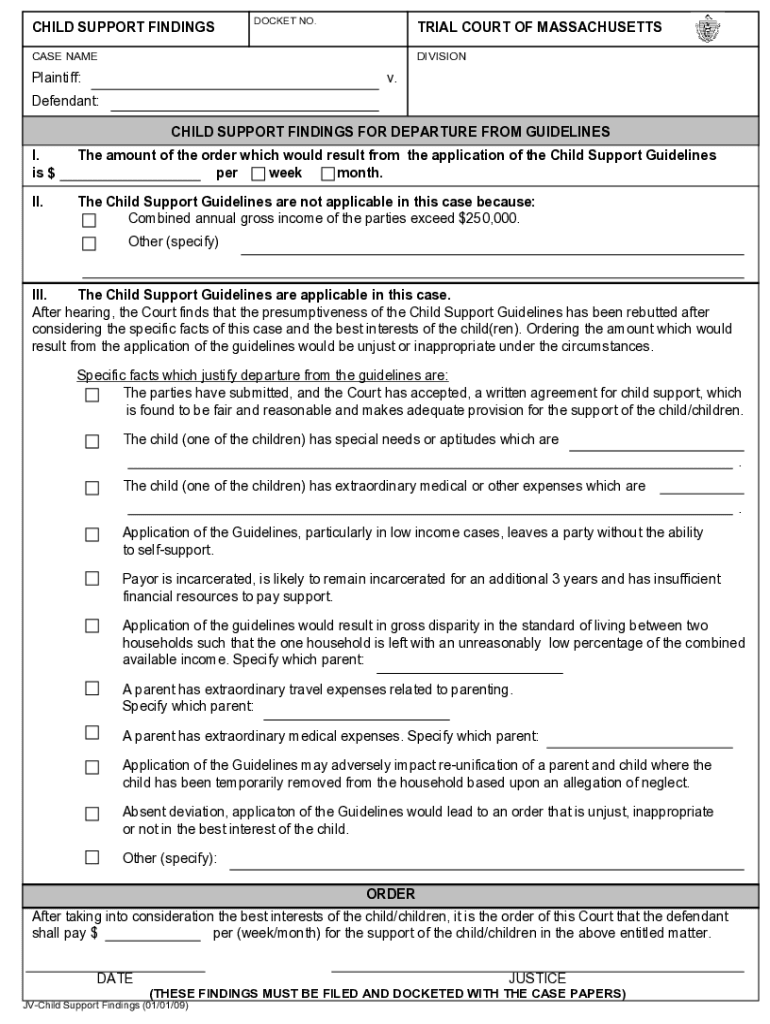
  1. Click ‘Get Form’ to open the mass gov child support document in the editor.
  2. Begin by entering the DOCKET NO. and CASE NAME at the top of the form. This information is crucial for identifying your case.
  3. In Section I, specify the amount of child support ordered per week or month. Ensure this reflects accurate calculations based on your situation.
  4. Proceed to Section II. Indicate whether the Child Support Guidelines apply by checking the appropriate box and providing details if combined annual gross income exceeds $250,000.
  5. In Section III, if applicable, provide specific facts justifying any departure from the guidelines. This may include special needs of children or extraordinary expenses.
  6. Finally, complete the ORDER section by stating the payment amount and frequency (week/month) before signing and dating the document.

Start using our platform today to fill out your mass gov child support form online for free!

See more mass gov child support versions

We've got more versions of the mass gov child support form. Select the right mass gov child support version from the list and start editing it straight away!
Versions Form popularity Fillable & printable
2009 4 Satisfied (44 Votes)
be ready to get more

Complete this form in 5 minutes or less

Get form

Got questions?

We have answers to the most popular questions from our customers. If you can't find an answer to your question, please contact us.
Contact us
Located in Brockton, Massachusetts, our Clinical Stabilization Services (CSS) program offers compassionate, evidence-based care for men in early recovery from substance use disorders.
CLINICAL STABILIZATION SERVICES (CSS) is an intensive substance use disorder treatment program for adults ages 18 and older. [ more] CSS is provided 24 hours per day. CSS provides nursing support, case management, education, counseling, and aftercare.
Child Support Services Division (CSS)
Contact us at (617) 660-1234 or (800) 332-2733 or email us. We will work together with you to determine if your child support order is no longer consistent with the Massachusetts Child Support Guidelines and if it isnt, assist you with returning to court.
Call our Interactive Voice Response Phone System at (800) 332-2733 and follow the prompts to get automated information that is available 24/7. We now have a dedicated Spanish IVR available for customers to reach us.

Security and compliance

At DocHub, your data security is our priority. We follow HIPAA, SOC2, GDPR, and other standards, so you can work on your documents with confidence.

Learn more
ccpa2
pci-dss
gdpr-compliance
hipaa
soc-compliance
be ready to get more

Complete this form in 5 minutes or less

Get form

People also ask

You can request payment information at any time through our Automated Voice Response System by calling (800) 332-2733. Callers in the Boston area should call (617) 660-1234.
CSS is a 24-hour/7-day voluntary residential treatment program for people seeking long-term recovery from substance use disorders. The referral-only program offers treatment that includes individual and motivational counseling, workshops and lectures focusing on recovery, and a wide variety of group counseling.

child support login ma