




Here's how it works



How to use or fill out LBOR Approved - Date - Realty Executives - Hedges Real Estate

- Click ‘Get Form’ to open it in the editor.
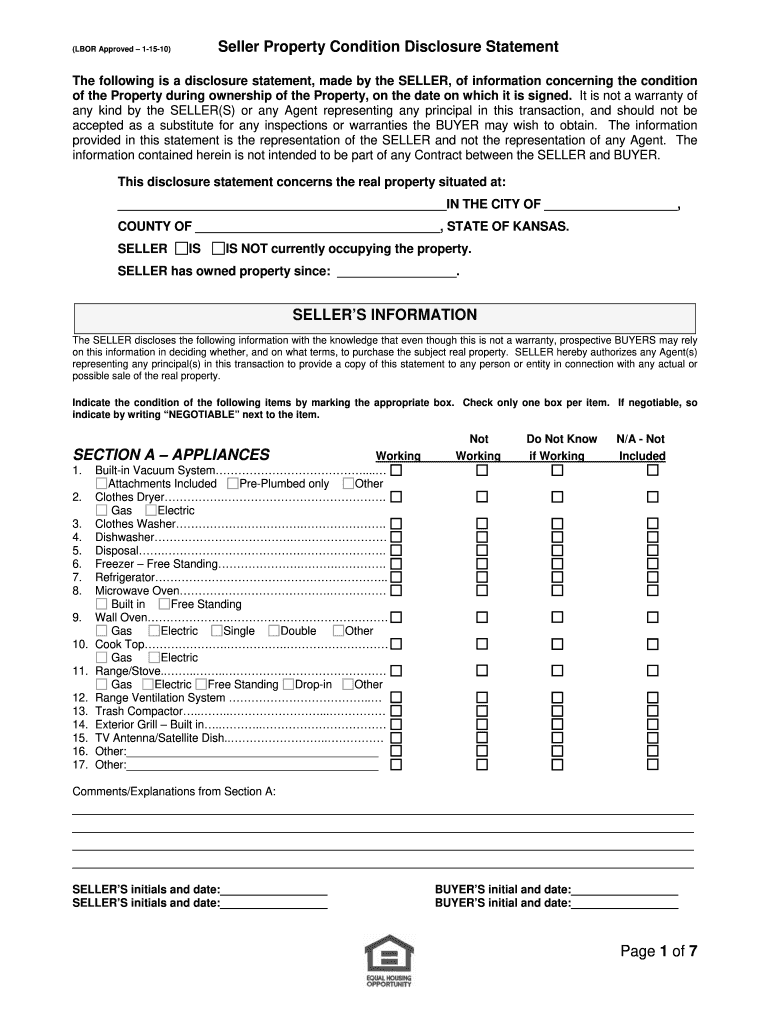
- Begin by entering the property address in the designated section, ensuring accuracy for all fields.
- Indicate whether the seller is currently occupying the property by selecting 'IS' or 'IS NOT'.
- Fill in the date of ownership under 'SELLER has owned property since', providing a clear timeline.
- In Section A, mark the condition of each appliance by checking the appropriate box. If an item is negotiable, write 'NEGOTIABLE' next to it.
- Continue through Sections B to K, answering questions regarding electrical systems, heating and cooling systems, and any hazardous conditions. Be thorough and honest in your responses.
- Ensure both seller and buyer initials and dates are filled out at the end of each section for verification.
Start using our platform today to streamline your document editing and signing process for free!
It's free
See more (LBOR Approved - Date - Realty Executives - Hedges Real Estate versions
| Versions | Form popularity | Fillable & printable |
|---|---|---|
| 2010 | 4.8 Satisfied (289 Votes) |
Got questions?
What do I need to sign my (LBOR Approved - Date - Realty Executives - Hedges Real Estate electronically?
Electronic document signing requires a software solution that works in compliance with data security and eSignature standards. DocHub is an excellent tool for that, because it meets all the above mentioned requirements. Whatever method you prefer to sign your (LBOR Approved - Date - Realty Executives - Hedges Real Estate in DocHub, your electronic signature will be legally binding and court-admissible.
Can I edit (LBOR Approved - Date - Realty Executives - Hedges Real Estate on my phone?
As a comprehensive document editing platform, DocHub is available on smart phones. Open DocHub in your choice of mobile browser and employ our intelligent mobile-friendly toolset to complete your (LBOR Approved - Date - Realty Executives - Hedges Real Estate.
Security and compliance
At DocHub, your data security is our priority. We follow HIPAA, SOC2, GDPR, and other standards, so you can work on your documents with confidence.
Learn more




