Trip opt out 2025

Get Form
trip opt out Preview on Page 1

Here's how it works

01. Edit your form online
Type text, add images, blackout confidential details, add comments, highlights and more.

02. Sign it in a few clicks
Draw your signature, type it, upload its image, or use your mobile device as a signature pad.

03. Share your form with others
Send it via email, link, or fax. You can also download it, export it or print it out.

How to use or fill out trip opt out with our platform

Form edit decoration
9.5
Ease of Setup
DocHub User Ratings on G2
9.0
Ease of Use
DocHub User Ratings on G2
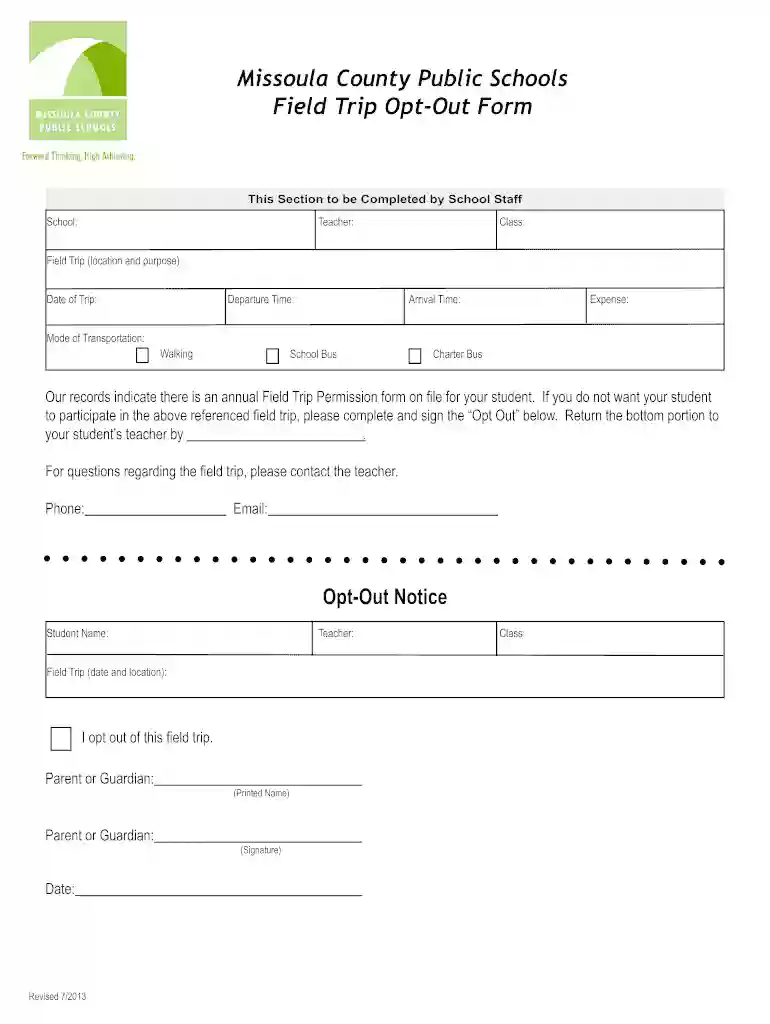
  1. Click ‘Get Form’ to open the trip opt-out form in the editor.
  2. Begin by filling in the school name, teacher's name, and class details at the top of the form. This information helps identify your student’s specific field trip.
  3. Next, provide details about the field trip including location, purpose, date, departure time, arrival time, expense, and mode of transportation. Choose from options like walking, school bus, or charter bus.
  4. In the Opt-Out Notice section, enter your student's name and teacher's name. Clearly state your intention to opt out of the field trip by checking the appropriate box.
  5. Finally, print your name as a parent or guardian and sign it. Don’t forget to include the date before submitting this portion back to your student’s teacher.

Start using our platform today for free to easily complete your trip opt-out form!

See more trip opt out versions

We've got more versions of the trip opt out form. Select the right trip opt out version from the list and start editing it straight away!
Versions Form popularity Fillable & printable
2013 4.8 Satisfied (80 Votes)
be ready to get more

Complete this form in 5 minutes or less

Get form

Got questions?

We have answers to the most popular questions from our customers. If you can't find an answer to your question, please contact us.
Contact us
Be Honest and Direct: Start with a positive note, then explain the situation clearly. For example, ``I really appreciate your enthusiasm about the trip, but I have to limit the number of people I can bring. Express Your Feelings: Share your reasons if you feel comfortable doing so.
If you move to an eligible tariff, the Bolt On will be added automatically, and youll be able to use your O2 Travel allowance in our Inclusive Zone from your next bill date.
If you choose to opt out of the O2 Travel Subscription, you will be charged our standard roaming rates. For details of these rates, please visit o2.co.uk/international. You can cancel O2 Travel at any time.
If youre a Volt ( Media O2) or Pay Monthly customer on selected plans, you may be eligible for the O2 Travel Inclusive Zone Bolt On. It gives you unlimited minutes, texts and data roaming in Zone 1 (27 destinations outside Europe, including the USA, Australia and New Zealand).
Trip.com is an online travel agency headquartered in Singapore, owned by Trip.com Group. Its website and mobile app can be used to book flights, hotels, trains, rental cars, airport rides, tours, attraction tickets, eSIM cards, and more.
be ready to get more

Complete this form in 5 minutes or less

Get form

People also ask

If youre signed up for O2 Travel, but feel it isnt right for your needs abroad, you can opt out at any time by texting: NOTRAVEL to 23336 (Pay Monthly)
You can ask to stop sending you marketing communications at any time by following the opt-out links within any marketing communication sent to you or by contacting us via the email address above. Respond to your request to contact or collaborate with you, for example for business, public relations or similar purposes.
We may remove or discontinue O2 Travel at any time. We reserve the right to terminate your use of O2 Travel, if you are, in our reasonable opinion, in bdocHub of your terms of service.

Related links