Type text, add images, blackout confidential details, add comments, highlights and more.

02. Sign it in a few clicks
Draw your signature, type it, upload its image, or use your mobile device as a signature pad.

03. Share your form with others
Send it via email, link, or fax. You can also download it, export it or print it out.

How to use or fill out ivc k 12 form with our platform
Ease of Setup
DocHub User Ratings on G2
Ease of Use
DocHub User Ratings on G2
Click ‘Get Form’ to open the ivc k 12 form in the editor.
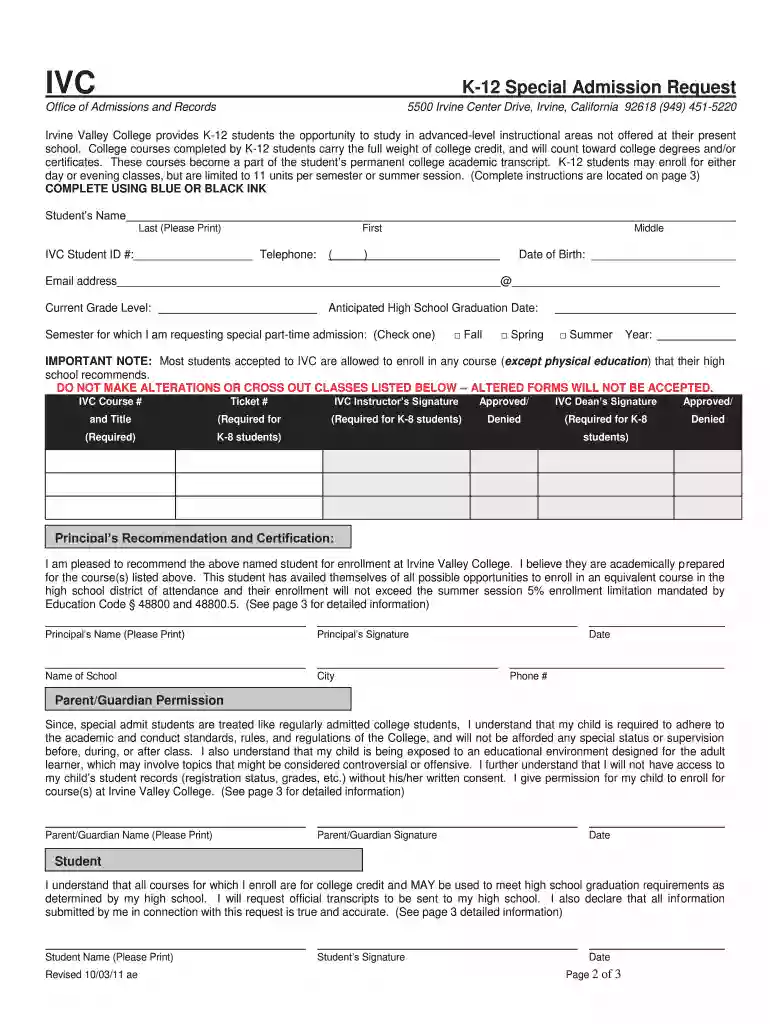
Begin by filling in your personal information. Enter your last name, first name, and middle name in the designated fields. Make sure to include your IVC Student ID number and telephone number.
Next, provide your date of birth and email address. Ensure that your email is accurate for future communications.
Indicate your anticipated high school graduation date and current grade level. This information helps the admissions office understand your academic status.
Select the semester for which you are requesting admission by checking the appropriate box (Fall, Spring, or Summer) and entering the year.
List the IVC course numbers and ticket numbers as required. Remember not to alter or cross out any classes listed on the form.
Obtain necessary signatures from your IVC instructor and dean, ensuring they approve your enrollment.
Have your principal complete their section by providing their recommendation and signature, along with their contact details.
Finally, ensure that a parent or guardian signs off on the permission section, acknowledging their understanding of the college environment.
Start filling out your ivc k 12 form today using our platform for free!
What are the three types of harassment under Title IX?
Examples of Title IX violations Some common examples of the types of discrimination covered under Title IX include: Sexual harassment. Failing to provide equal athletic opportunity. Sex-based discrimination in a schools science, technology, engineering, and math (STEM) courses and programs.
What is Title IX in simple terms?
Federal law prohibits discrimination on the basis of race, color or national origin (Title VI of the Civil Rights Act of 1964); sex (Title IX of the Education Amendments of 1972); or disability (Section 504 of the Rehabilitation Act of 1973 and the Americans with Disabilities Act of 1990) in educational programs or
What is Title IX vs Title VI?
Sexual Harassment under Title IX Under University policy and Title IX, there are three forms of sexual harassment: quid pro quo; hostile environment; and sexual assault, dating/domestic violence, and stalking.
How to register IVC?
How to Register for Classes To register for classes, go to MySite (Legacy or Banner). Log in with your MySite (Legacy or Banner) username and password and select Registration from the Student menu. Review your registration appointment time.
What is Title IX IVC?
Sidebar Menu Title IX Irvine Valley College, in ance with applicable federal and state laws and District policy, prohibits sexual harassment and sexual violence. The Title IX Office responds to, investigates, and/or seeks resolution to allegations of discrimination and sexual harassment.
Related Searches
IVC Dual Enrollment FormIVC Dual Enrollment Summer 2025IVC FormsIVC prerequisite formIVC Admissions and RecordsIVC class scheduleIVC Registration DatesIVC application
Related forms
RSA-PD-06-08 RSA 2 Annual Vocational Rehabilitation Program Cost Report (PDF) - ed
To be eligible for Irvine Valley Promise, students must: Be a first-time college student* Be a California resident or eligible for residency waiver (AB540) Identify Irvine Valley College as College of Record
What GPA do you need to get into IVC?
To be eligible, students must demonstrate at least a 3.25 GPA (unweighted academic) in grades 9-12.
Related links
Eclipse V-Series Panels User Guide
V-Series user panels are fully compatible with both the Eclipse and Eclipse HX digital matrix systems, and are available in 12-key, 24-key and 32 key pushbutton
The IVC Admissions and Records Office utilizes electronic forms for submitting requests. This will allow students to complete and submit forms securely.
This site uses cookies to enhance site navigation and personalize your experience.
By using this site you agree to our use of cookies as described in our Privacy Notice.
You can modify your selections by visiting our Cookie and Advertising Notice.... Read more...Read less