Get - sta ca 2026

Get Form
Get - sta ca Preview on Page 1

Here's how it works

01. Edit your form online
Type text, add images, blackout confidential details, add comments, highlights and more.

02. Sign it in a few clicks
Draw your signature, type it, upload its image, or use your mobile device as a signature pad.

03. Share your form with others
Send it via email, link, or fax. You can also download it, export it or print it out.

How to use or fill out Get - sta ca with our platform

Form edit decoration
9.5
Ease of Setup
DocHub User Ratings on G2
9.0
Ease of Use
DocHub User Ratings on G2
  1. Click ‘Get Form’ to open it in the editor.
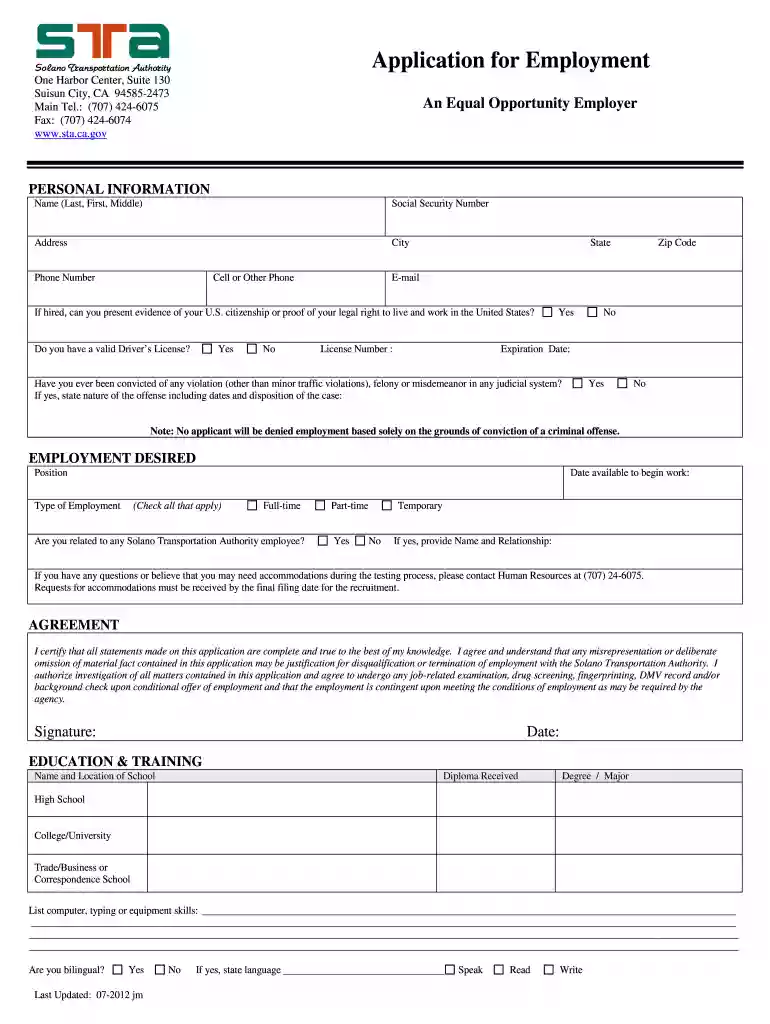
  2. Begin by filling out the 'Personal Information' section. Enter your name, social security number, address, and contact details accurately.
  3. In the 'Employment Desired' section, specify the position you are applying for and your availability to start work. Check all applicable types of employment.
  4. Complete the 'Education & Training' section by listing your educational background, including degrees and any relevant skills.
  5. Detail your 'Employment History' by listing previous jobs in reverse chronological order. Include job titles, responsibilities, and reasons for leaving each position.
  6. Fill out the 'Equal Employment Opportunity Data' section voluntarily for statistical purposes. This information will remain confidential.
  7. Review all entries for accuracy before submitting your application to ensure compliance with requirements outlined in the job announcement.

Start using our platform today to streamline your application process for free!

See more Get - sta ca versions

We've got more versions of the Get - sta ca form. Select the right Get - sta ca version from the list and start editing it straight away!
Versions Form popularity Fillable & printable
2017 4.8 Satisfied (44 Votes)
2012 3.9 Satisfied (29 Votes)
be ready to get more

Complete this form in 5 minutes or less

Get form

Got questions?

We have answers to the most popular questions from our customers. If you can't find an answer to your question, please contact us.
Contact us
Because these goals are put in place solely to serve people, they are built upon the foundation of our Core Four principles of Safety, Equity, Climate Action, and Economic Prosperity, while also reflecting our focus on Mobility and Innovation.
(CRIMINAL HISTORY RECORDS CHECK AND SECURITY THREAT ASSESSMENT) CRIMINAL HISTORY RECORDS CHECK. Successful completion of a Criminal History Records Check (CHRC) and Security Threat Assessment (STA) are required to receive unescorted access to secure areas of PBIA. Disqualifying criminal offenses.
Mission: We lead people-first transportation programs and policies to enhance safety, equity, climate action and economic prosperity for all Californians. Vision: Whoever you are, wherever you live, every person has access to a safe, sustainable and convenient transportation system throughout California.
The California Department of Transportation (Caltrans) is an executive department of the U.S. state of California. The department is part of the cabinet-level California State Transportation Agency (CalSTA). Caltrans is headquartered in Sacramento.
First, you must complete an application and submit it to the Transportation Security Administration. Once your application has been processed and approved, you must take and pass a written exam. After you have passed the exam, you will be required to complete a background check and fingerprinting process.

Security and compliance

At DocHub, your data security is our priority. We follow HIPAA, SOC2, GDPR, and other standards, so you can work on your documents with confidence.

Learn more
ccpa2
pci-dss
gdpr-compliance
hipaa
soc-compliance
be ready to get more

Complete this form in 5 minutes or less

Get form

People also ask

Out of this plans five new goals, four were chosen to align with the Core Four Principles: Safety, Equity, Climate Action and Prosperity. However, our success toward those four goals depends on the strong foundation of a thriving workforce.
We encourage all drivers and owner operators to get approved by filling out the Security Threat Assessment (STA) Application and enrolling in one of the training sessions. It is completely free! Training can be scheduled in our office. Contact us to schedule a time.

Related links