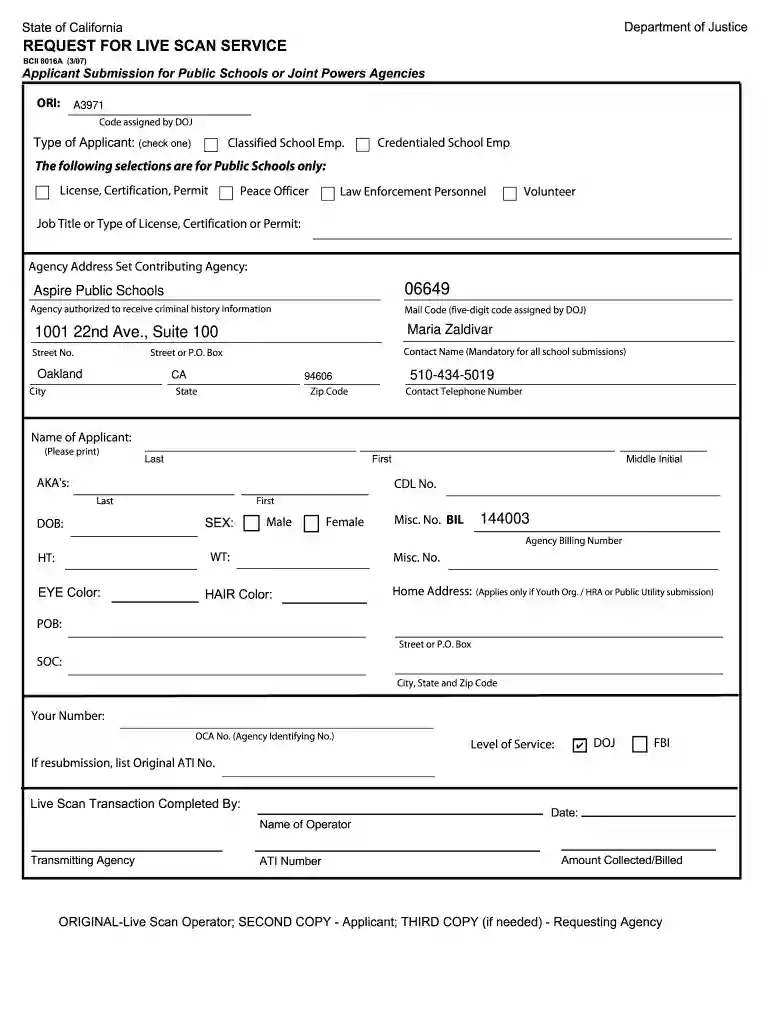
BCII 8016A - Request for Live Scan Services - Aspire Public Schools 2026

Get Form
bcia 8016a Preview on Page 1

Here's how it works

01. Edit your bcia 8016a online
Type text, add images, blackout confidential details, add comments, highlights and more.

02. Sign it in a few clicks
Draw your signature, type it, upload its image, or use your mobile device as a signature pad.

03. Share your form with others
Send it via email, link, or fax. You can also download it, export it or print it out.

How to use or fill out BCII 8016A - Request for Live Scan Services - Aspire Public Schools with our platform

Form edit decoration
9.5
Ease of Setup
DocHub User Ratings on G2
9.0
Ease of Use
DocHub User Ratings on G2
  1. Click ‘Get Form’ to open the BCII 8016A in the editor.
  2. Begin by selecting the type of applicant from the options provided, such as 'Classified School Employee' or 'Volunteer'. This helps identify your role within Aspire Public Schools.
  3. Fill in the job title or type of license, certification, or permit you are applying for. Ensure this information is accurate as it is crucial for processing.
  4. Enter the agency address and contact details. Include the name of the contact person, which is mandatory for all school submissions, along with their phone number.
  5. Complete your personal information including your name, date of birth, sex, height, weight, eye color, and hair color. This section is essential for identification purposes.
  6. If applicable, provide your home address and any additional identifiers like your Agency Billing Number or OCA Number.
  7. Select the level of service required (DOJ or FBI) and include any necessary resubmission details if applicable.
  8. Finally, ensure all fields are filled out correctly before saving and submitting your form through our platform.

Start using our platform today to easily complete your BCII 8016A form online for free!

See more BCII 8016A - Request for Live Scan Services - Aspire Public Schools versions

We've got more versions of the BCII 8016A - Request for Live Scan Services - Aspire Public Schools form. Select the right BCII 8016A - Request for Live Scan Services - Aspire Public Schools version from the list and start editing it straight away!
Versions Form popularity Fillable & printable
2024 4.4 Satisfied (48 Votes)
2011 4.9 Satisfied (37 Votes)
2007 4.4 Satisfied (292 Votes)
be ready to get more

Complete this form in 5 minutes or less

Get form

Got questions?

We have answers to the most popular questions from our customers. If you can't find an answer to your question, please contact us.
Contact us
California Residents The Live Scan operator will check your identification, input your personal descriptor information, capture your fingerprints electronically, and transmit the information electronically. This process takes approximately 3 - 7 days.
Effective, January 1, 2022, all administrators, employees and all volunteers in California MUST have a one-time background check as approved by the California Department of Justice to exclude individuals with a history of child abuse. This form of background check requires live scan fingerprinting.
What does POB on my Live Scan form mean? POB stands for place of birth. You need to write the city and state in which you were born in the space provided.
Live Scan in California typically costs between $50 and $100, depending on the provider and the type of background check. This includes a service fee (usually $20$50), plus processing fees: around $32 for the California DOJ and $17 for the FBI, if a federal check is required.

Security and compliance

At DocHub, your data security is our priority. We follow HIPAA, SOC2, GDPR, and other standards, so you can work on your documents with confidence.

Learn more
ccpa2
pci-dss
gdpr-compliance
hipaa
soc-compliance