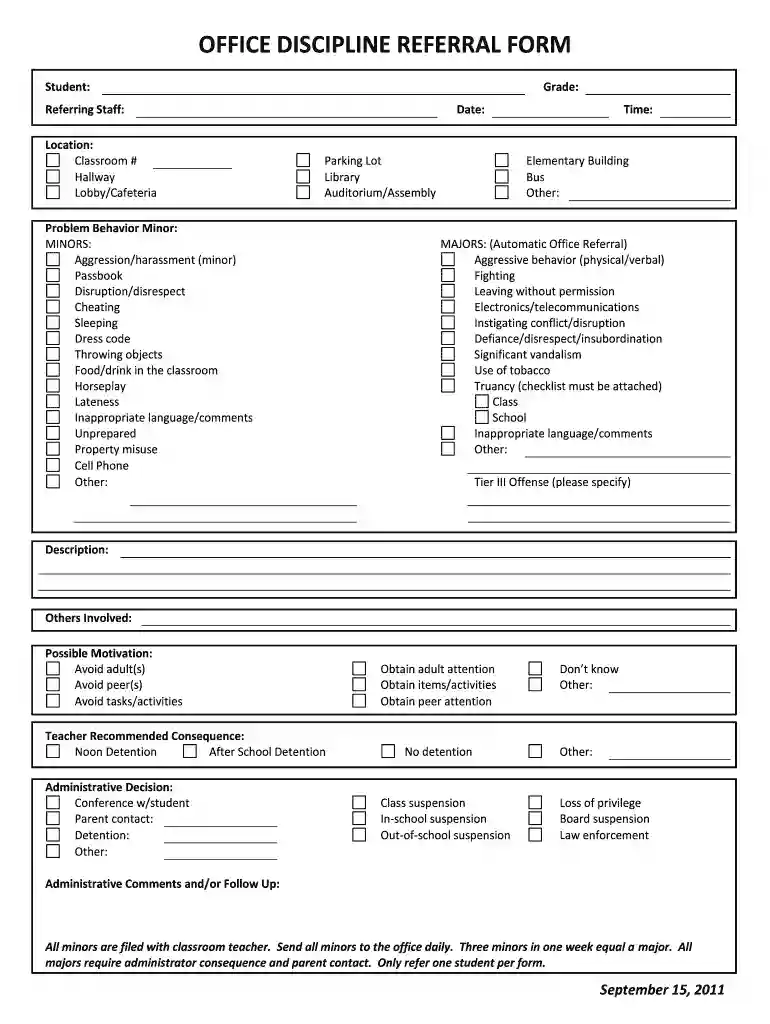
Office discipline referral form 2026

Get Form
office referral form Preview on Page 1

Here's how it works

01. Edit your office referral form online
Type text, add images, blackout confidential details, add comments, highlights and more.

02. Sign it in a few clicks
Draw your signature, type it, upload its image, or use your mobile device as a signature pad.

03. Share your form with others
Send office discipline referral via email, link, or fax. You can also download it, export it or print it out.

How to use or fill out office discipline referral form with our platform

Form edit decoration
9.5
Ease of Setup
DocHub User Ratings on G2
9.0
Ease of Use
DocHub User Ratings on G2
  1. Click ‘Get Form’ to open the office discipline referral form in the editor.
  2. Begin by entering the student's name and grade at the top of the form. This information is crucial for identifying the student involved.
  3. Fill in the referring staff's name, location, and classroom number. Specify where the incident occurred, selecting from options like hallway, cafeteria, or library.
  4. Record the date and time of the incident. Accurate timing helps in tracking behavior patterns.
  5. Indicate whether the problem behavior is a minor or major offense. For minors, check relevant behaviors such as disruption or dress code violations. For majors, select serious offenses like fighting or truancy.
  6. Provide a detailed description of the incident in the designated section. Include any others involved and possible motivations behind their actions.
  7. Select recommended consequences based on your assessment. Options include detention or administrative decisions like parent contact.
  8. Finally, add any administrative comments or follow-up actions needed before submitting the form for processing.

Start using our platform today to streamline your office discipline referral process for free!

See more office discipline referral form versions

We've got more versions of the office discipline referral form form. Select the right office discipline referral form version from the list and start editing it straight away!
Versions Form popularity Fillable & printable
2011 4.9 Satisfied (54 Votes)
be ready to get more

Complete this form in 5 minutes or less

Get form

Got questions?

We have answers to the most popular questions from our customers. If you can't find an answer to your question, please contact us.
Contact us
Open a new document in any type of word processing software. Create a header which says Referral Form at the top of the page. Create the most important fields including the name of the person and his contact details. Create fields for the details about the referral.
Its usually a physical form that a teacher will fill out and turn into the office with information about the incident and what steps the teacher has taken to correct the problem. An administrator (either a principal or vice principal) will be assigned the referral and decide how to officially discipline the student.
A school discipline referral is a formal way for teachers to send students to administrators for disciplinary action. This video explains that referrals typically involve a physical form documenting the incident and previous intervention attempts.
Office discipline referrals (ODRs) are a data source commonly used by school teams to identify students who need behavioral intervention.

Security and compliance

At DocHub, your data security is our priority. We follow HIPAA, SOC2, GDPR, and other standards, so you can work on your documents with confidence.

Learn more
ccpa2
pci-dss
gdpr-compliance
hipaa
soc-compliance