Marriage certificate form 2025

Get Form
marriage certificate form Preview on Page 1

Here's how it works

01. Edit your marriage certificate form online
Type text, add images, blackout confidential details, add comments, highlights and more.
02. Sign it in a few clicks
Draw your signature, type it, upload its image, or use your mobile device as a signature pad.
03. Share your form with others
Send marriage certificate form fill via email, link, or fax. You can also download it, export it or print it out.

How to use or fill out marriage certificate form with our platform

Form edit decoration
9.5
Ease of Setup
DocHub User Ratings on G2
9.0
Ease of Use
DocHub User Ratings on G2
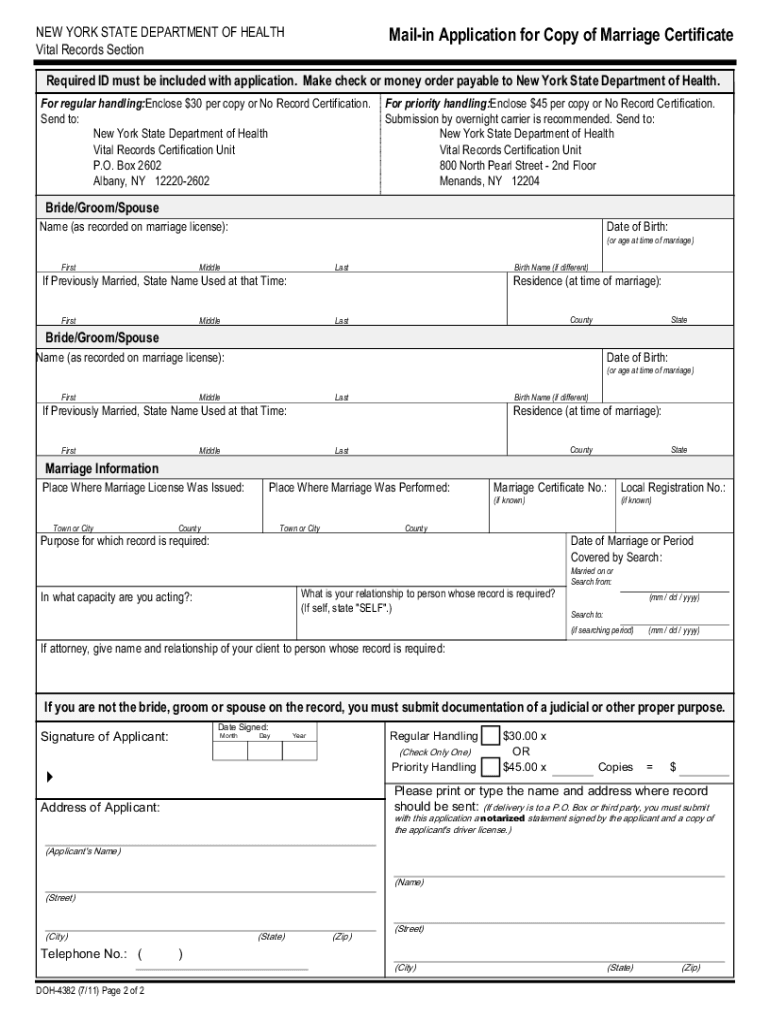
  1. Click ‘Get Form’ to open the marriage certificate application in the editor.
  2. Begin by entering the bride, groom, or spouse's name as recorded on the marriage license. Include their date of birth and any previous names if applicable.
  3. Fill in the residence details at the time of marriage, including county and state for both parties.
  4. Provide information about where the marriage license was issued and where the marriage took place, along with any known registration numbers.
  5. Indicate the purpose for which you require the record and your relationship to the person named on it. If you are not directly related, ensure to include documentation of a judicial purpose.
  6. Complete your contact information where you want the record sent. If sending to a P.O. Box or third party, remember to include a notarized statement.
  7. Finally, sign and date your application before submitting it along with payment and any required documentation.

Start using our platform today for free to simplify your marriage certificate application process!

See more marriage certificate form versions

We've got more versions of the marriage certificate form form. Select the right marriage certificate form version from the list and start editing it straight away!
Versions Form popularity Fillable & printable
2011 4.8 Satisfied (82 Votes)
2005 4.1 Satisfied (54 Votes)
be ready to get more

Complete this form in 5 minutes or less

Get form

Got questions?

We have answers to the most popular questions from our customers. If you can't find an answer to your question, please contact us.
Contact us
You can order a marriage certificate at any time following your marriage ceremony, however your application may take up to 8 weeks after your marriage is registered to be processed.
How to Order a Marriage Certificate Online. Use the Vital Statistics Agencys secure online ordering service. A credit card is required. By Mail. Send a completed Application for Marriage Certificate or Registration Photocopy (VSA 430M) form (PDF, 1MB) with payment to: In Person. Go to any Service BC counter.
The marriage licence is the piece of paper you bring to your ceremony and sign with your officiant and witnesses. You need this to legally get married. The marriage certificate is the piece of paper you receive after your ceremony that says you are legally wed.
A certified copy of the public record of the marriage; A certified copy of the religious record of the marriage; or. The original marriage certificate.
The easiest and fastest way to order a marriage certificate is online through Service Ontario. For questions regarding marriage certificates please contact Service Ontario at 416-325-8305 or 1-800-461-2156.
be ready to get more

Complete this form in 5 minutes or less

Get form

People also ask

You must order the long-form certificate from Service Nova Scotia/Vital Statistics. The little white and blue form you may have received when you were married is not a long-form marriage certificate and is not legal proof of marriage. You will have to pay a fee to get your long-form certificate from Vital Statistics.
Most U.S. states accept a Canadian marriage certificate as legal proof of marriage without any extra steps. However, some states or agencies may require an apostille (official authentication of the document). If needed, you can request authentication through: Global Affairs Canada (federal authentication)

marriage certificate form fill up