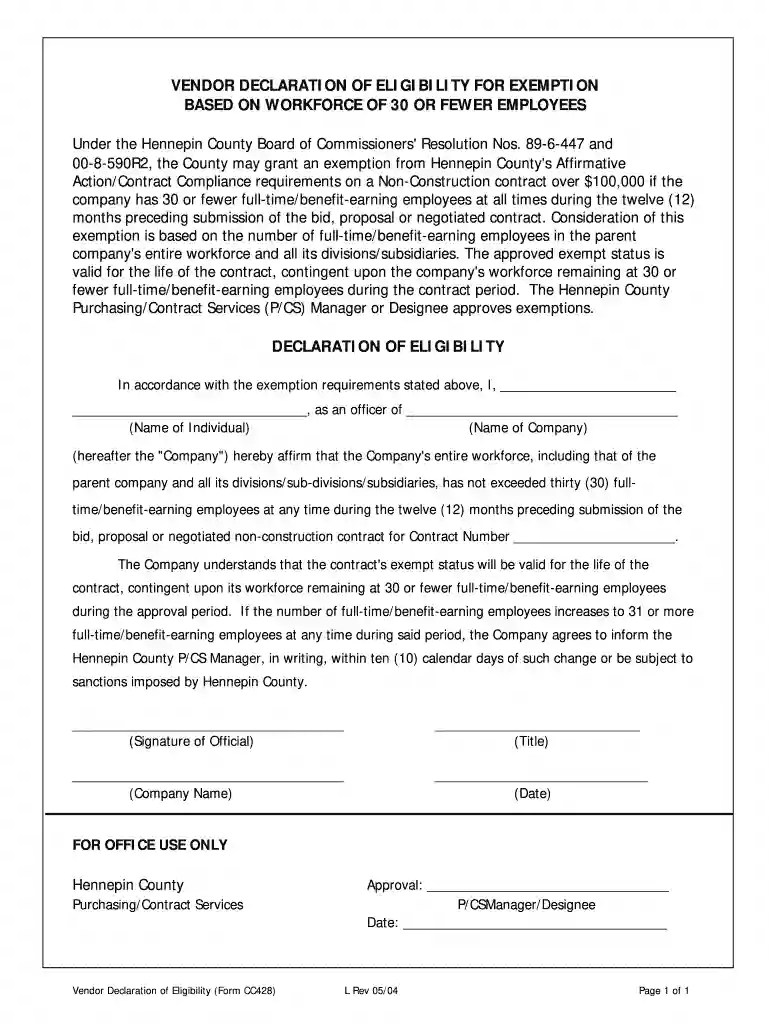
Cc428 vendor declaration eligibility form 2026

Get Form
vendor declaration form Preview on Page 1

Here's how it works

01. Edit your vendor declaration form online
Type text, add images, blackout confidential details, add comments, highlights and more.

02. Sign it in a few clicks
Draw your signature, type it, upload its image, or use your mobile device as a signature pad.

03. Share your form with others
Send declaration of eligibility form via email, link, or fax. You can also download it, export it or print it out.

How to use or fill out cc428 vendor declaration eligibility form with DocHub

Form edit decoration
9.5
Ease of Setup
DocHub User Ratings on G2
9.0
Ease of Use
DocHub User Ratings on G2
  1. Click ‘Get Form’ to open the cc428 vendor declaration eligibility form in our editor.
  2. Begin by filling in your name and title in the designated fields. This identifies you as the officer of the company making the declaration.
  3. Next, enter your company's name accurately. Ensure that it matches any official documentation to avoid discrepancies.
  4. In the section regarding employee count, affirm that your entire workforce has not exceeded thirty (30) full-time/benefit-earning employees during the past twelve months. This is crucial for maintaining eligibility for exemption.
  5. Sign and date the form at the bottom. Your signature confirms that all information provided is accurate and complete.
  6. If applicable, ensure to fill out any additional sections required for office use, such as approval signatures from Hennepin County Purchasing/Contract Services.

Start using our platform today to easily complete your cc428 vendor declaration eligibility form for free!

See more cc428 vendor declaration eligibility form versions

We've got more versions of the cc428 vendor declaration eligibility form form. Select the right cc428 vendor declaration eligibility form version from the list and start editing it straight away!
Versions Form popularity Fillable & printable
2004 4.8 Satisfied (121 Votes)
be ready to get more

Complete this form in 5 minutes or less

Get form

Got questions?

We have answers to the most popular questions from our customers. If you can't find an answer to your question, please contact us.
Contact us
0:34 2:19 This helps agencies with inclusivity goals dont forget references. Just like job hunting agenciesMoreThis helps agencies with inclusivity goals dont forget references. Just like job hunting agencies want to know youre reliable provide contacts from past clients who can vouch for your awesomeness.
If youre using an Apple device, tap your browsers share button. Scroll down and tap Print. If youre using an Android device, a PDF copy will download to your device. Tap Open, then search for the Print option and print the eNVD from your phone.
Three-year Livestock Production Assurance (LPA) accreditation/reaccreditation fee ($90 + GST) LPA National Vendor Declaration (NVD) hard copy books ($55+ GST for 10 forms, $65 + GST for 20 forms) MSA-only Vendor Declaration hard copy books ($23 + GST for 25 forms).
How to order an NVD Book Link your LPA account in your myMLA dashboard for single sign-on use. ( One time process) Login to LPA. On you LPA home dashboard click Order Books. Select the number of LPA and MSA books you require and proceed to checkout.
NVD forms can be obtained by contacting the LPA Helpline on 1800 683 111, or by visiting .mla.com.au. To register to use PigPass NVDs visit .pigpass.com.au or call the PigPass helpline on 1800 001 458. You will need a PIC before ordering NVD forms. Applying for a PIC is simple and there is no cost involved.

Security and compliance

At DocHub, your data security is our priority. We follow HIPAA, SOC2, GDPR, and other standards, so you can work on your documents with confidence.

Learn more
ccpa2
pci-dss
gdpr-compliance
hipaa
soc-compliance