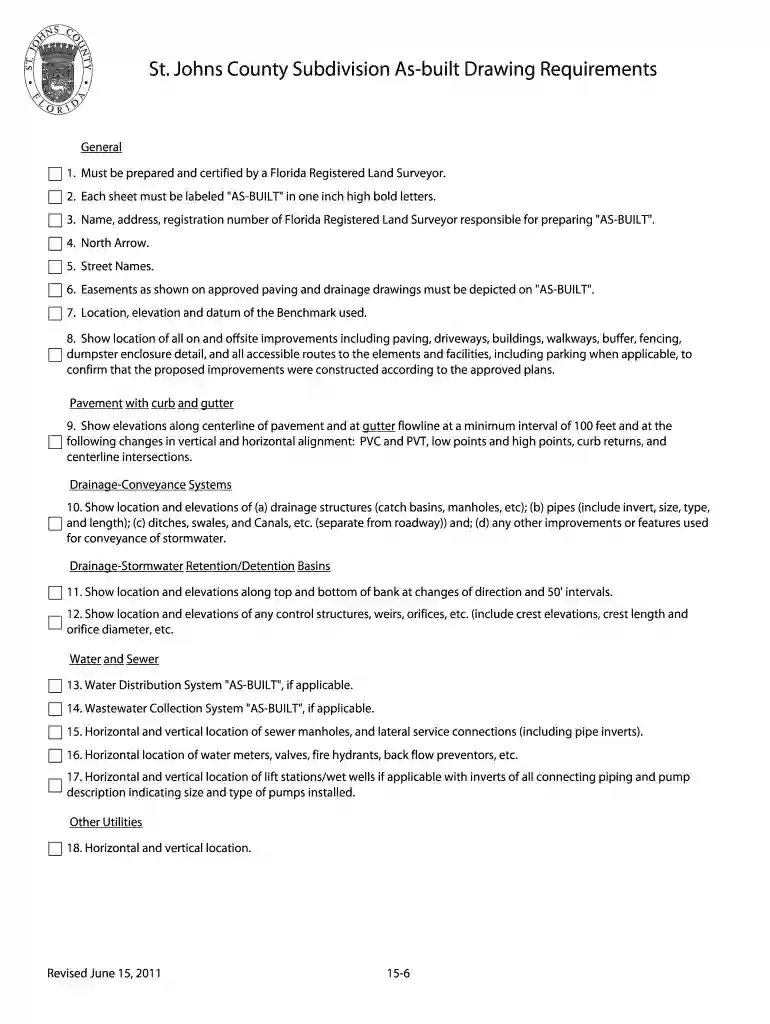
built draw Preview on Page 1

SJC Subdivision As-built Drawing Requirements - St. Johns County ... - co st-johns fl 2026

Here's how it works

  • 01. Edit your built draw online

    Type text, add images, blackout confidential details, add comments, highlights and more.

  • 02. Sign it in a few clicks

    Draw your signature, type it, upload its image, or use your mobile device as a signature pad.

  • 03. Share your form with others

    Send st johns county certificate of occupancy via email, link, or fax. You can also download it, export it or print it out.

How to use or fill out SJC Subdivision As-built Drawing Requirements - St. Johns County ... - co st-johns fl with our platform

Form edit decoration
9.5
Ease of Setup
DocHub User Ratings on G2
9.0
Ease of Use
DocHub User Ratings on G2
  1. Click ‘Get Form’ to open it in the editor.
  2. Begin by entering the name, address, and registration number of the Florida Registered Land Surveyor responsible for preparing the 'AS-BUILT'. Ensure this information is clearly visible.
  3. Label each sheet as 'AS-BUILT' in one-inch high bold letters to meet documentation standards.
  4. Incorporate a North Arrow and street names accurately on your drawing for orientation.
  5. Depict all easements as shown on approved paving and drainage drawings, ensuring they are correctly represented.
  6. Show the location, elevation, and datum of the Benchmark used for reference in your drawings.
  7. Illustrate all on and offsite improvements including paving, driveways, buildings, walkways, and accessible routes to confirm compliance with approved plans.
  8. For pavement with curb and gutter, indicate elevations along the centerline at specified intervals and changes in alignment.
  9. Detail drainage systems by showing locations and elevations of structures like catch basins and pipes, ensuring clarity in stormwater conveyance features.
  10. Finally, include any additional utilities such as water distribution systems or wastewater collection systems as applicable.

Start using our platform today to streamline your document editing process for free!

See more built draw versions

We've got more versions of the built draw form. Select the right built draw version from the list and start editing it straight away!

VersionsForm popularityFillable & printable
20114.8 Satisfied (145 Votes)

be ready to get more

Complete this form in 5 minutes or less

Security and compliance

At DocHub, your data security is our priority. We follow HIPAA, SOC2, GDPR, and other standards, so you can work on your documents with confidence.

st johns county easements

St. Johns County Final Report - OPPAGA

Aug 30, 2022 The County uses a functional organizational structure whereby employees are grouped according to their activities in the organization.Read more

Learn more
Architectural Survey Report - St. Johns College

Oct 31, 2024 Five buildings were constructed on the St. Johns College campus prior to the abolishment of slavery in Maryland in 1864, including; McDowellRead more

Learn more
Table of Contents

Introduction. Manual Overview. The manual is divided into the following sections: Getting Started - A basic introduction that discusses the controls andRead more

Learn more
If you believe that this page should be taken down, please follow our DMCA take down process here