




01. Edit your form online
Type text, add images, blackout confidential details, add comments, highlights and more.

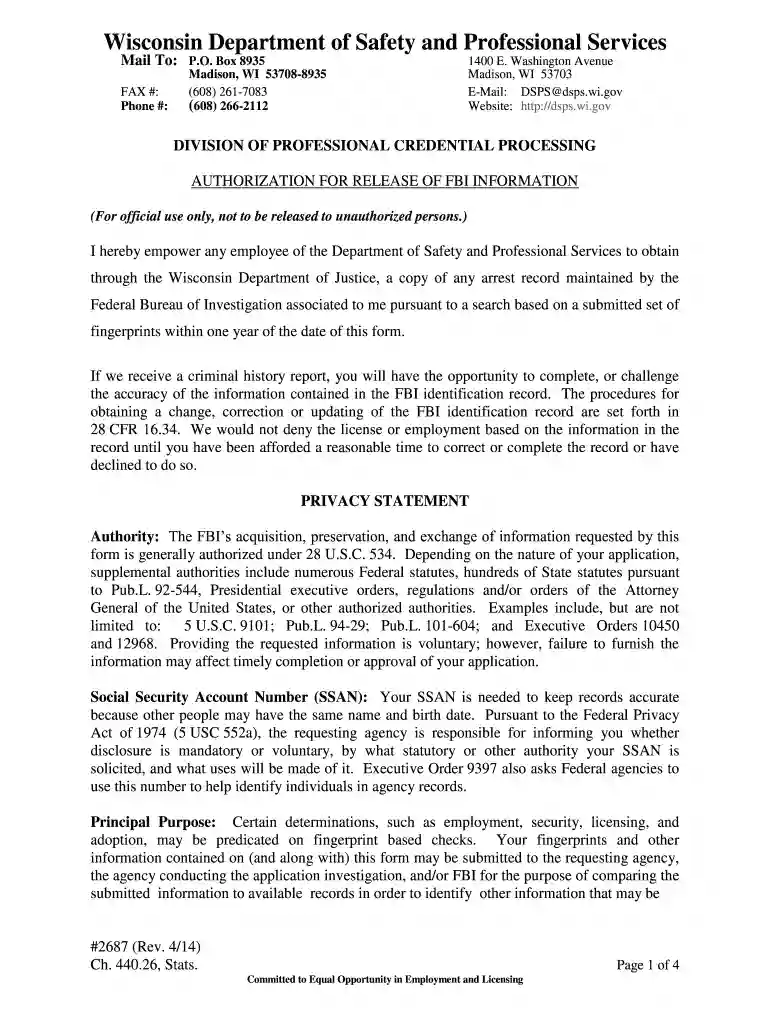
Type text, add images, blackout confidential details, add comments, highlights and more.

Draw your signature, type it, upload its image, or use your mobile device as a signature pad.

Send it via email, link, or fax. You can also download it, export it or print it out.

Start using our editor today to fill out Form 2687 quickly and efficiently!
We've got more versions of the Form 2687, Authorization for Release of FBI Information - dsps wi form. Select the right Form 2687, Authorization for Release of FBI Information - dsps wi version from the list and start editing it straight away!
With DocHub, you can quickly approve your Form 2687, Authorization for Release of FBI Information - dsps wi or any other document on iOS, even without setting up additional programs. You can access your DocHub account from any internet-connected browser and complete and sign your form in any preferred method with just a couple of clicks.
You may quickly fill out, modify, and even eSign your Form 2687, Authorization for Release of FBI Information - dsps wi using DocHub. Create a new account and start your free trial. After that, you can add the file with the form and simply make all the necessary edits. No need to print on paper or use a third-party application to sign it, as you can put your electronic signature on your document quicker through DocHub.
At DocHub, your data security is our priority. We follow HIPAA, SOC2, GDPR, and other standards, so you can work on your documents with confidence.
Your fingerprints and other information contained on (and along with) this Form (#2687) may be submitted to the requesting agency, the agency conducting theRead more
authorization 2570 authorize 2571 authorized 2572 authorizes 2573 authors 2687 await 2688 awaited 2689 awaiting 2690 awaits 2691 awaji 2692 awakeRead more


