




Here's how it works



How to use or fill out DHS-1920, Release of Information Authorization ... - State of Michigan - michigan with DocHub

- Click ‘Get Form’ to open it in the editor.
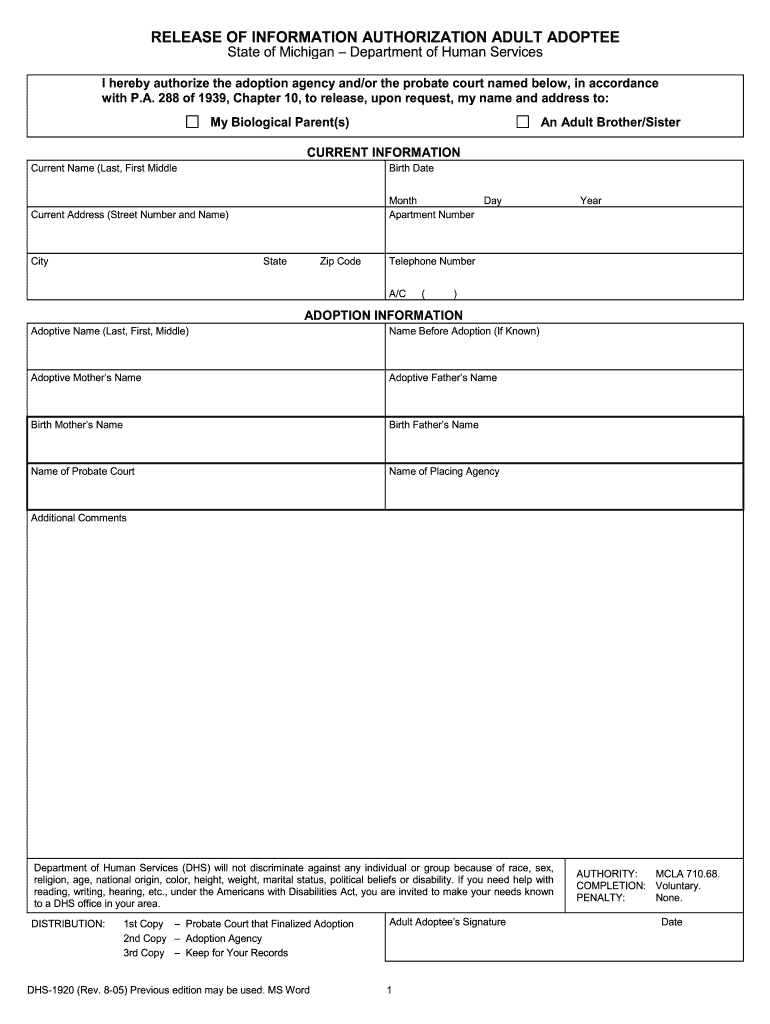
- Begin by filling out the 'Current Information' section. Enter your current name, birth date, and address details including street number, apartment number (if applicable), city, state, and zip code. Ensure all information is accurate for proper identification.
- Next, move to the 'Adoption Information' section. Here, provide your adoptive name, name before adoption (if known), and the names of your adoptive parents as well as your birth parents. This information is crucial for the agency to process your request.
- If you have any additional comments or specific requests regarding the release of information, include them in the designated area at the bottom of the form.
- Finally, sign and date the form at the bottom to authorize the release of information. Make sure to keep a copy for your records as indicated in the distribution instructions.
Start using our platform today to easily complete and manage your DHS-1920 form online for free!
It's free
See more DHS-1920, Release of Information Authorization ... - State of Michigan - michigan versions
| Versions | Form popularity | Fillable & printable |
|---|---|---|
| 2005 | 4.6 Satisfied (51 Votes) |
Got questions?
How do I sign my michigan dhs 431 form free of charge?
Most eSignature services require users to have a paid subscription. With DocHub, there are two ways for you to add an electronic signature to your michigan dhs 431 form free of charge:
- You can do it during a 7-day trial period;
- You can sign up for a free plan.
The second option, though, has restrictions on the number of signatures, sign requests, emails, and documents for editing available per month. You can check for full details here.
Can I edit dhs release of information form on my phone?
As a comprehensive document editing platform, DocHub is accessible on mobile devices. Open DocHub in your choice of mobile browser and use our intelligent mobile-friendly toolset to fill out your dhs release of information form.
Security and compliance
At DocHub, your data security is our priority. We follow HIPAA, SOC2, GDPR, and other standards, so you can work on your documents with confidence.
Learn more




