Lcc 3012-2026

Get Form
lcc form Preview on Page 1

Here's how it works

01. Edit your lcc form online
Type text, add images, blackout confidential details, add comments, highlights and more.
02. Sign it in a few clicks
Draw your signature, type it, upload its image, or use your mobile device as a signature pad.
03. Share your form with others
Send it via email, link, or fax. You can also download it, export it or print it out.

How to use or fill out lcc 3012 with our platform

Form edit decoration
9.5
Ease of Setup
DocHub User Ratings on G2
9.0
Ease of Use
DocHub User Ratings on G2
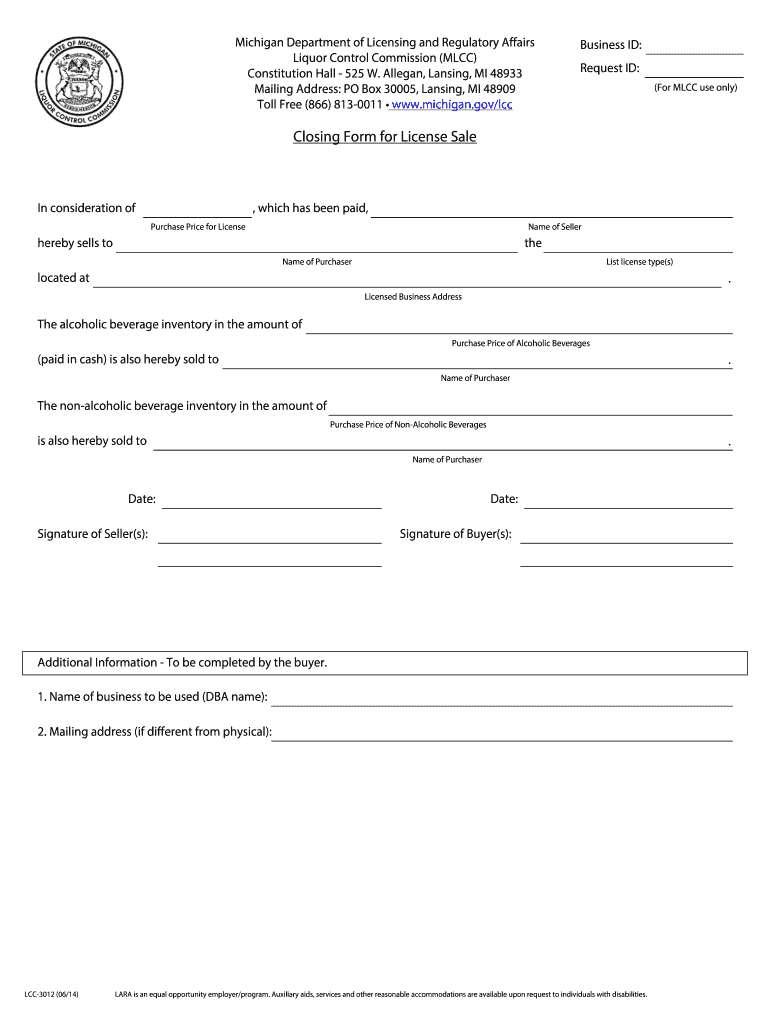
  1. Click ‘Get Form’ to open the lcc 3012 in the editor.
  2. Begin by entering the Business ID and Request ID at the top of the form. These identifiers are crucial for processing your request.
  3. In the section labeled 'Closing Form for License Sale', fill in the name of the seller and purchaser, ensuring accuracy to avoid any issues.
  4. Specify the license type(s) being sold and provide the licensed business address where applicable.
  5. Detail the purchase price for both alcoholic and non-alcoholic beverages, ensuring that these amounts reflect what has been agreed upon.
  6. Sign and date the form in the designated areas for both seller(s) and buyer(s) to validate the transaction.
  7. Complete any additional information required by the buyer, including the DBA name and mailing address if different from physical location.

Start using our platform today to fill out your lcc 3012 form easily and for free!

See more lcc 3012 versions

We've got more versions of the lcc 3012 form. Select the right lcc 3012 version from the list and start editing it straight away!
Versions Form popularity Fillable & printable
2014 4.9 Satisfied (273 Votes)
2012 4.3 Satisfied (42 Votes)
be ready to get more

Complete this form in 5 minutes or less

Get form

Got questions?

We have answers to the most popular questions from our customers. If you can't find an answer to your question, please contact us.
Contact us

Sure, and it’s really straightforward! DocHub is an online PDF editor with advanced document processing functions that allow you promptly modify your documents, complete blank fields and add new ones for others to fill out, and create eSignatures in several ways. Add your lcc 3012, give information as required, and choose how you want to eSign your template - by typing your name, drawing your signature, uploading its picture, or using a QR code.

You can complete and sign your lcc 3012 online, even on a tight deadline. All you need to access top-notch editing tools on any device is a DocHub profile, which you can sign up within a couple of moments. When you register, add your document or find what you are searching for in our catalog, complete it utilizing the editing tools you want, and place your electronic signature on it at the end.

Security and compliance

At DocHub, your data security is our priority. We follow HIPAA, SOC2, GDPR, and other standards, so you can work on your documents with confidence.

Learn more
ccpa2
pci-dss
gdpr-compliance
hipaa
soc-compliance