Type text, add images, blackout confidential details, add comments, highlights and more.

02. Sign it in a few clicks
Draw your signature, type it, upload its image, or use your mobile device as a signature pad.

03. Share your form with others
Send mie disclosure form via email, link, or fax. You can also download it, export it or print it out.

How to use or fill out personal credential with our platform
Ease of Setup
DocHub User Ratings on G2
Ease of Use
DocHub User Ratings on G2
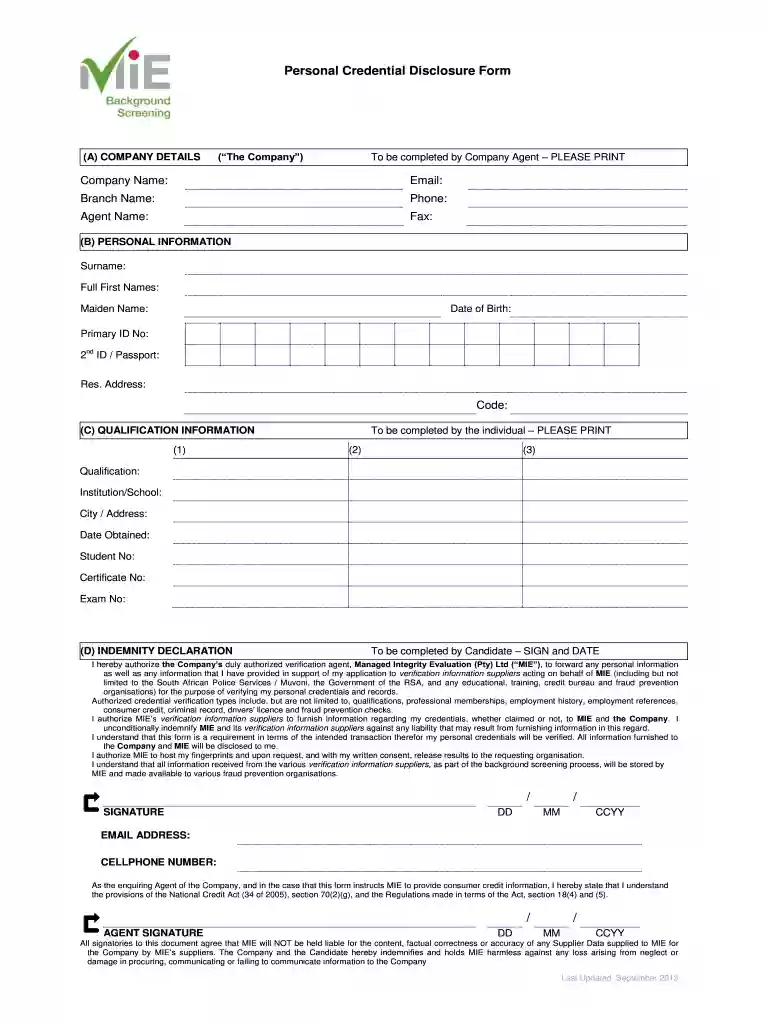
Click ‘Get Form’ to open the Personal Credential Disclosure Form in the editor.
Begin with section (A) COMPANY DETAILS. Fill in the Company Name, Email, Branch Name, Phone, Agent Name, and Fax. Ensure all details are printed clearly.
Move to section (B) PERSONAL INFORMATION. Here, provide your Surname, Full First Names, Maiden Name, Date of Birth, Primary ID No., 2nd ID/Passport, Residential Address, and Code. Again, please print clearly.
In section (C) QUALIFICATION INFORMATION, list your qualifications. For each qualification (1), (2), and (3), include the Qualification name, Institution/School attended, City/Address of the institution, Date Obtained, Student No., Certificate No., and Exam No.
Finally, complete section (D) INDEMNITY DECLARATION by signing and dating the form. Make sure to provide your email address and cellphone number as well.
Start filling out your personal credential form online for free today!
We've got more versions of the personal credential form. Select the right personal credential version from the list and start editing it straight away!
Personal credential requirementsPersonal credential programsBest personal trainer certificationCertified Personal trainer salaryHow much Is NASM certificationHow much do Personal Trainers make$99 personal training certificationAccredited Personal Trainer certification
Security and compliance
At DocHub, your data security is our priority. We follow HIPAA, SOC2, GDPR, and other standards, so you can work on your documents with confidence.
Jul 12, 2024 Digital Badges: Specific types of digital credentials that visually represent an individuals abilities, learning achievements, or experiences.Read more
A PIV credential is a U.S. federal government-wide credential used to access federally controlled facilities and information systems at the appropriate securityRead more
Cookie consent notice
This site uses cookies to enhance site navigation and personalize your experience.
By using this site you agree to our use of cookies as described in our Privacy Notice.
You can modify your selections by visiting our Cookie and Advertising Notice.