Ct das chro employment information 2026

Get Form
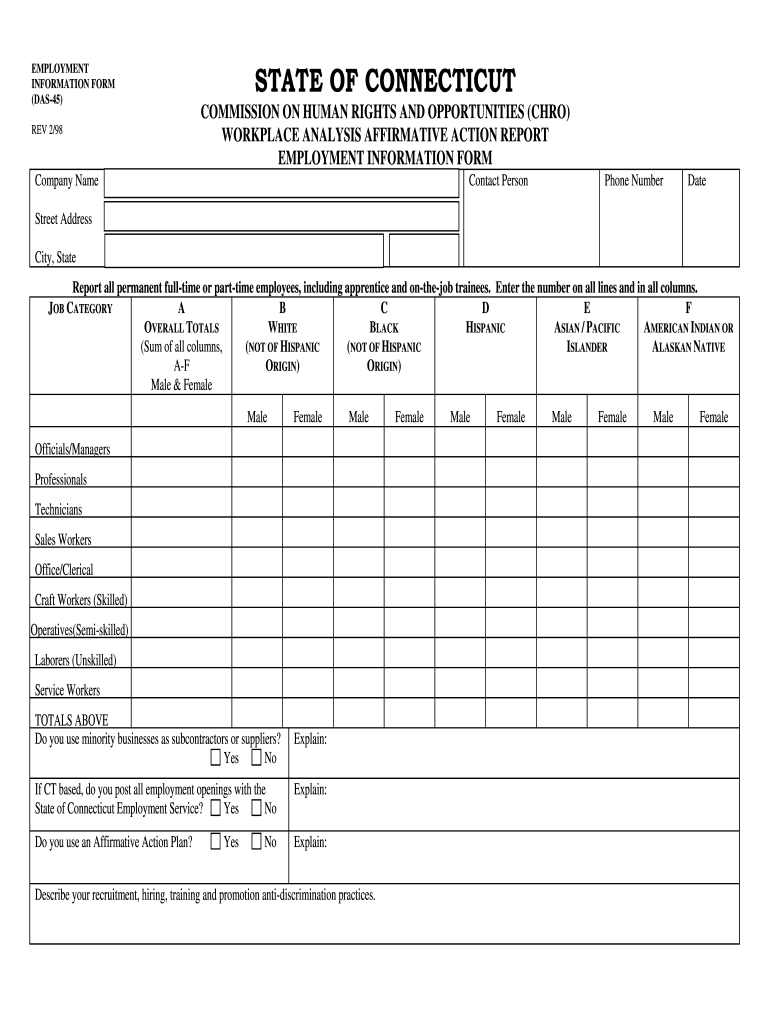
das ct jobs Preview on Page 1

Here's how it works

01. Edit your das ct jobs online
Type text, add images, blackout confidential details, add comments, highlights and more.
02. Sign it in a few clicks
Draw your signature, type it, upload its image, or use your mobile device as a signature pad.
03. Share your form with others
Send ct das jobs via email, link, or fax. You can also download it, export it or print it out.

How to use or fill out ct das chro employment information with our platform

Form edit decoration
9.5
Ease of Setup
DocHub User Ratings on G2
9.0
Ease of Use
DocHub User Ratings on G2
  1. Click ‘Get Form’ to open the ct das chro employment information form in the editor.
  2. Begin by entering your Company Name, Contact Person, and Phone Number in the designated fields at the top of the form.
  3. Fill in the Date and Street Address, followed by City and State. Ensure all details are accurate for proper identification.
  4. In the Employment Information section, report all permanent full-time or part-time employees. Enter numbers in each job category column (A-F) for Asian/Pacific Islander, Black, Hispanic, American Indian or Alaskan Native, and White.
  5. Complete the totals row by summing up all entries across categories to reflect overall employee demographics.
  6. Answer the questions regarding minority businesses and affirmative action plans by selecting 'Yes' or 'No' and providing explanations where required.
  7. Review your entries for accuracy before saving or exporting your completed form directly from our platform.

Start filling out your ct das chro employment information form online for free today!

See more ct das chro employment information versions

We've got more versions of the ct das chro employment information form. Select the right ct das chro employment information version from the list and start editing it straight away!
Versions Form popularity Fillable & printable
1998 4.8 Satisfied (167 Votes)
be ready to get more

Complete this form in 5 minutes or less

Get form

Got questions?

We have answers to the most popular questions from our customers. If you can't find an answer to your question, please contact us.
Contact us
Agency Mission: The mission of the Connecticut Commission on Human Rights and Opportunities (CHRO) is to eliminate discrimination through civil and human rights law enforcement and to establish equal opportunity and justice for all persons within the state through advocacy and education.
In the Connecticut Commission on Human Rights and Opportunities (CHRO) process, the complainant, respondent, and their respective legal counsels come together in a structured setting meant to facilitate resolution through negotiations. It usually takes place within about 60 to 90 days after the case assessment review.
A formal complaint must be filed within 300 days of the alleged act of discrimination. Importantly, contacting the CHRO, completing the online inquiry form, or meeting with an Intake Officer does not constitute the filing of a formal complaint for purposes of the 300-day deadline.
The Connecticut Commission on Human Rights and Opportunities (CHRO) can investigate a discrimination claim for you. Call them at 860-541-3400 or visit their website for more information on how to file a discrimination complaint.

Security and compliance

At DocHub, your data security is our priority. We follow HIPAA, SOC2, GDPR, and other standards, so you can work on your documents with confidence.

Learn more
be ready to get more

Complete this form in 5 minutes or less

Get form