How to p incident report 2026

Get Form
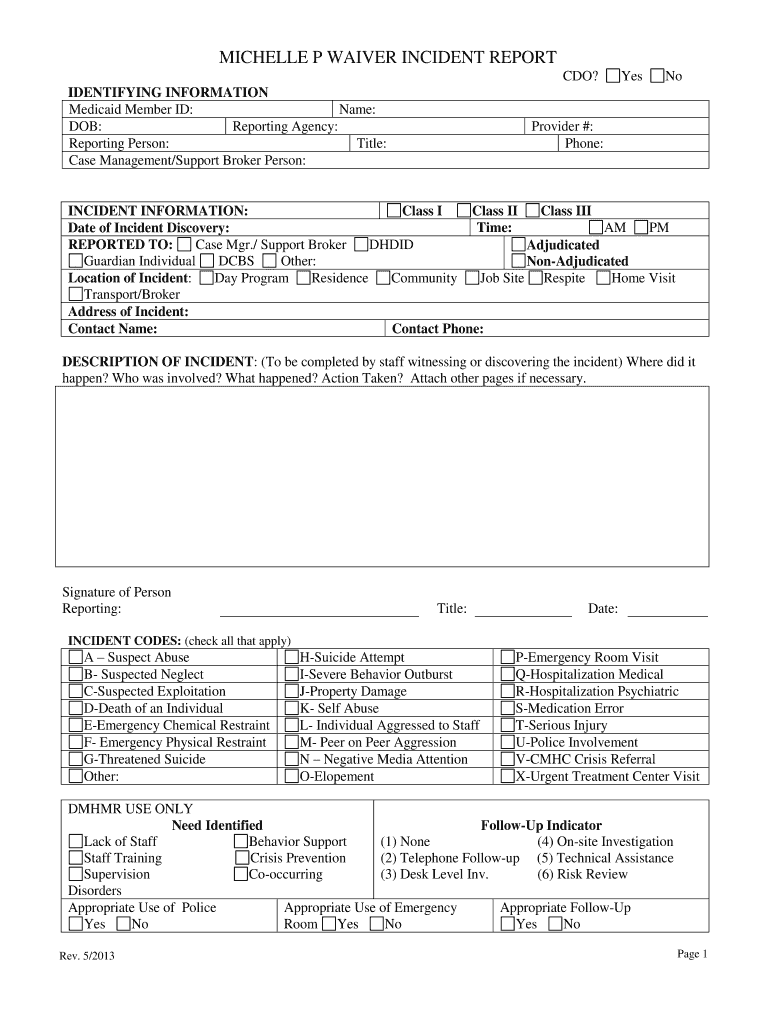
michelle p waiver form Preview on Page 1

Here's how it works

01. Edit your michelle p waiver form online
Type text, add images, blackout confidential details, add comments, highlights and more.
02. Sign it in a few clicks
Draw your signature, type it, upload its image, or use your mobile device as a signature pad.
03. Share your form with others
Send incident reports pdf via email, link, or fax. You can also download it, export it or print it out.

How to use or fill out the Incident Report with our platform

Form edit decoration
9.5
Ease of Setup
DocHub User Ratings on G2
9.0
Ease of Use
DocHub User Ratings on G2
  1. Click ‘Get Form’ to open the Incident Report in the editor.
  2. Begin by filling in the identifying information, including Medicaid Member ID, name, date of birth, and details of the reporting agency and person.
  3. In the incident information section, select the appropriate class of incident and provide the time and date of discovery.
  4. Indicate who was reported to by checking relevant boxes and specify the location of the incident.
  5. In the description section, detail what happened during the incident. Include all necessary information such as involved parties and actions taken.
  6. Check all applicable incident codes that relate to your report for accurate categorization.
  7. Complete follow-up sections regarding supervisor or case manager insights on preventing future incidents and necessary training needs.
  8. Finally, ensure all signatures are collected before submitting your report.

Start using our platform today for free to streamline your incident reporting process!

See more how to p incident report versions

We've got more versions of the how to p incident report form. Select the right how to p incident report version from the list and start editing it straight away!
Versions Form popularity Fillable & printable
2013 4.9 Satisfied (57 Votes)
be ready to get more

Complete this form in 5 minutes or less

Get form

Got questions?

We have answers to the most popular questions from our customers. If you can't find an answer to your question, please contact us.
Contact us
It should include: the names and positions of the people involved. the names of any witnesses. the exact location and/or address of the incident. the exact time and date of the occurrence. a detailed and clear description of what exactly happened. a description of the injuries.
What are the five rules of incident report writing? Timeliness: Always report the incident as soon as possible. Accuracy: Make sure all information provided is accurate and detailed. Completeness: Be thorough and provide all important details. Confidentiality: Handle sensitive and personal information carefully.
A general staff incident report generally includes: Persons name and contact details. Incident Time, date, and site. Pertinent details about what happened. Kind of injury or damage. Name of witnesses. Safety measures taken Suggestions for prevention.
How to write a workplace incident report Gather essential information. Describe the incident. Include injuries and damages. Interview witnesses. Identify contributing factors. Review company policies and procedures. Attach supporting documents. Maintain objectivity.
How to Write an Incident Report: A Step-by-Step Guide (with Examples) Step 1: Provide Fundamental Information. Step 2: Take Note of Any Damages and Injuries. Step 3: Identify Affected Individual(s) Step 4: Identify Witnesses and Take Their Statements. Step 5: Take Action. Step 6: Close Your Report.

Security and compliance

At DocHub, your data security is our priority. We follow HIPAA, SOC2, GDPR, and other standards, so you can work on your documents with confidence.

Learn more
ccpa2
pci-dss
gdpr-compliance
hipaa
soc-compliance
be ready to get more

Complete this form in 5 minutes or less

Get form