




Here's how it works



How to use or fill out Renewal New Multi-Tenant Registration Application - City of Dallas

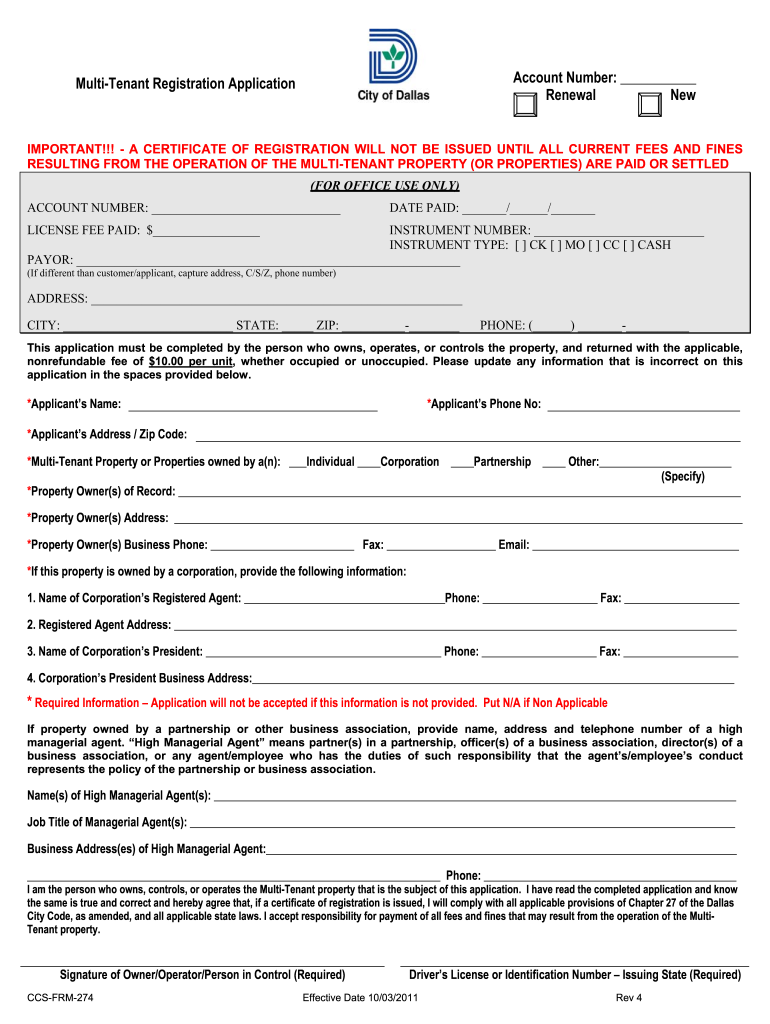
- Click ‘Get Form’ to open it in the editor.
- Begin by entering your Account Number at the top of the form. Select whether this is a renewal or new application.
- Fill in the payment details, including the date paid and license fee. Ensure you select the appropriate instrument type for your payment method.
- Complete the applicant's information, including name, phone number, and address. Make sure to indicate if you are an individual, corporation, or partnership.
- Provide details about the property owner(s) and any high managerial agents if applicable. This includes names, addresses, and contact information.
- For each multi-tenant property being registered, complete a separate form with specific details such as property name, address, number of units, and occupancy rate.
- Finally, review all entered information for accuracy before signing and submitting your application.
Start using our platform today to streamline your application process for free!
It's free
See more Renewal New Multi-Tenant Registration Application - City of Dallas - dallascityhall versions
Got questions?
How can I create an electronic signature in my Renewal New Multi-Tenant Registration Application - City of Dallas - dallascityhall on Android?
Approving documents on a mobile device is fast, simple, and doesn’t require software installation if you have an account with DocHub. Log in from any browser, complete your empty fields with your data, and click on Sign → Create your signature. You can draw your eSignature the same way you usually do on paper, add its image to your Renewal New Multi-Tenant Registration Application - City of Dallas - dallascityhall, or type in your name and stylize its look. No matter what option you choose, your paperwork will be valid.
How do you create an e-signature for the Renewal New Multi-Tenant Registration Application - City of Dallas - dallascityhall on iOS?
Apart from a comprehensive toolset for editing PDFs on mobile devices, DocHub enables you to sign your Renewal New Multi-Tenant Registration Application - City of Dallas - dallascityhall along the way. Open our editor in your internet browser, make modifications using DocHub’s toolset, and complete your editing by eSigning the finished form.
Security and compliance
At DocHub, your data security is our priority. We follow HIPAA, SOC2, GDPR, and other standards, so you can work on your documents with confidence.
Learn more




