forgot address Preview on Page 1

Teex csho engineering form 2026

Here's how it works

  • 01. Edit your forgot address online

    Type text, add images, blackout confidential details, add comments, highlights and more.

  • 02. Sign it in a few clicks

    Draw your signature, type it, upload its image, or use your mobile device as a signature pad.

  • 03. Share your form with others

    Send it via email, link, or fax. You can also download it, export it or print it out.

How to use or fill out teex csho engineering form with our platform

Form edit decoration
9.5
Ease of Setup
DocHub User Ratings on G2
9.0
Ease of Use
DocHub User Ratings on G2
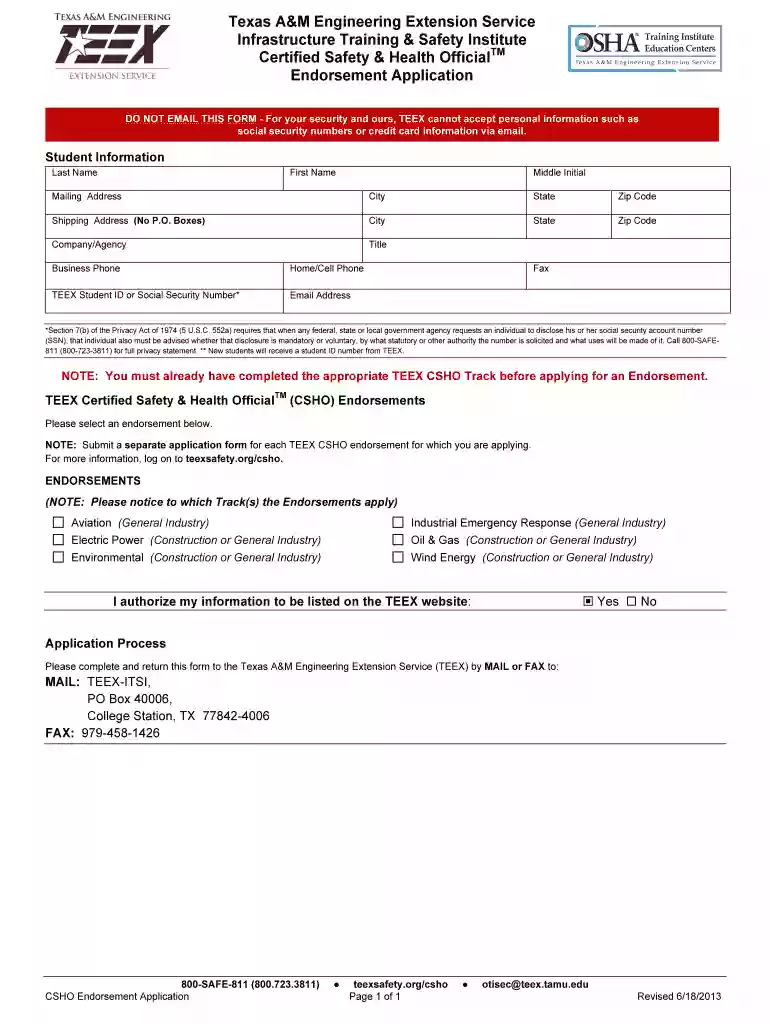
  1. Click ‘Get Form’ to open the teex csho engineering form in the editor.
  2. Begin by filling out the 'Student Information' section. Enter your last name, first name, and middle initial. Provide your mailing address, including city, state, and zip code.
  3. Next, complete the 'Shipping Address' section. Ensure you do not use a P.O. Box for this address. Fill in the required fields: city, state, and zip code.
  4. In the 'Company/Agency' field, enter your employer's name along with your title. Include both business and home/cell phone numbers for contact purposes.
  5. If applicable, provide your TEEX Student ID or Social Security Number (SSN). Remember that disclosing your SSN is voluntary; refer to the privacy statement for more details.
  6. Select the appropriate endorsement from the list provided. Note that a separate application is needed for each endorsement you are applying for.
  7. Finally, indicate whether you authorize your information to be listed on the TEEX website by selecting 'Yes' or 'No'.
  8. Once completed, return the form via mail or fax as instructed at the bottom of the document.

Start using our platform today to fill out your teex csho engineering form easily and efficiently!

See more forgot address versions

We've got more versions of the forgot address form. Select the right forgot address version from the list and start editing it straight away!

VersionsForm popularityFillable & printable
20134.8 Satisfied (283 Votes)

be ready to get more

Complete this form in 5 minutes or less

Got questions?

We have answers to the most popular questions from our customers. If you can't find an answer to your question, please contact us.

OSHA themselves have accepted several organizations online safety training programs as a part of their voluntary OutdocHub Training Program. The OSHA guidelines for inclusion in the program, while not regulations, include a variety of features that are important in developing online training.
Certainly if OSHA is conducting an inspection, the compliance safety and health officer (CSHO) can review the employers roster of employees to determine if a particular person is an employee without revealing the name of the employee on whose behalf the complaint is filed.
Certificates are available on the student portal 14 days after a class has ended. If you already have a MYTEEX Student Portal account, go to my.teex.org/teexportal and log in. You should see the course you took and the print certificate option.
The Certified Safety and Health Official certificate program focuses on the responsibilities of a Safety Professional and reviews extensively both federal and state occupational safety and health standards a Safety Professionals needs to be familiar with.

Security and compliance

At DocHub, your data security is our priority. We follow HIPAA, SOC2, GDPR, and other standards, so you can work on your documents with confidence.

Related links

Certificate and Degree Programs - By Degree Level

TEEX Certified Safety and Health Official (CSHO) Construction TEEX Master of Science (MS) in Mechanical Engineering (ME EN) with emphasis in ErgonomicsRead more

Learn more
The Texas AM University System RELLIS Campus Master Plan

Texas AM Engineering Extension Service (TEEX). Texas AM Transportation Institute (TTI). Texas AM Engineering Experiment Station (TEES). The planningRead more

Learn more
If you believe that this page should be taken down, please follow our DMCA take down process here