Type text, add images, blackout confidential details, add comments, highlights and more.
02. Sign it in a few clicks
Draw your signature, type it, upload its image, or use your mobile device as a signature pad.
03. Share your form with others
Send it via email, link, or fax. You can also download it, export it or print it out.
How to use or fill out forms for pre operation with our platform
Ease of Setup
DocHub User Ratings on G2
Ease of Use
DocHub User Ratings on G2
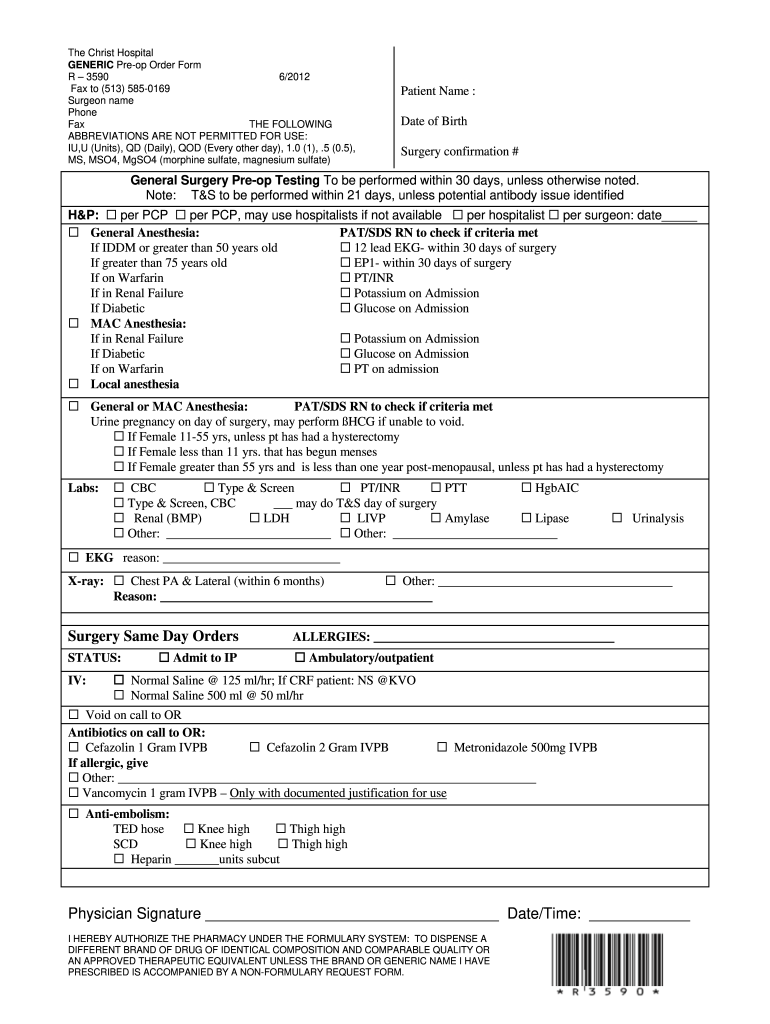
Click ‘Get Form’ to open the pre-op order form in the editor.
Begin by entering the patient's name and date of birth in the designated fields. Ensure accuracy as this information is crucial for identification.
Fill in the surgery confirmation number, which helps track the surgical procedure and its details.
Complete the General Surgery Pre-op Testing section by checking off tests that need to be performed within specified timeframes. Pay attention to any special conditions noted for patients over certain ages or with specific health issues.
In the Labs section, mark all required lab tests such as CBC and PT/INR. If there are additional tests needed, specify them in the provided spaces.
For Surgery Same Day Orders, indicate patient status and IV requirements. Be sure to document any allergies clearly.
Finally, ensure that a physician signature is included along with the date and time before submitting the form.
Start using our platform today to streamline your pre-operation form completion for free!
We've got more versions of the forms for pre operation form. Select the right forms for pre operation version from the list and start editing it straight away!
Pre op Checklist nursingPre operative checklist before surgeryPre op checklist day of surgerySurgical Clearance Form PDFSurgical consent form pdfMedical clearance form for surgery templatePre op checklist anesthesiaPre operative checklist who
Security and compliance
At DocHub, your data security is our priority. We follow HIPAA, SOC2, GDPR, and other standards, so you can work on your documents with confidence.
Cookie consent notice
This site uses cookies to enhance site navigation and personalize your experience.
By using this site you agree to our use of cookies as described in our Privacy Notice.
You can modify your selections by visiting our Cookie and Advertising Notice.