Medical reports online 2026

Get Form
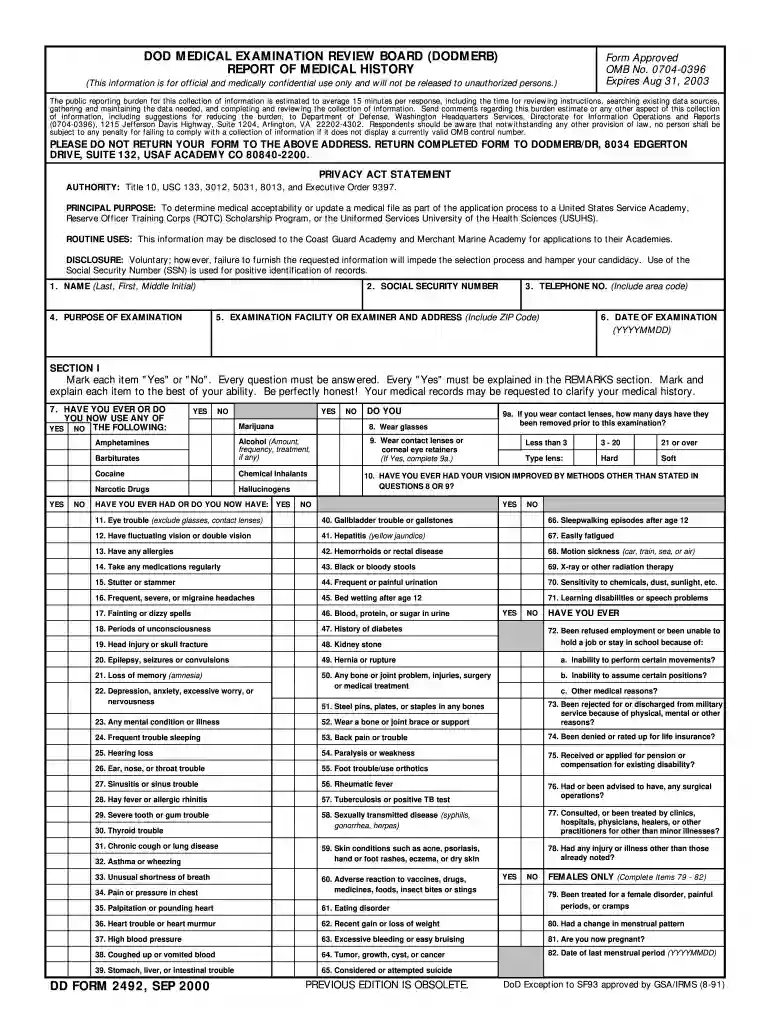
medical reports online Preview on Page 1

Here's how it works

01. Edit your medical reports online online
Type text, add images, blackout confidential details, add comments, highlights and more.

02. Sign it in a few clicks
Draw your signature, type it, upload its image, or use your mobile device as a signature pad.

03. Share your form with others
Send medical report online via email, link, or fax. You can also download it, export it or print it out.

How to use or fill out medical reports online with our platform

Form edit decoration
9.5
Ease of Setup
DocHub User Ratings on G2
9.0
Ease of Use
DocHub User Ratings on G2
  1. Click ‘Get Form’ to open the medical report in the editor.
  2. Begin by entering your personal information in the designated fields, including your name, social security number, and contact details. Ensure accuracy as this information is crucial for identification.
  3. Proceed to Section I where you will answer a series of health-related questions. Mark each item 'Yes' or 'No', and provide explanations for any 'Yes' responses in the remarks section. Be honest and thorough to ensure your medical history is accurately represented.
  4. In Section II, review and certify that all provided information is true and complete. Sign and date the form electronically using our platform’s signature feature.
  5. Once completed, save your document and utilize our platform's sharing options to send it directly to the appropriate medical facility or examiner.

Start filling out your medical reports online for free today!

See more medical reports online versions

We've got more versions of the medical reports online form. Select the right medical reports online version from the list and start editing it straight away!
Versions Form popularity Fillable & printable
2008 4.9 Satisfied (323 Votes)
2000 4.1 Satisfied (35 Votes)
be ready to get more

Complete this form in 5 minutes or less

Get form

Got questions?

We have answers to the most popular questions from our customers. If you can't find an answer to your question, please contact us.
Contact us
Obviously as a patient you have the right to request access to your record and to obtain a copy of it. However, the proper channel for requesting to review or obtain a copy of your record is through the Medical Records department, just as for all other patients.
If your doctor offers a web portal, you may be able to easily view and download your health information whenever you want. There are a few exceptions to getting your information, but you cant be denied access for not paying your medical bill.
To check your medical status online, follow these steps: Visit the GAMCA medical test booking website or the medical centers website. Click Medical Status. Provide details such as your passport number and nationality. Click the submit button to view your medical status.
If your provider has a designated medical records department, contact them directly. Provide any reference numbers, confirmations, or details you received when submitting your request. It will help your provider quickly locate your file.

Security and compliance

At DocHub, your data security is our priority. We follow HIPAA, SOC2, GDPR, and other standards, so you can work on your documents with confidence.

Learn more
ccpa2
pci-dss
gdpr-compliance
hipaa
soc-compliance
be ready to get more

Complete this form in 5 minutes or less

Get form