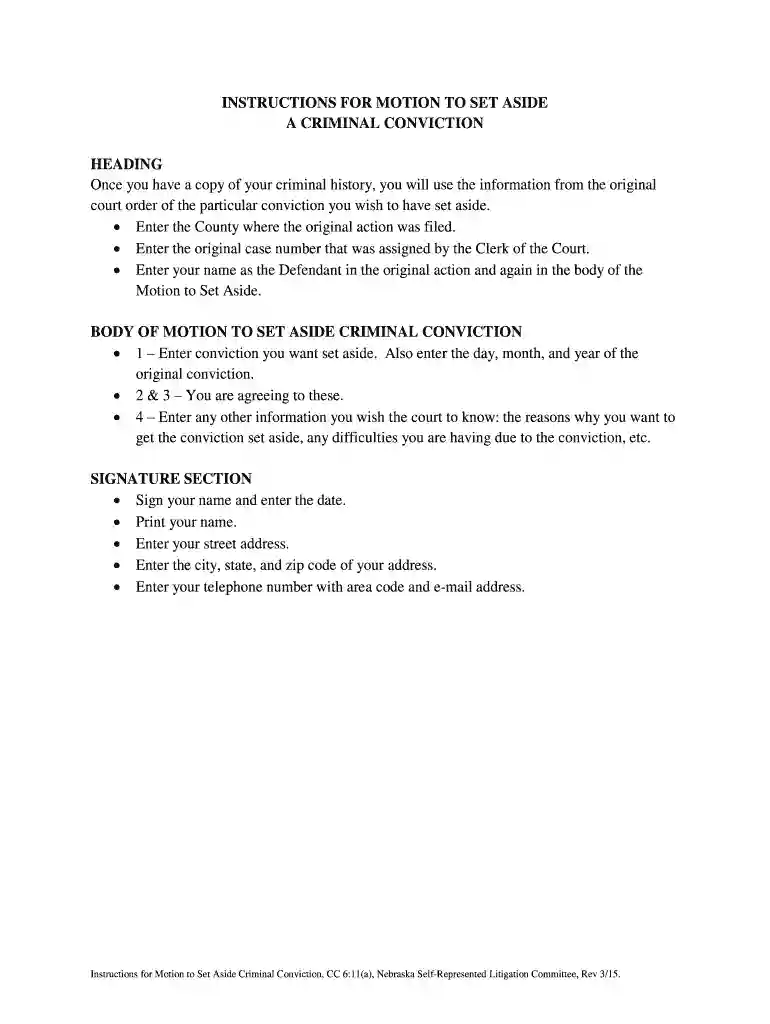
Motion to set aside judgment georgia form 2026

Get Form
motion to set aside judgment georgia form Preview on Page 1

Here's how it works

01. Edit your motion to set aside judgment georgia form online
Type text, add images, blackout confidential details, add comments, highlights and more.

02. Sign it in a few clicks
Draw your signature, type it, upload its image, or use your mobile device as a signature pad.

03. Share your form with others
Send motion to vacate judgment georgia form via email, link, or fax. You can also download it, export it or print it out.

How to use or fill out motion to set aside judgment georgia form with DocHub

Form edit decoration
9.5
Ease of Setup
DocHub User Ratings on G2
9.0
Ease of Use
DocHub User Ratings on G2
  1. Click ‘Get Form’ to open the motion to set aside judgment Georgia form in our platform.
  2. In the heading section, enter the County where the original action was filed and the original case number assigned by the Clerk of the Court.
  3. Input your name as the Defendant in both the heading and body of the Motion to Set Aside.
  4. In the body of the motion, specify the conviction you wish to have set aside along with the date of that conviction (day, month, year).
  5. Agree to sections 2 and 3 as indicated in the form.
  6. Provide any additional information you want the court to consider, such as reasons for requesting to set aside your conviction and any difficulties faced due to it.
  7. Complete the signature section by signing your name, entering today's date, printing your name, and providing your street address, city, state, zip code, telephone number with area code, and email address.

Start using our editor today for free to complete your motion efficiently!

See more motion to set aside judgment georgia form versions

We've got more versions of the motion to set aside judgment georgia form form. Select the right motion to set aside judgment georgia form version from the list and start editing it straight away!
Versions Form popularity Fillable & printable
2015 4.9 Satisfied (35 Votes)
2011 4.3 Satisfied (55 Votes)
be ready to get more

Complete this form in 5 minutes or less

Get form

Got questions?

We have answers to the most popular questions from our customers. If you can't find an answer to your question, please contact us.
Contact us
Under CCP 473(b), the court may set aside a default and default judgment if the defendant asking for the set aside presents enough evidence to the court to demonstrate that the default was entered by inadvertence, mistake, surprise, or excusable neglect.
A set aside in simple terms means that a court vacates or voids a prior order, as if the order never existed. Before a court will set aside a judgment or order, there must be a clear statutory basis for the set aside, and facts that warrant the order vacated.
To help you navigate this potentially complex legal procedure, you can follow these steps to make a motion to vacate judgment: Ask the court clerk for a motion to vacate judgment form. Enter the details of your case on the form. Explain the reason for your request. Sign the motion. File the motion into the case.
A judgment or order may be set aside if given, entered or made irregularly, illegally or against good faith: r 36.15(1). The focus of r 36.15(1) is on the judgment or order that is attacked and the question is whether it was given, entered or made irregularly, illegally or against good faith.

Security and compliance

At DocHub, your data security is our priority. We follow HIPAA, SOC2, GDPR, and other standards, so you can work on your documents with confidence.

Learn more
ccpa2
pci-dss
gdpr-compliance
hipaa
soc-compliance
be ready to get more

Complete this form in 5 minutes or less

Get form