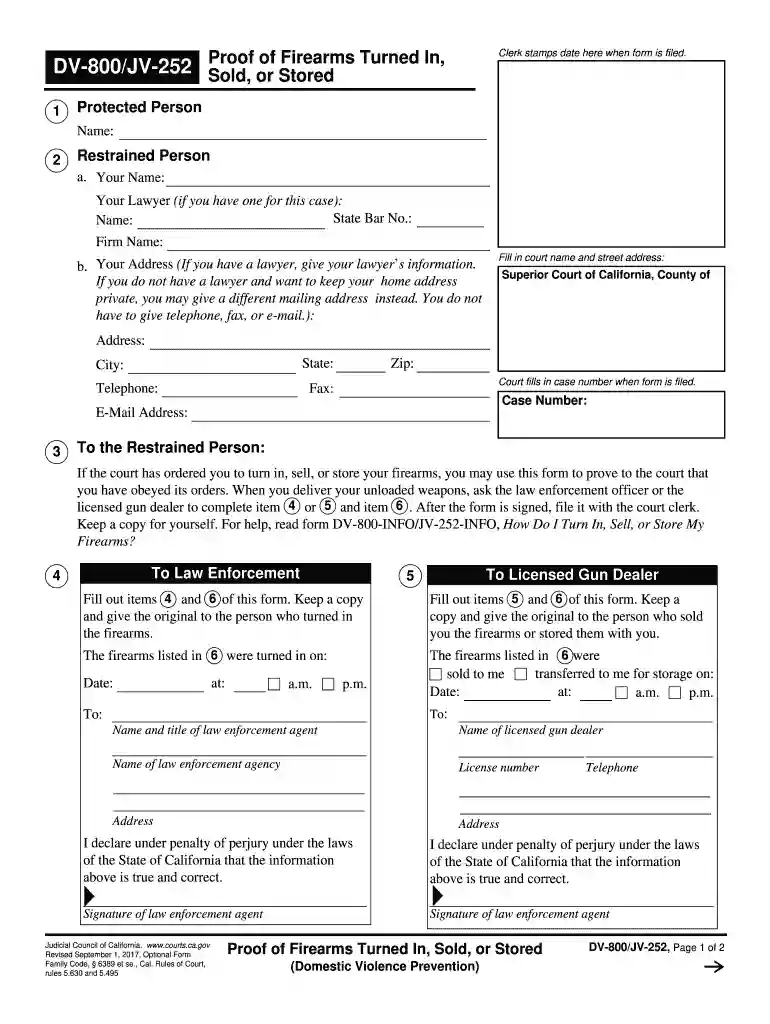
dv 800 2017-2019 form Preview on Page 1

Dv 800 2017-2019 form-2026

Here's how it works

  • 01. Edit your form online

    Type text, add images, blackout confidential details, add comments, highlights and more.

  • 02. Sign it in a few clicks

    Draw your signature, type it, upload its image, or use your mobile device as a signature pad.

  • 03. Share your form with others

    Send it via email, link, or fax. You can also download it, export it or print it out.

How to use or fill out dv 800 2017-2019 form with DocHub

Form edit decoration
9.5
Ease of Setup
DocHub User Ratings on G2
9.0
Ease of Use
DocHub User Ratings on G2
  1. Click ‘Get Form’ to open the DV-800 form in our editor.
  2. Begin by entering the Protected Person's name in the designated field at the top of the form.
  3. Next, fill in the Restraint Person's details, including your name and lawyer's information if applicable. If you prefer privacy, provide an alternative mailing address instead of your home address.
  4. Complete the court name and address fields accurately. This ensures that your submission is directed to the correct jurisdiction.
  5. In section 3, read through the instructions carefully. If firearms have been turned in, sold, or stored as per court orders, ensure that items 4 and 5 are filled out by law enforcement or a licensed gun dealer.
  6. List all firearms involved in section 6, including make, model, and serial number. If more space is needed, attach a separate sheet as instructed.
  7. Finally, declare under penalty of perjury that all information provided is true and correct by signing and dating the form before submission.

Start using our platform today to easily complete your DV-800 form online for free!

See more dv 800 2017-2019 form versions

We've got more versions of the dv 800 2017-2019 form form. Select the right dv 800 2017-2019 form version from the list and start editing it straight away!

VersionsForm popularityFillable & printable
20194.8 Satisfied (84 Votes)
20174.4 Satisfied (216 Votes)
20144.4 Satisfied (380 Votes)
20144.3 Satisfied (27 Votes)
20034 Satisfied (23 Votes)

be ready to get more

Complete this form in 5 minutes or less

Security and compliance

At DocHub, your data security is our priority. We follow HIPAA, SOC2, GDPR, and other standards, so you can work on your documents with confidence.

Related links

Curriculum Vitae: Wesley Bolch

Apr 9, 2020 Developed Catalog of External Faculty Professional Awards: In 2015, I established a comprehensive catalog of some 800+ external engineering-Read more

Learn more
Teen Dating Violence | Intimate Partner Violence Prevention

Jan 14, 2025 Discover the latest data about teen dating violence, its outcomes, and ways to prevent it.

Learn more
The American Psychiatric Association practice guideline for

by T EDITION Cited by 365 For inquiries about permissions or licensing, please contact Permissions Licensing, American Psychiatric. Association Publishing, 800 Maine Avenue SWRead more

Learn more
If you believe that this page should be taken down, please follow our DMCA take down process here