Type text, add images, blackout confidential details, add comments, highlights and more.
02. Sign it in a few clicks
Draw your signature, type it, upload its image, or use your mobile device as a signature pad.
03. Share your form with others
Send imm 5406 via email, link, or fax. You can also download it, export it or print it out.
How to use or fill out imm 5406 form 2021 with our platform
Ease of Setup
DocHub User Ratings on G2
Ease of Use
DocHub User Ratings on G2
Click ‘Get Form’ to open the imm 5406 form in the editor.
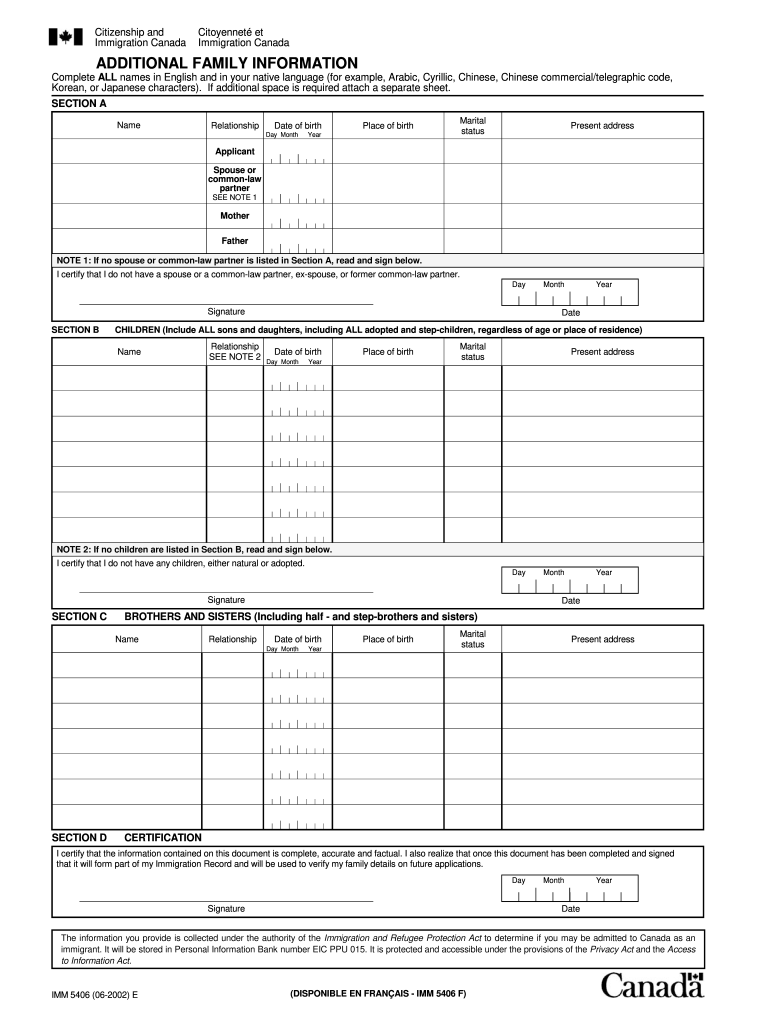
Begin with Section A, where you will enter your name, relationship, date of birth, place of birth, marital status, and present address. Ensure all names are filled in both English and your native language.
If applicable, complete the spouse or common-law partner details. If you do not have a spouse or partner, sign the certification statement provided.
Move to Section B to list all children, including adopted and step-children. Fill in their names, relationships, dates of birth, places of birth, marital statuses, and present addresses.
In Section C, provide information about your siblings. Include their names, relationships, dates of birth, places of birth, marital statuses, and present addresses.
Finally, review Section D for certification. Sign and date to confirm that all information is accurate and complete.
Start using our platform today to fill out your imm 5406 form easily and for free!
IMM 5406 form PDF downloadIMM 5406 form 2024 PDF downloadIMM 5406 form sampleIMM 5406 form guideAdditional FAMILY information IMM 5406 formIMM 5669Imm 5406 eIMM 5406 signature
Security and compliance
At DocHub, your data security is our priority. We follow HIPAA, SOC2, GDPR, and other standards, so you can work on your documents with confidence.
Feb 13, 2026 Contact information for Center supervisors and managers is provided in the Center tabs provided below. Please use this as a reference as it has the most up-to-Read more
May 21, 2003 This edition replaces SC27-1379-07. This edition applies to Version 8 Release 4 of IBM DB2 Content Manager OnDemand for z/OS and OS/390.Read more
Approval of benefits is subject to premium payments and coverage limitations as outlined in the Specific Plan Details Document (SPD). Coding edits may apply.Read more
Cookie consent notice
This site uses cookies to enhance site navigation and personalize your experience.
By using this site you agree to our use of cookies as described in our Privacy Notice.
You can modify your selections by visiting our Cookie and Advertising Notice.