






Definition and Meaning of Ladder Inspection Form Template Excel
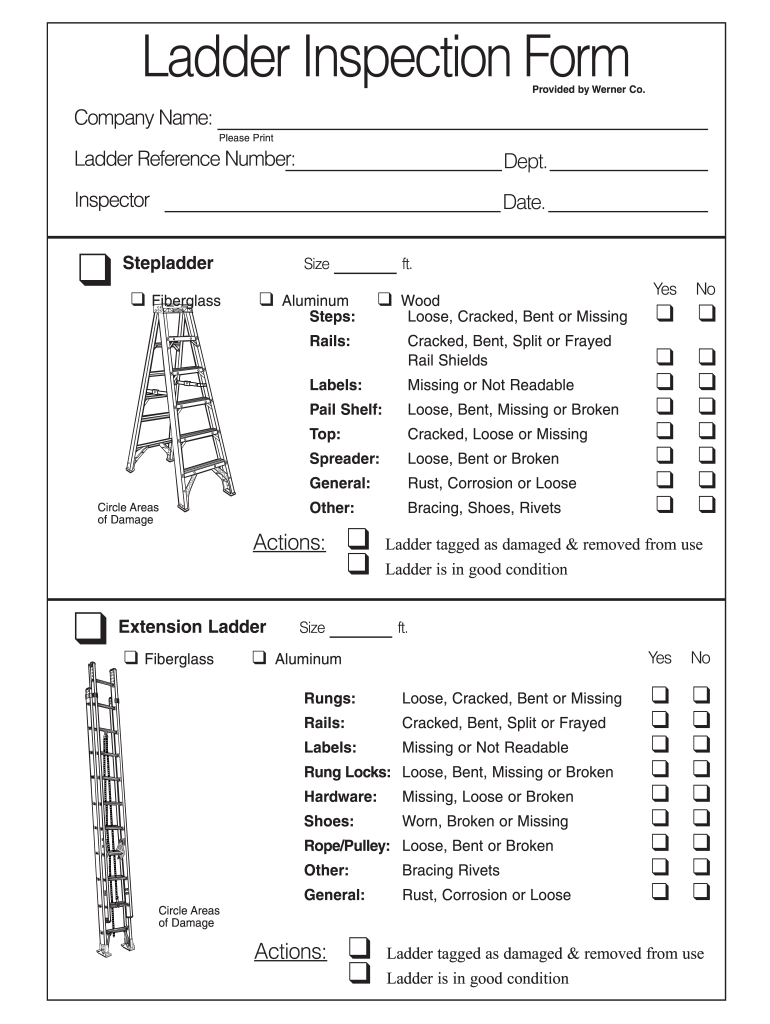
A ladder inspection form template in Excel is a structured document used to evaluate and record the condition of ladders in various settings, typically in workplaces where ladder safety is a priority. This template allows inspectors to systematically document the findings of ladder evaluations, ensuring compliance with safety regulations and enhancing the overall safety of personnel using ladders. Common elements within the template may include sections for ladder identification, inspector details, inspection dates, and a checklist to assess the physical state of the ladder components such as rungs, rails, and labels.
This form serves multiple purposes: it helps in identifying any existing damage, determines whether a ladder is suitable for use, and facilitates compliance with Occupational Safety and Health Administration (OSHA) regulations and company-specific safety protocols. By using an Excel template, the documentation process becomes more efficient, allowing for easy data entry, modifications, and record-keeping.
Key Elements of the Ladder Inspection Form Template Excel
The ladder inspection form template includes several crucial components that help streamline the inspection process. Understanding these key elements assists inspectors in conducting thorough evaluations.
-
Ladder Identification Information: This section typically requests details such as the ladder's model number, serial number, and location. Tracking this information is integral for inventory and maintenance purposes.
-
Inspector Information: The form should include the name and signature of the inspector, along with the date of inspection. This accountability fosters a culture of safety and responsibility.
-
Condition Checklist: The heart of the inspection form features a checklist assessing various ladder components for integrity and safety, which may include:
- Rungs: Check for wear, cracks, or significant damage.
- Rails: Inspect for bends, corrosion, or other structural issues.
- Labels: Ensure safety labels are intact and legible.
-
Evaluation Outcome: This section allows the inspector to classify the ladder as either safe for use or tagged for repair or replacement. It could also include notes for actions required.
-
Additional Comments: Inspectors may provide specific recommendations or observations that fall outside the constraints of the formal checklist.
Having a clearly outlined template helps maintain uniformity in inspections, enabling effective oversight and safe ladder use across various contexts.
How to Use the Ladder Inspection Form Template Excel
Utilizing the ladder inspection form template effectively requires familiarity with Excel and adherence to a structured approach during inspections.
-
Open the Template: Launch Excel and open the ladder inspection form template, ready to enter information directly into the fields.
-
Fill in Ladder Information: Record the ladder's identification details, including the model, serial number, and the exact location where the ladder is stored or used.
-
Enter Inspector Details: Complete the inspector information section, noting the name, title, and date, which ensures accountability and traceability.
-
Perform the Inspection: Methodically check each ladder component against the checklist:
- Assess rungs for stability and damage.
- Examine rails for structural integrity and signs of wear.
- Verify that all safety labels are in place and readable.
-
Document Findings: As you inspect each component, mark your findings in the appropriate sections of the form. Be clear in your notations, especially if a ladder is deemed unsuitable for use.
-
Finalize the Evaluation: Based on your findings, determine the ladder's status, providing detailed notes in the comments section if necessary.
Using a structured approach helps maintain thorough documentation and ensures compliance with safety standards.
Examples of Using the Ladder Inspection Form Template Excel
Real-world scenarios highlight the value of the ladder inspection form template in enhancing safety in workplaces.
-
Construction Sites: Regular ladder inspections on construction sites are critical. Utilizing the template allows foremen to ensure that all ladders are in good repair before workers access them, reducing the likelihood of accidents on the job.
-
Warehousing: In warehouse settings, where ladders are commonly used for accessing high shelving units, the form helps staff maintain a record of ladder conditions. Regular inspections conducted using an Excel template could reduce work-related injuries due to falling or malfunctioning ladders.
-
Healthcare Facilities: Hospitals and care facilities use ladders for various maintenance tasks. Using a consistent inspection protocol documented in Excel streamlines safety audits and ensures compliance with health regulations.
By leveraging the ladder inspection form template, organizations can foster a safety-first culture, ensuring both compliance and the wellbeing of their employees.
Why You Should Use the Ladder Inspection Form Template Excel
Employing the ladder inspection form template in Excel provides numerous advantages for organizations concerned with safety and compliance.
-
Streamlined Data Entry: Excel’s capabilities allow for efficient data entry and storage. Managers can easily track completed inspections and identify patterns over time.
-
Improved Compliance: With structured documentation readily available, companies can more easily comply with OSHA regulations and instill best practices in ladder safety.
-
Accessible Data Analysis: Utilizing Excel facilitates data analysis, which can lead to insights that inform future maintenance schedules and safety training programs.
-
Time-Saving: By using a pre-designed template rather than creating forms from scratch, organizations save time and reduce the risk of errors.
Overall, employing the ladder inspection form template streamlines the inspection process, enhances accountability, and ultimately contributes to a safer working environment.