




Here's how it works

01. Edit your osha hot work permit form pdf online
Type text, add images, blackout confidential details, add comments, highlights and more.

02. Sign it in a few clicks
Draw your signature, type it, upload its image, or use your mobile device as a signature pad.

03. Share your form with others
Send free printable hot work permit form via email, link, or fax. You can also download it, export it or print it out.
How to use or fill out hot work permit form pdf with our platform

- Click ‘Get Form’ to open the hot work permit form in the editor.
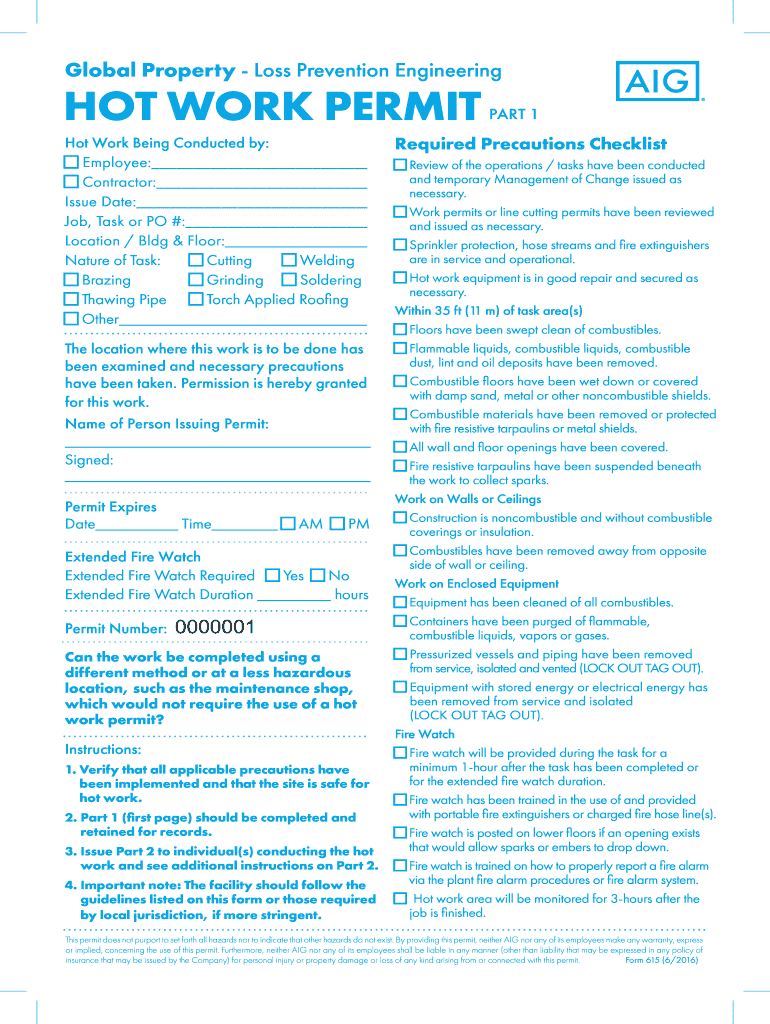
- Begin by filling in the 'Hot Work Being Conducted by' section. Specify whether the worker is an employee or a contractor, and provide their name.
- Enter the issue date, job/task number, and location details in the designated fields.
- Select the nature of the task being performed by checking the appropriate boxes for cutting, welding, brazing, grinding, etc.
- Complete Part 1 of the form by ensuring all required precautions are checked off. This includes confirming that flammable materials have been removed and that fire protection measures are in place.
- Once Part 1 is filled out, issue Part 2 to those conducting the hot work. Ensure they understand additional instructions provided there.
- After completing the work, document any final checks and sign off on both fire watch and final check-off sections before returning the permit to its issuer.
Start using our platform today for free to streamline your hot work permit process!
Fill out hot work permit form pdf online
It's free
It's free
See more hot work permit form pdf versions
We've got more versions of the hot work permit form pdf form. Select the right hot work permit form pdf version from the list and start editing it straight away!
| Versions | Form popularity | Fillable & printable |
|---|---|---|
| 2016 | 4.4 Satisfied (35 Votes) |
Security and compliance
At DocHub, your data security is our priority. We follow HIPAA, SOC2, GDPR, and other standards, so you can work on your documents with confidence.
Learn more




