Type text, add images, blackout confidential details, add comments, highlights and more.
02. Sign it in a few clicks
Draw your signature, type it, upload its image, or use your mobile device as a signature pad.
03. Share your form with others
Send tph 204 medical form via email, link, or fax. You can also download it, export it or print it out.
How to use or fill out tph 204 with our platform
Ease of Setup
DocHub User Ratings on G2
Ease of Use
DocHub User Ratings on G2
Click ‘Get Form’ to open the tph 204 in the editor.
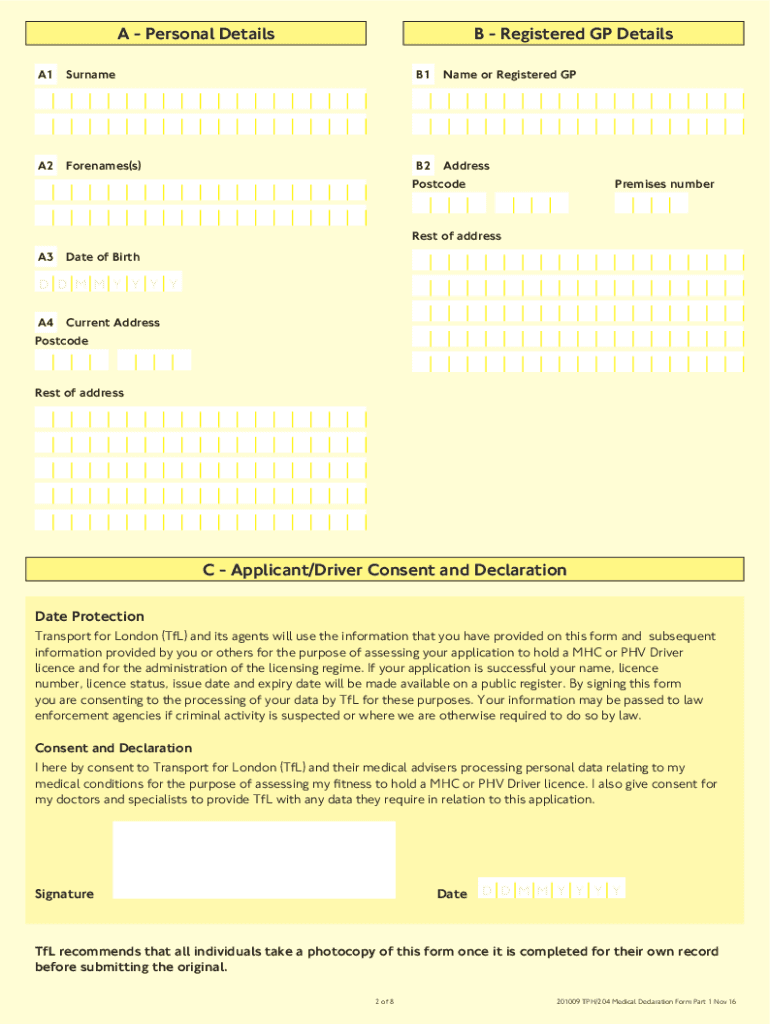
Begin by filling out Section A - Personal Details. Use BLOCK CAPITAL letters and black ink for clarity. Ensure all fields, including your surname, forenames, date of birth, and current address, are completed accurately.
Proceed to Section B - Registered GP Details. Enter the name and address of your registered GP who has access to your full medical records.
In Section C - Applicant/Driver Consent and Declaration, read the consent statement carefully before signing and dating the form.
Sections D through F must be completed by a registered medical practitioner. Ensure they have access to your full medical records during their examination.
Once completed, return the form to TfL at the specified address. Remember to take a photocopy for your records before submission.
Start using our platform today for free to streamline your tph 204 completion!
Mont. Admin. r. 17.50.1612 - ANALYTICAL METHODS | State
(1) For purposes of this subchapter, the department adopts and incorporates by reference: (a) Test Methods for Evaluating Solid Waste, Physical/Chemical Methods
Technical Protocol for Implementing Intrinsic Remediation
This report is a work prepared for the United States Government by Parsons Engineering. Science, Inc. and representatives from the United StatesRead more
Toxicological Profile for Total Petroleum Hydrocarbons (TPH)
This public health statement tells you about total petroleum hydrocarbons (TPH) and the effects of exposure. The Environmental Protection Agency (EPA)Read more
Cookie consent notice
This site uses cookies to enhance site navigation and personalize your experience.
By using this site you agree to our use of cookies as described in our Privacy Notice.
You can modify your selections by visiting our Cookie and Advertising Notice.