Super 8 credit card authorization form 2026

Get Form
super 8 credit card authorization form Preview on Page 1

Here's how it works

01. Edit your super 8 credit card authorization form online
Type text, add images, blackout confidential details, add comments, highlights and more.

02. Sign it in a few clicks
Draw your signature, type it, upload its image, or use your mobile device as a signature pad.

03. Share your form with others
Send super 8 credit card via email, link, or fax. You can also download it, export it or print it out.

How to use or fill out super 8 credit card authorization form with DocHub

Form edit decoration
9.5
Ease of Setup
DocHub User Ratings on G2
9.0
Ease of Use
DocHub User Ratings on G2
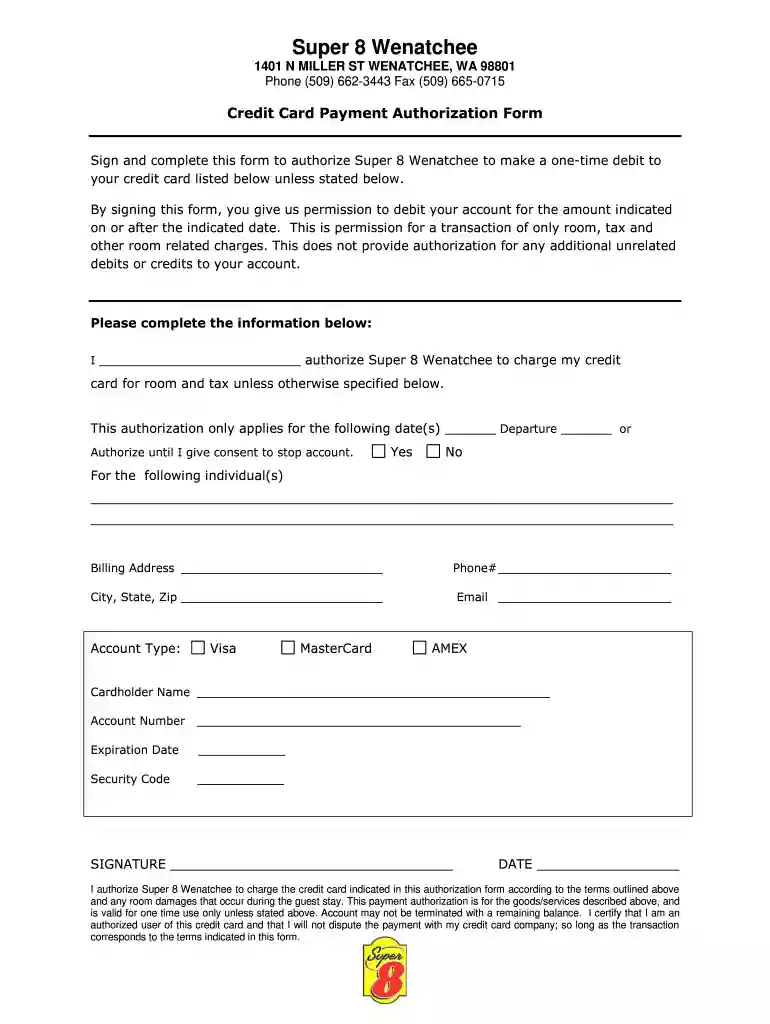
  1. Click ‘Get Form’ to open the Super 8 credit card authorization form in our editor.
  2. Begin by entering your name in the designated field to authorize Super 8 Wenatchee to charge your credit card.
  3. Specify the date(s) for which this authorization applies, or indicate if it is valid until you revoke consent.
  4. Fill in the names of any individuals for whom this authorization is applicable, if necessary.
  5. Complete your billing address, including phone number, city, state, and zip code.
  6. Select your account type (Visa, MasterCard, AMEX) and provide the cardholder's name along with the account number.
  7. Enter the expiration date and security code from your credit card.
  8. Finally, sign and date the form to confirm your authorization for charges as outlined above.

Start filling out your Super 8 credit card authorization form online for free today!

See more super 8 credit card authorization form versions

We've got more versions of the super 8 credit card authorization form form. Select the right super 8 credit card authorization form version from the list and start editing it straight away!
Versions Form popularity Fillable & printable
2017 4.2 Satisfied (37 Votes)
be ready to get more

Complete this form in 5 minutes or less

Get form

Got questions?

We have answers to the most popular questions from our customers. If you can't find an answer to your question, please contact us.
Contact us

Yes, you can utilize DocHub for signing any business and personal documentation, including your credit card authorization form. All eSignatures you create with our service are legally binding and court-admissible, as DocHub complies with standards required by ESIGN and UETA. Save your completed document with a detailed Audit Trail if needed.

Apart from an extensive toolset for editing PDFs on mobile devices, DocHub allows you to sign your credit card authorization template along the way. Open our editor in your internet browser, make changes using DocHub’s toolset, and finish your editing by eSigning the finished form.

I, [Your Full Name], hereby authorize [Authorized Persons Full Name], bearing ID number [ID Details], to act on my behalf in legal matters related to [Case Name/Number or Legal Purpose]. The authorized person is permitted to: Sign legal documents. Represent me during proceedings or consultations.
I, [Your Full Name], hereby authorize [Authorized Persons Full Name], with ID number [ID Number of Authorized Person], to receive my credit card on my behalf. Due to [brief explanation of why you cannot receive it yourself], I am unable to personally collect the credit card from [Bank/Institutions Name].
Credit card authorization forms are a best practice for merchants. While its not legally required, It is highly recommended to ensure both you and your client are aware of how charges will be processed for future transactions.

Security and compliance

At DocHub, your data security is our priority. We follow HIPAA, SOC2, GDPR, and other standards, so you can work on your documents with confidence.

Learn more
ccpa2
pci-dss
gdpr-compliance
hipaa
soc-compliance

People also ask

A free credit card authorization form has the following fields: Cardholder name. Credit card type, such as Visa, Mastercard, American Express, or Discover. Card number. Expiration date. The cardholders billing address. Merchants business information. A general message authorizing charges.
A letter of authorization (or authority letter) is a legal document that allows a third party (usually referred to as an agent) to act on behalf of the person writing the letter. In simple terms, when you write an authorization letter, you are legally permitting someone to act on your behalf.
Heres how the card authorization process works: The customer initiates the sale. Your processor sends an authorization request. The clients bank reviews the request. It approves or declines the purchase. The payment terminal receives an authorization code.
As the cardholder, youll typically need to complete a form with your name, billing address, card type, expiration date, and the charges you authorize, like room, tax, or extras. Once submitted, the hotel can charge the company credit card even if you arent there.

Related links