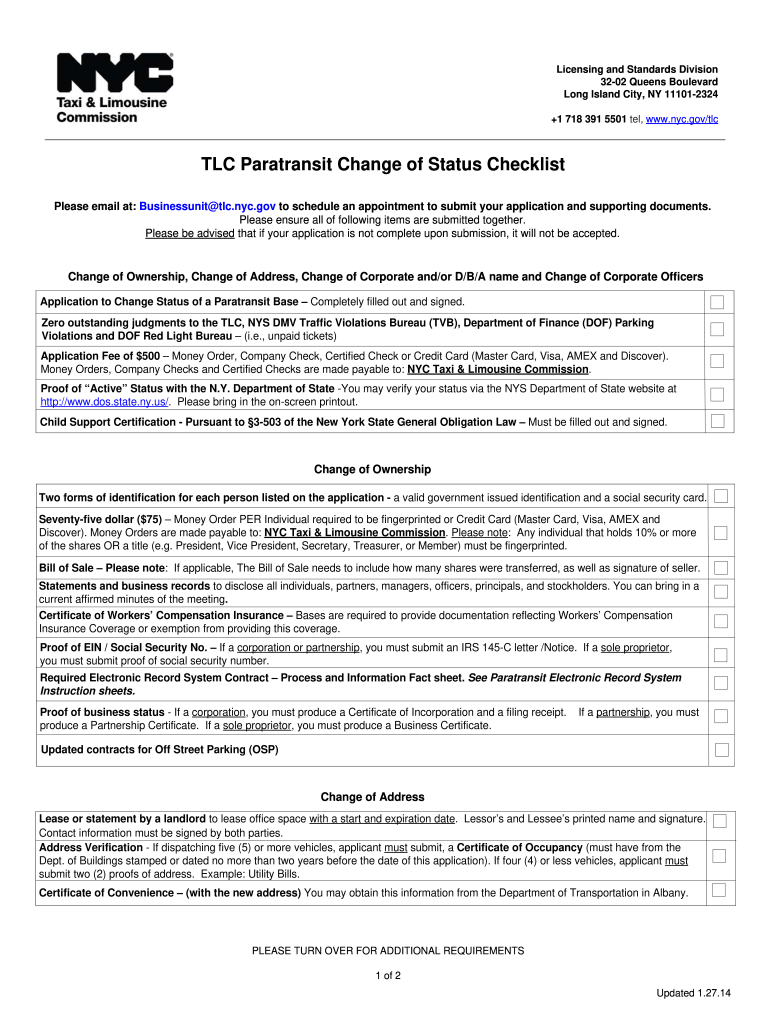
TLC Paratransit Change of Status Checklist - NYC.gov - nyc 2026

Get Form
tlc up Preview on Page 1

Here's how it works

01. Edit your tlc up online
Type text, add images, blackout confidential details, add comments, highlights and more.
02. Sign it in a few clicks
Draw your signature, type it, upload its image, or use your mobile device as a signature pad.
03. Share your form with others
Send tlc up nyc via email, link, or fax. You can also download it, export it or print it out.

How to use or fill out TLC Paratransit Change of Status Checklist - NYC.gov - nyc with our platform

Form edit decoration
9.5
Ease of Setup
DocHub User Ratings on G2
9.0
Ease of Use
DocHub User Ratings on G2
  1. Click ‘Get Form’ to open the TLC Paratransit Change of Status Checklist in our editor.
  2. Begin by filling out the 'Application to Change Status of a Paratransit Base' section. Ensure all fields are completed accurately and sign where indicated.
  3. Next, check for any outstanding judgments with the TLC or NYS DMV. You must confirm that there are no unpaid tickets before proceeding.
  4. Prepare your payment method for the application fee of $500. You can select from options like Money Order, Company Check, or Credit Card.
  5. Gather supporting documents such as proof of active status with the NY Department of State and Child Support Certification. Upload these documents directly into our platform for easy submission.
  6. For changes in ownership, ensure you have two forms of ID for each individual listed and prepare a Bill of Sale if applicable.
  7. Finally, review all sections thoroughly before submitting your completed form and documents through our platform to ensure everything is in order.

Start using our platform today to streamline your document editing and submission process for free!

See more TLC Paratransit Change of Status Checklist - NYC.gov - nyc versions

We've got more versions of the TLC Paratransit Change of Status Checklist - NYC.gov - nyc form. Select the right TLC Paratransit Change of Status Checklist - NYC.gov - nyc version from the list and start editing it straight away!
Versions Form popularity Fillable & printable
2015 4.9 Satisfied (502 Votes)
2014 4 Satisfied (33 Votes)
be ready to get more

Complete this form in 5 minutes or less

Get form

Got questions?

We have answers to the most popular questions from our customers. If you can't find an answer to your question, please contact us.
Contact us

A lot of software applications are available on the market for document modifying and signing. DocHub is one of the most in-demand online solutions that comply with all security and compliance requirements and ensures your eSigned paperwork is legally enforceable. All you need to try it out is to create an account, add your tlc lars, provide the required details, and click Sign. Generate your electronic signature by typing, drawing it, uploading its picture to your document, or scanning a unique QR code.

It is a no-brainer on a computer or via a mobile device to fill out a tlc lars login with DocHub. All you need to do is open any installed internet browser on your smartphone and proceed to the DocHub website. Once authenticated, add your file and open it in editing mode. Use our toolbar to make your edits and save adjustments. Optionally, keep your document in your files or send it to a recipient immediately.

Access-A-Ride (AAR) Paratransit Service provides public transportation for eligible customers with disabilities or health conditions that prevent them from using the public buses and subways for some or all of their trips. AAR operates 24/7/365. AAR service is available within NYCs five boroughs.
Whether you are applying or redocHubing for Access-A-Ride (AAR), call (877) 337-2017 (toll-free for area codes 212, 929, 718, 347, 516, 631, 646, 914, 917, 332 and 845) or 718-393-4999 (from other area codes).

Security and compliance

At DocHub, your data security is our priority. We follow HIPAA, SOC2, GDPR, and other standards, so you can work on your documents with confidence.

Learn more
ccpa2
pci-dss
gdpr-compliance
hipaa
soc-compliance