Cms ub 04 claim form 2026

Get Form
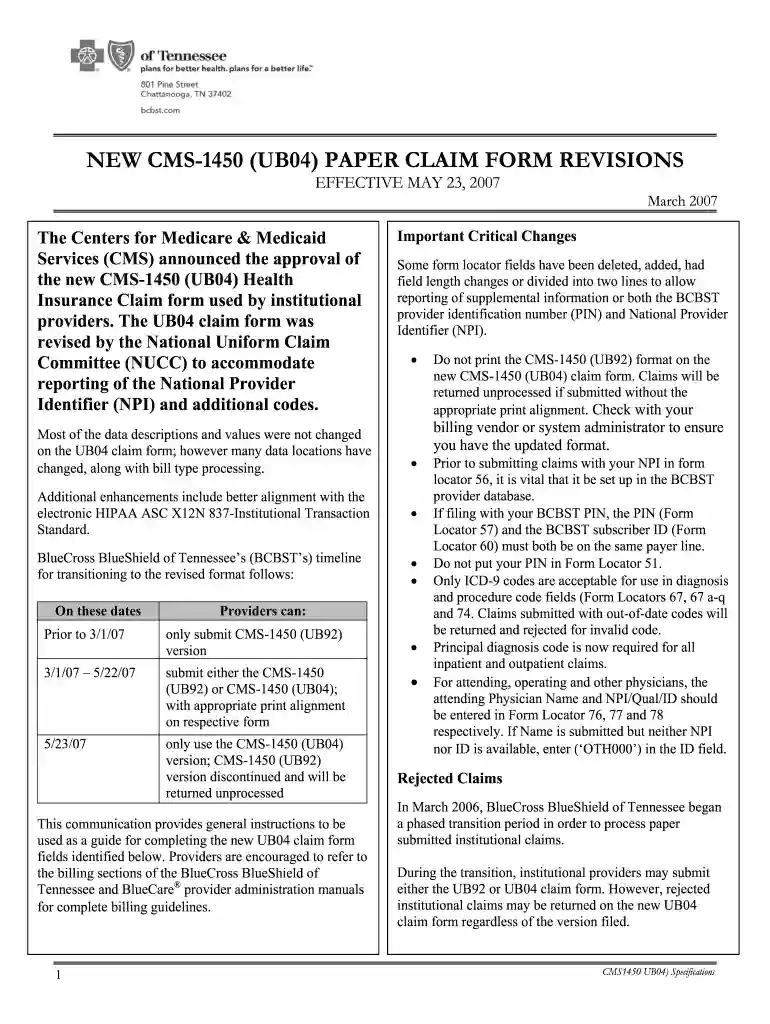
cms ub 04 claim form Preview on Page 1

Here's how it works

01. Edit your cms ub 04 claim form online
Type text, add images, blackout confidential details, add comments, highlights and more.

02. Sign it in a few clicks
Draw your signature, type it, upload its image, or use your mobile device as a signature pad.

03. Share your form with others
Send claim form ub04 via email, link, or fax. You can also download it, export it or print it out.

How to use or fill out cms ub 04 claim form with DocHub

Form edit decoration
9.5
Ease of Setup
DocHub User Ratings on G2
9.0
Ease of Use
DocHub User Ratings on G2
  1. Click ‘Get Form’ to open the CMS UB 04 claim form in our editor.
  2. Begin by filling out Form Locator 1 with the Billing Provider's Name, Address, and Telephone Number. Ensure all details are accurate for processing.
  3. In Form Locator 2, enter the Pay-to Name and Address. This is crucial for payment routing.
  4. Complete Form Locators 3a and 3b with the Patient Control Number and Medical Record Number respectively to track patient information.
  5. For Type of Bill (Form Locator 4), select the appropriate code that reflects the nature of the service provided.
  6. Fill in patient details in Form Locators 8a through 9e, including Patient Identifier, Name, and Address. Accuracy here is vital for claims processing.
  7. Continue filling out additional required fields such as Admission Date (FL 14) and Principal Diagnosis Code (FL 67) to ensure compliance with billing standards.

Start using our platform today to fill out your CMS UB 04 claim form easily and for free!

See more cms ub 04 claim form versions

We've got more versions of the cms ub 04 claim form form. Select the right cms ub 04 claim form version from the list and start editing it straight away!
Versions Form popularity Fillable & printable
2007 4.9 Satisfied (47 Votes)
be ready to get more

Complete this form in 5 minutes or less

Get form

Got questions?

We have answers to the most popular questions from our customers. If you can't find an answer to your question, please contact us.
Contact us
The UB-04 claim form is used to submit claims for outpatient services by institutional facilities (for example, outpatient departments, Rural Health Clinics and chronic dialysis centers).
1500 is a medical claim (Professional) and UB04 is hospital claim (Institutional). 837P is a 1500 Medical Claims and 837I is a UB04 hospital claims. When paper is sent, a 1500 form is used for Medical claims and a UB04 form for Hospital.
When a physician has a private practice but performs services at an institutional facility such as a hospital or outpatient facility, the CMS-1500 form would be used to bill for their services. The UB-04 (CMS-1450) form is the claim form for institutional facilities such as hospitals or outpatient facilities.
Form CMS-1490S (version 01/18) DEPARTMENT OF HEALTH AND HUMAN SERVICES. CENTERS FOR MEDICARE MEDICAID SERVICES. PATIENTS REQUEST FOR MEDICAL PAYMENT.
Though many insurers accept both forms, CMS-1500 is used primarily for billing Medicare Part B and other insurance programs that cover outpatient care. UB-04 is required for billing Medicare Part A and Medicaid institutional claims.

Security and compliance

At DocHub, your data security is our priority. We follow HIPAA, SOC2, GDPR, and other standards, so you can work on your documents with confidence.

Learn more

People also ask

The CMS-1450 form (aka UB-04 at present) can be used by an institutional provider to bill a Medicare fiscal intermediary (FI) when a provider qualifies for a waiver from the Administrative Simplification Compliance Act (ASCA) requirement for electronic submission of claims.

cms 1450 claim form