UTSA Resume Template for Undergraduates 2026

Get Form
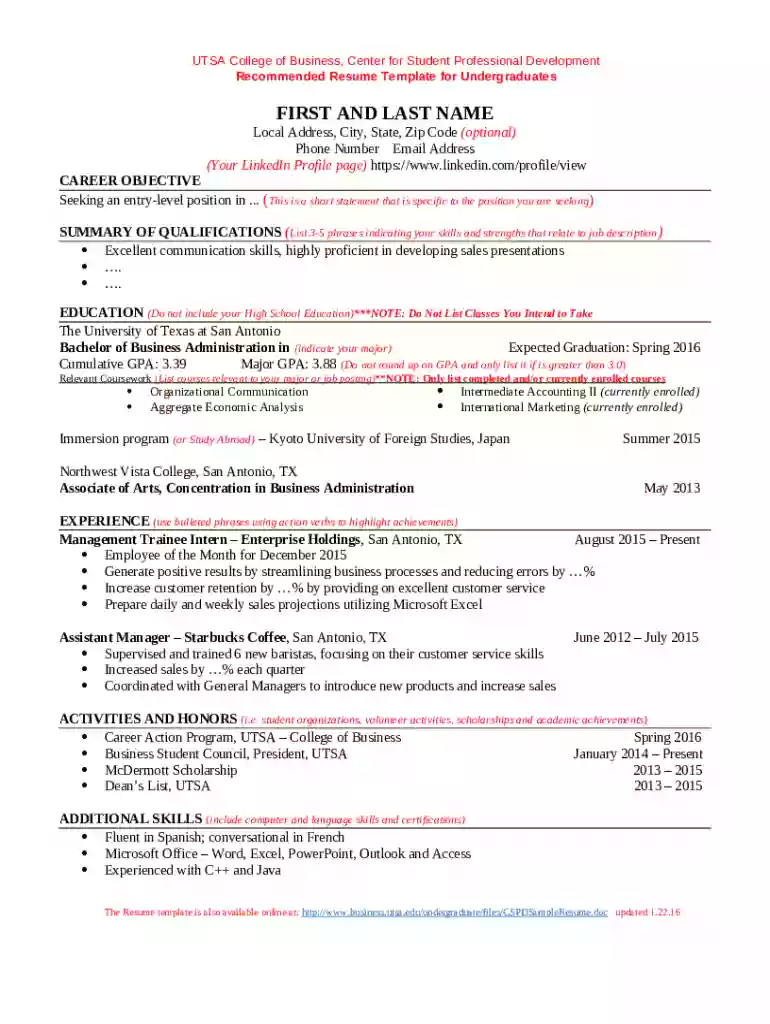
UTSA Resume Template for Undergraduates Preview on Page 1

Here's how it works

01. Edit your form online
Type text, add images, blackout confidential details, add comments, highlights and more.

02. Sign it in a few clicks
Draw your signature, type it, upload its image, or use your mobile device as a signature pad.

03. Share your form with others
Send it via email, link, or fax. You can also download it, export it or print it out.

Definition and Meaning

The UTSA Resume Template for Undergraduates is designed to help students at the University of Texas at San Antonio develop professional resumes. It offers a structured format that highlights students' academic achievements, skills, and work experience effectively. The template is tailored to meet industry standards, ensuring that undergraduates present their qualifications in a clear and impressive manner. Key characteristics include sections for personal details, education, experience, skills, and extracurricular activities. This standardized approach supports undergraduates in creating a resume that stands out in competitive job markets.

How to Use the UTSA Resume Template for Undergraduates

  1. Download the Template:

    • Access the UTSA Career Center website or contact the Center for Student Professional Development (CSPD) to obtain the template.
  2. Fill in Personal Information:

    • Begin by entering your first and last name, along with your local address, phone number, and email address.
  3. Detail Your Education:

    • Include your degree program, major, and anticipated graduation date. Highlight any honors or relevant coursework.
  4. List Professional Experience:

    • Detail internships, part-time jobs, or volunteer roles. Focus on achievements and responsibilities using action verbs.
  5. Highlight Skills:

    • Include technical and soft skills, such as teamwork, problem-solving, or proficiency in specific software tools.
  6. Add Extracurricular Activities:

    • Mention participation in student organizations or leadership roles that demonstrate initiative and commitment.
  7. Adjust Formatting:

    • Ensure all sections are aligned and consistent in style. Double-check for errors and clarity.

Steps to Complete the UTSA Resume Template for Undergraduates

  1. Preparation:

    • Gather all relevant documents, including transcripts, certifications, and records of experience.
  2. Customization:

    • Tailor the template to align with the specific job or internship you are applying for. Focus on matching your skills with the job description.
  3. Review with Mentors:

    • Seek feedback from professors, career advisors, or peers to refine your resume.
  4. Finalization:

    • Double-check all information for accuracy and clarity. Ensure your contact details are current.
  5. Export and Send:

    • Save the completed resume as a PDF to preserve formatting. Submit it through the appropriate application portal or via email.

Key Elements of the UTSA Resume Template for Undergraduates

  • Personal Information Section:

    • Essential for contact purposes and should be the first thing potential employers notice.
  • Education Block:

    • Highlights academic credentials and helps employers assess your foundational knowledge.
  • Experience Section:

    • Demonstrates your practical skills and the ability to apply classroom knowledge in real-world settings.
  • Skills Section:

    • Offers a snapshot of your competencies, whether technical or interpersonal.
  • Extracurricular Activities:

    • Provides insight into your interests, leadership skills, and ability to balance various commitments.

Who Typically Uses the UTSA Resume Template for Undergraduates

  • UTSA Students:

    • Primarily used by current undergraduates seeking internships or entry-level positions.
  • Recent Graduates:

    • As they transition into the workforce, they continue to benefit from a format that highlights their university experience.
  • Career Changers:

    • Students exploring different career paths can use the template to reframe their academic and extracurricular experiences accordingly.
decoration image ratings of Dochub

How to Obtain the UTSA Resume Template for Undergraduates

  • Visit the UTSA Website:

    • Download directly from the Career Center section.
  • Contact Career Advisors:

    • Reach out to the CSPD for direct access or guidance on using the template effectively.
  • Attend Workshops:

    • Participate in resume-building workshops organized by the university for hands-on guidance and insights.

Important Terms Related to the UTSA Resume Template for Undergraduates

  • Action Verbs:

    • Words like "led," "created," or "managed" used in describing your achievements.
  • Chronological Order:

    • Listing your experiences starting from the most recent to the earliest.
  • Format Consistency:

    • Maintaining uniformity in fonts, spacing, and structure throughout the resume.
  • Custom Tailoring:

    • Modifying the resume to align with specific job descriptions or industry standards.

Version or Alternatives to the UTSA Resume Template for Undergraduates

  • Industry-Specific Templates:

    • Consider templates specialized for fields such as engineering, business, or arts to better align with industry expectations.
  • Custom Resumes:

    • While the UTSA template is highly recommended, creating a tailored resume from scratch might be beneficial for unique positions.
  • Online Resume Builders:

    • Utilize platforms like DocHub for editing flexibility and to explore additional resume formats. They support various file formats, offering a comprehensive solution for undergraduate resume building.

By following these guidelines, undergraduates can maximize the potential of the UTSA Resume Template and present their credentials in the best possible light.

be ready to get more

Complete this form in 5 minutes or less

Get form

Security and compliance

At DocHub, your data security is our priority. We follow HIPAA, SOC2, GDPR, and other standards, so you can work on your documents with confidence.
Learn more
ccpa2
pci-dss
gdpr-compliance
hipaa
soc-compliance
be ready to get more

Complete this form in 5 minutes or less

Get form