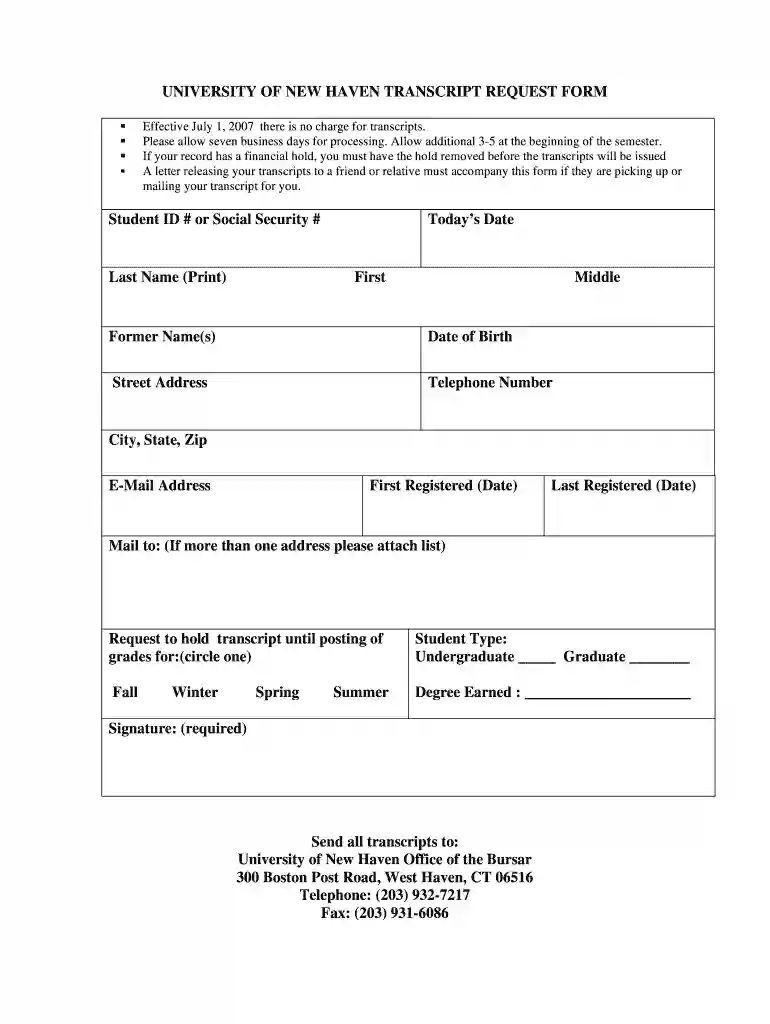
University of new haven transcript request 2026

Get Form
university of new haven transfer out form Preview on Page 1

Here's how it works

01. Edit your university of new haven transfer out form online
Type text, add images, blackout confidential details, add comments, highlights and more.

02. Sign it in a few clicks
Draw your signature, type it, upload its image, or use your mobile device as a signature pad.

03. Share your form with others
Send university of new haven transcript request via email, link, or fax. You can also download it, export it or print it out.

How to use or fill out university of new haven transcript request with our platform

Form edit decoration
9.5
Ease of Setup
DocHub User Ratings on G2
9.0
Ease of Use
DocHub User Ratings on G2
  1. Click ‘Get Form’ to open the university of new haven transcript request in the editor.
  2. Begin by entering your Student ID # or Social Security # in the designated field. This is essential for identifying your records.
  3. Fill in your Last Name, First Name, and Middle Name as they appear on your official documents. If applicable, include any Former Name(s).
  4. Provide your Date of Birth and Street Address, ensuring all information is accurate for processing.
  5. Enter your Telephone Number and E-Mail Address for any necessary communication regarding your request.
  6. Indicate the dates you first and last registered at the university to help locate your records efficiently.
  7. Specify where you would like the transcripts mailed. If there are multiple addresses, attach a list.
  8. Select whether you want to hold the transcript until grades are posted by circling the appropriate option.
  9. Indicate your Student Type (Undergraduate or Graduate) by checking the corresponding box.
  10. Complete the Degree Earned section if applicable, then sign and date the form to validate your request.

Start using our platform today to easily complete your transcript request online for free!

See more university of new haven transcript request versions

We've got more versions of the university of new haven transcript request form. Select the right university of new haven transcript request version from the list and start editing it straight away!
Versions Form popularity Fillable & printable
2007 4 Satisfied (43 Votes)
be ready to get more

Complete this form in 5 minutes or less

Get form

Got questions?

We have answers to the most popular questions from our customers. If you can't find an answer to your question, please contact us.
Contact us
Overview. University of New Haven is a private institution that was founded in 1920. In the 2025 edition of Best Colleges, University of New Haven is ranked No. #91 in Regional Universities North.
You order an aspect of your student record online, sign an online release authorizing your high school to release your records to your designated recipients, and pay document handling and shipping fees online.
Unofficial Transcript Log in to the Campus Information Services. Click on the Academic Records tile on your Student Homepage. Click on the View Unofficial Transcript link.
Order your transcripts online in WebCat: Sign in to WebCat. Click on Student Records. Click on Transcripts from the list of options. Choose Request Official Transcripts from the list of options. A new window will open up for Parchment. Follow the step-by step instructions to place your order.
Most colleges allow you to order copies of transcripts online, by mail, or in person via the office of admissions or registrars office.

Security and compliance

At DocHub, your data security is our priority. We follow HIPAA, SOC2, GDPR, and other standards, so you can work on your documents with confidence.

Learn more
ccpa2
pci-dss
gdpr-compliance
hipaa
soc-compliance
be ready to get more

Complete this form in 5 minutes or less

Get form

People also ask

Log in to your Student Administration account. Navigate to the Transcripts Verifications tile on the Homepage. The New Request landing page displays. Select Request Official Transcript.
The University of New Haven has begun the move to Division I.
Current Students Sign in to WebCat. Click on Student Records. Click on Transcripts from the list of options. Choose Request Official Transcripts from the list of options. A new window will open up for Parchment. Follow the step-by step instructions to place your order.

Related links