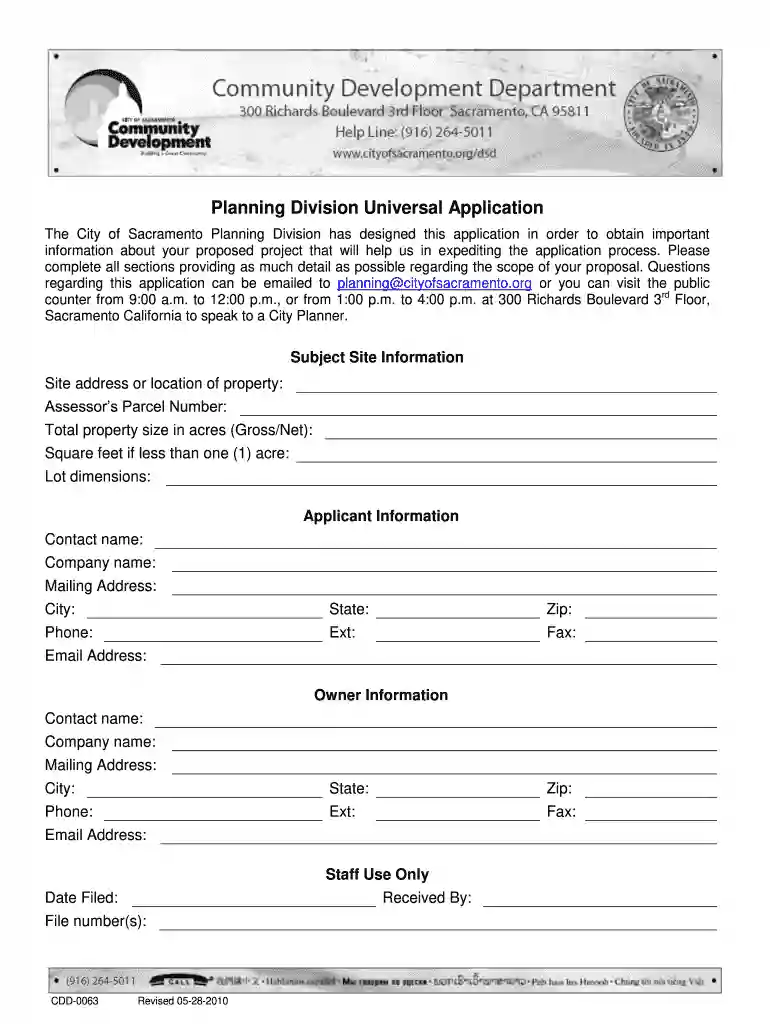
0063 com Preview on Page 1

Cdd 0063-2026

Here's how it works

  • 01. Edit your 0063 com online

    Type text, add images, blackout confidential details, add comments, highlights and more.

  • 02. Sign it in a few clicks

    Draw your signature, type it, upload its image, or use your mobile device as a signature pad.

  • 03. Share your form with others

    Send it via email, link, or fax. You can also download it, export it or print it out.

How to use or fill out cdd 0063 with our platform

Form edit decoration
9.5
Ease of Setup
DocHub User Ratings on G2
9.0
Ease of Use
DocHub User Ratings on G2
  1. Click ‘Get Form’ to open the cdd 0063 in the editor.
  2. Begin with the 'Subject Site Information' section. Enter the site address, Assessor’s Parcel Number, and total property size. Ensure accuracy as this information is crucial for processing your application.
  3. Move to 'Applicant Information'. Fill in your contact details including name, company, mailing address, phone number, and email. This ensures that you can be reached for any follow-up questions.
  4. In the 'Owner Information' section, provide similar details for the property owner if different from the applicant. This helps clarify ownership and responsibility.
  5. Proceed to 'Zoning Information'. Input zoning details and any relevant designations. This section is vital for compliance with local regulations.
  6. Complete the 'Project Information' by naming your project and detailing previous land uses. Be thorough to avoid delays in processing.
  7. Finally, review all sections for completeness before submitting your form through our platform. Utilize our editing tools to make any necessary adjustments easily.

Start filling out your cdd 0063 today on our platform for free!

See more 0063 com versions

We've got more versions of the 0063 com form. Select the right 0063 com version from the list and start editing it straight away!

VersionsForm popularityFillable & printable
20104.9 Satisfied (287 Votes)

be ready to get more

Complete this form in 5 minutes or less

Got questions?

We have answers to the most popular questions from our customers. If you can't find an answer to your question, please contact us.

Cooling Degree Days (CDD) - CDD is the equivalent number of days you would have to cool your building by 1 degree to accommodate the cooling requirement.
Cooling Degree Days (CDD) - CDD is the equivalent number of days you would have to cool your building by 1 degree to accommodate the cooling requirement. For example, if you have a day on which the temperature is 80F degrees, that day is worth 15 Cooling Degree Days because it is 15 degrees above 65F.
CDD. Cooling Degree Days- A form of degree day used to estimate energy requirements for air conditioning or refrigeration. Typically, cooling degree days are calculated as how much warmer the mean temperature at a location is than 65F on a given day.
Cooling Degree Days (CDD) are a measure used to estimate the energy demand for cooling buildings. CDD is calculated as the sum of daily temperatures exceeding a baseline temperature, typically 18C, across a specific time period.
A CDD, or community development district, is a community that imposes fees to fund infrastructure and amenities within its boundaries.

Security and compliance

At DocHub, your data security is our priority. We follow HIPAA, SOC2, GDPR, and other standards, so you can work on your documents with confidence.

People also ask

If the mean temperature is above 65F, the CDD amount is the difference between the mean temperature and 65. For example, if the high temperature for the day was 92F and the low was 68F, the mean temperature for the day would be 92 + 68 = 160 / 2 = 80F. The Cooling Degree Days would then be 80 - 65 = 15 CDD.

Related links

Budget for the Fiscal Year 2024-2025

May 24, 2018 D0063-730 - Moores Professorship - Peter V. 0. 0. 0. 34,000. 0. 34,000 CDD OPERATIONS. 0. 0. 0. 0. 0. 0. 0. 0. 10,227. 0. 10,227. FC2091.Read more

Learn more
Planning Forms

CDD-0063; Modification of Approved Discretionary Planning Permit Application CDD-0450; Accessory Dwelling Units CDD-0009; DMV Zoning Verification CDD-0112Read more

Learn more
technical reference manual - product description - hp e-pc

These are typical values given for the standard base models. NOTE. When the PC is turned off with the power button on the front panel, the power.Read more

Learn more
If you believe that this page should be taken down, please follow our DMCA take down process here