






Definition and Meaning of Free Printable Kitchen Inventory Templates
A kitchen inventory template is a structured document designed to help individuals and businesses efficiently manage their kitchen supplies and stock levels. By using a printable version, users can easily track items such as ingredients, utensils, appliances, and other kitchen essentials. The template serves as a tool to maintain order and ensure that users never run out of important items. A well-organized inventory can lead to reduced waste, improved meal planning, and cost savings.
These templates are particularly helpful in restaurants, catering services, and households that require a detailed overview of their kitchen inventory. Utilizing a free printable option ensures accessibility for all users without incurring additional costs, allowing individuals and organizations to customize the template according to their specific needs.
How to Use Free Printable Kitchen Inventory Templates
-
Print the Template: Start by printing the free kitchen inventory template on a standard-sized paper. Ensure that the template is clear and legible.
-
Categorize Items: Break down your kitchen items into categories such as vegetables, meats, dairy products, dry goods, and kitchen tools. This organization helps in quick referencing and tracking.
-
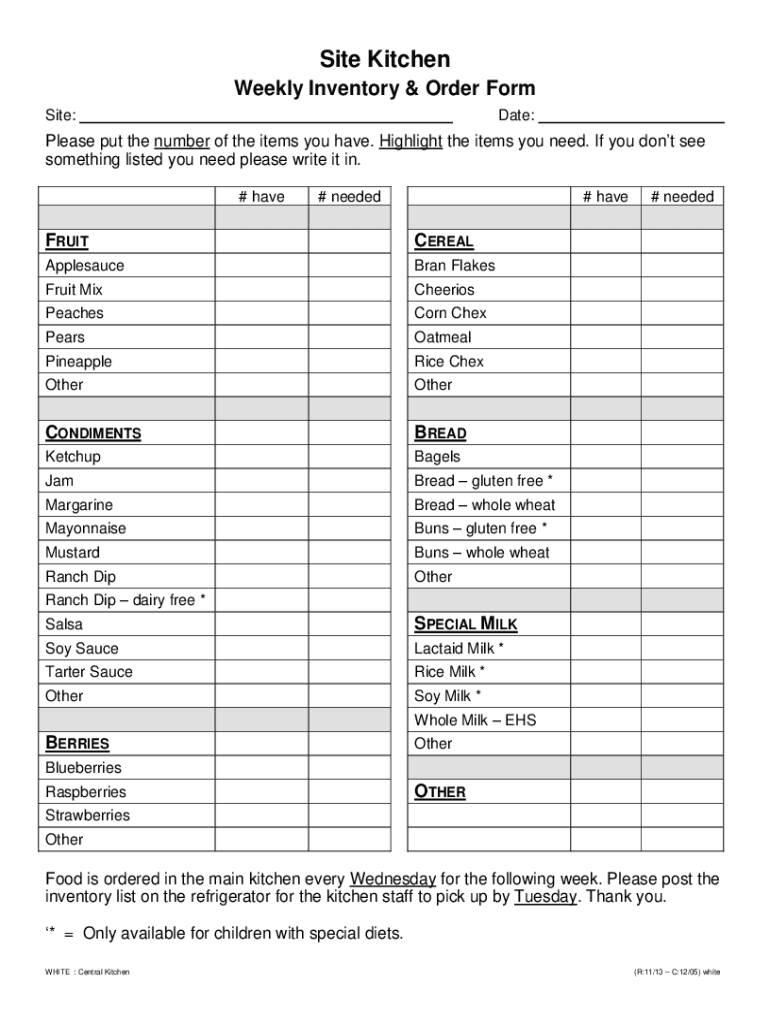
List and Count Items: Write down each item under its respective category and tally the current stock levels. This step involves counting each type of item, ensuring accuracy in maintaining inventory levels.
-
Highlight Needed Items: Use a highlighter to mark items that need restocking. This visual cue helps in quickly identifying the items to be purchased during your next shopping trip.
-
Regular Updates: Update the inventory template regularly to reflect current stock levels. A weekly or bi-weekly review can help maintain an accurate account of your kitchen supplies.
By following these steps, users can effectively utilize the kitchen inventory templates to streamline their kitchen management processes.
Steps to Complete the Free Printable Kitchen Inventory Templates
-
Gather Inventory Information: Collect all necessary information about your kitchen stock, including quantities, expiration dates, and suppliers.
-
Input Basic Details: On the upper section of the template, fill out the basic information such as the date of inventory, person responsible for updating the list, and any additional notes pertinent to the inventory process.
-
Item Logging: Log each kitchen item in the appropriate section of the template. Include specific details like the name of the item, quantity on hand, and any notes regarding its storage or special handling requirements.
-
Estimate Reorder Levels: Determine the minimum quantity of each item that should trigger a reorder and note these figures in the designated area of the template.
-
Finalize and Review: Once all items have been logged and reviewed, finalize the document. Ensure to double-check for errors or omissions that could affect inventory accuracy.
Key Elements of the Free Printable Kitchen Inventory Templates
-
Identification Information: Include fields for the date, person responsible, and location of inventory to keep track of when and where the inventory was taken.
-
Categorized Sections: Different sections for various categories of kitchen items help maintain order and increase the ease of use.
-
Stock Levels: Fields that specify the current number of items available, along with spaces for noting minimum reorder quantities.
-
Reorder Alerts: Areas marked for highlighting items that need purchasing, which aids in efficient replenishment planning.
-
Notes and Observations: Sections for jotting down any observations or special instructions related to specific items, providing essential context for future reference.
Examples of Using Free Printable Kitchen Inventory Templates
-
Restaurant Management: A bustling restaurant kitchen can benefit immensely from an organized inventory system. By using a free printable template, restaurants can monitor high-turnover items like seafood and fresh produce, ensuring timely restocks without unnecessary surplus.
-
Catering Services: Catering operations, often dealing with large-volume orders, require meticulous inventory control. These templates help in tracking specific ingredients needed for menu-planned events, ensuring all components are available when needed.
-
Home Kitchens: Households can also take advantage of these templates during meal planning and budgeting. By keeping track of pantry items, families can plan meals more efficiently, reducing food waste.
Who Typically Uses the Free Printable Kitchen Inventory Templates
-
Small and Medium-Sized Enterprises (SMEs): Catering companies, cafes, and small restaurants use these templates to manage stock and streamline operations without investing in expensive inventory management software.
-
Home Cooks and Enthusiasts: Individuals who enjoy cooking or manage large family meals can use these templates to keep tabs on their pantry items and essential cooking supplies.
-
Non-Profit Organizations: Community kitchens and food banks that depend on donations and strict budget control can benefit from maintaining an organized inventory system using printable templates.


Software Compatibility with Free Printable Kitchen Inventory Templates
While these templates are designed for print usage, they can also be adapted for digital filling. Compatible with popular software like Microsoft Word or Excel and Google Sheets, users can customize their templates according to specific needs while benefiting from digital conveniences such as auto-calculation and real-time updates.
-
Microsoft Word or Excel: Easily customizable and can automatically update totals when used in Excel.
-
Google Sheets: Offers collaboration advantages, allowing multiple users to update and edit the inventory in real time from different locations.
-
PDF Readers: For users who prefer a direct print-and-fill approach, templates can be printed directly using standard PDF readers without software modifications.
These tools enhance the flexibility and usability of kitchen inventory templates, offering a balance between traditional record-keeping and modern-day digital solutions.