







Definition and Meaning of the NYC Department of Education Authorization for SIPP Expenditure Form
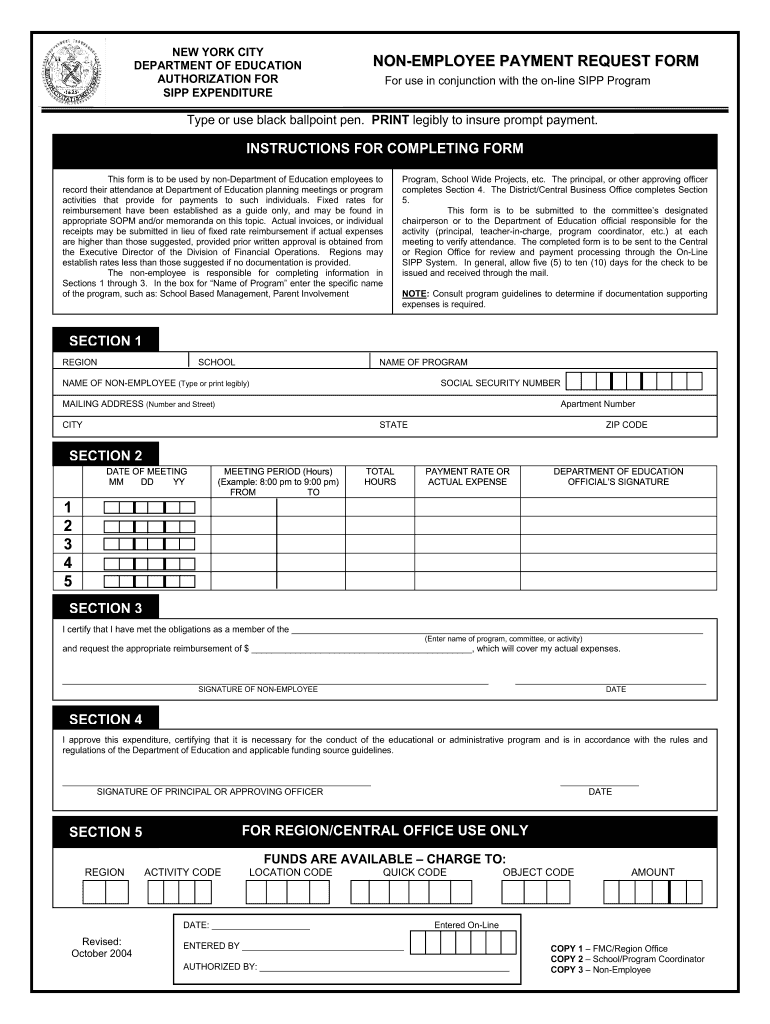
The New York City Department of Education Authorization for SIPP Expenditure Form is a document used to request approval for expenditures related to the School Improvement Program (SIPP). This form is essential for ensuring that funds are allocated appropriately within educational initiatives that aim to enhance student outcomes. The principal purpose of this form is to provide a structured process for submitting expenditure requests, thereby making it easier for schools and educational programs to access necessary resources.
It generally includes specific fields for detailing the intended expenditure, including the purpose, amount, and recipient of the funds. Successful completion of the form enables schools to obtain the necessary approvals from district officials, ensuring compliance with overarching educational policies and financial regulations. Understanding this form is key for educators, administrators, and financial personnel involved in managing school budgets.
Key Elements of the NYC DOE SIPP Form
- Identification Information: Sections for the requester’s name, school, and contact details.
- Expenditure Details: Areas to specify the amount requested, the purpose of the expenditure, and the timeline for usage.
- Approvals: Signature lines for necessary administrative approvals, ensuring that the expenditure aligns with district goals.
- Guidelines Compliance: Reference to compliance with applicable guidelines and regulations, crucial for audit purposes.
Each of these elements contributes to a thorough understanding of the request, ensuring transparency and accountability.
How to Use the NYC Department of Education Authorization for SIPP Expenditure Form
Utilizing the NYC DOE Authorization for SIPP Expenditure Form involves a systematic approach that encourages accuracy and compliance. It is designed to be user-friendly while ensuring that all required information is captured effectively.
- Gather Required Information: Before completing the form, collect necessary details such as the expenditure amount, purpose, and any supporting documentation.
- Complete the Form: Fill in all sections accurately. Include identification information, the detailed purpose of funds, and any relevant deadlines. Be precise with amounts and ensure that all calculations are verified.
- Obtain Necessary Approvals: After filling out the form, present it to the relevant authorities for signatures. This may include department heads or financial officers to ensure compliance with district policies.
- Submit the Form: Once approved, submit the form according to your district’s submission guidelines, which may include online platforms, emails, or physical delivery.
By following these steps meticulously, users can ensure that their requests are processed smoothly and efficiently within the educational financial system.
Steps to Complete the NYC Department of Education Authorization for SIPP Expenditure Form
Completing the NYC DOE Authorization for SIPP Expenditure Form requires careful attention to detail. Below is a structured process highlighting essential steps:
- Download the Form: Access the most current version of the form, ensuring it is the official template provided by the NYC Department of Education.
- Fill in Personal and School Information:
- Input your name, title, and contact details.
- Provide the school’s name and relevant codes or identifiers.
- Detail the Expenditure:
- Specify the amount being requested.
- Briefly describe the purpose, ensuring it aligns with SIPP goals.
- Include the expected date of utilization to assist in budgeting.
- Approval Signatures:
- Present the form to required supervisors or administrators for their signatures.
- Ensure that all relevant stakeholders review the details for accuracy.
- Submission:
- Follow your school’s protocols for submitting the signed document, which may vary.
- Retain a copy of the submitted form for your records.
By adhering to these steps, applicants can efficiently complete and submit the form, ensuring that all financial requests are properly documented.
Important Terms Related to the NYC Department of Education SIPP Form
Understanding the terminology associated with the NYC DOE Authorization for SIPP Expenditure Form can enhance clarity and efficiency in its use. Key terms include:
- SIPP (School Improvement Program): A program aimed at improving educational outcomes, often funded through specific allocations.
- Authorization: The formal approval required before expenditures can be made, ensuring accountability.
- Expenditure: Refers to the spending of funds; in this context, for approved educational activities or resources.
- Reimbursement: A process through which the funds used for eligible expenditures are returned to the requester, subject to compliance with guidelines.
Familiarity with these terms facilitates a smoother process when filing for expenditures, enhancing communication between faculty and administrative personnel.
Legal Use of the NYC Department of Education Authorization for SIPP Expenditure Form
The NYC DOE Authorization for SIPP Expenditure Form must be used within legal frameworks that govern financial transactions in educational institutions. This includes compliance with federal and state guidelines, as well as district policies, which may impose restrictions on how funds can be allocated and spent.
- Compliance Requirements:
- All expenditures must comply with applicable educational laws, funding regulations, and district mandates.
- Forms must be completed accurately and submitted within prescribed timelines to facilitate timely processing.
- Approval Protocol:
- The form must obtain necessary signatures from administrators who are legally designated to authorize fund expenditures.
- Auditing and Transparency:
- All records, including the completed form, must be maintained accurately to enable audit trails, facilitating accountability and financial transparency.
Understanding these legal parameters is essential for effective fiscal management within educational settings.




