Resource order 2026

Get Form
resource order Preview on Page 1

Here's how it works

01. Edit your resource order online
Type text, add images, blackout confidential details, add comments, highlights and more.

02. Sign it in a few clicks
Draw your signature, type it, upload its image, or use your mobile device as a signature pad.

03. Share your form with others
Send adapted number via email, link, or fax. You can also download it, export it or print it out.

How to use or fill out resource order with our platform

Form edit decoration
9.5
Ease of Setup
DocHub User Ratings on G2
9.0
Ease of Use
DocHub User Ratings on G2
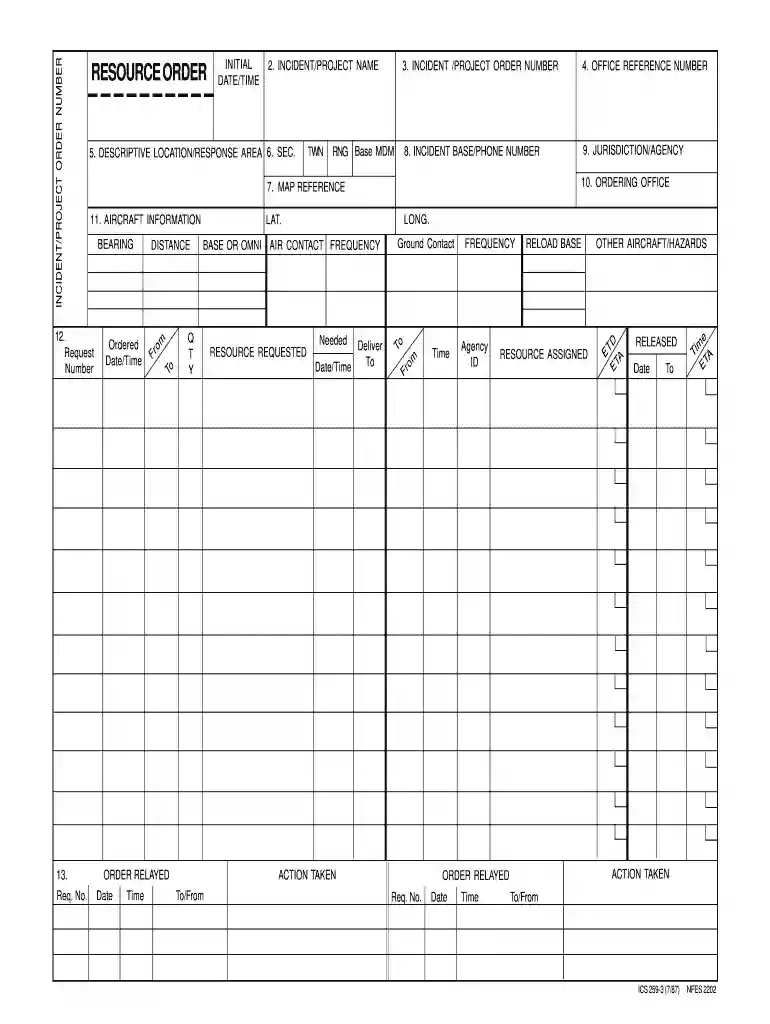
  1. Click ‘Get Form’ to open the resource order in the editor.
  2. Begin by entering the INCIDENT/PROJECT NAME in the designated field. This helps identify the specific project associated with your order.
  3. Fill in the INCIDENT/PROJECT ORDER NUMBER and OFFICE REFERENCE NUMBER. These identifiers are crucial for tracking and referencing your order.
  4. Provide a detailed DESCRIPTION LOCATION/RESPONSE AREA, ensuring that it accurately reflects where resources are needed.
  5. Complete the AIRCRAFT INFORMATION section if applicable, including any relevant details about aircraft involved in the operation.
  6. Specify RESOURCE REQUESTED along with QUANTITY needed. This ensures that you receive the correct amount of resources for your incident.
  7. Finally, review all entries for accuracy before submitting your form to ensure a smooth processing experience.

Start using our platform today to streamline your resource order process for free!

See more resource order versions

We've got more versions of the resource order form. Select the right resource order version from the list and start editing it straight away!
Versions Form popularity Fillable & printable
1987 4.8 Satisfied (223 Votes)
be ready to get more

Complete this form in 5 minutes or less

Get form

Got questions?

We have answers to the most popular questions from our customers. If you can't find an answer to your question, please contact us.
Contact us
Submitted by Anonymous (not verified) on Sun, 08/03/2025 - 01:47. The form used by dispatchers, service personnel, and logistics coordinators to document the request, ordering or release of resources, and the tracking of those resources on an incident. Steward. IBC Incident Business Committee.
The Supply Unit Leader in the Logistics Section is responsible for completing the Resource Order (ICS Form 260) in the Incident Command System. This role is critical for effectively managing resources during an incident, ensuring all resource needs are documented and processed.
Final approval for ordering additional resources, as well as releasing resources from an incident, is the responsibility of the Incident Commander.
Resource Order Management applications manage the end to end. lifecycle of a resource order request. This includes validating resource. availability as well as the resource order request.

Security and compliance

At DocHub, your data security is our priority. We follow HIPAA, SOC2, GDPR, and other standards, so you can work on your documents with confidence.

Learn more
ccpa2
pci-dss
gdpr-compliance
hipaa
soc-compliance
be ready to get more

Complete this form in 5 minutes or less

Get form