Seattle grading extension 2026

Get Form
grading season extension Preview on Page 1

Here's how it works

01. Edit your grading season extension online
Type text, add images, blackout confidential details, add comments, highlights and more.
02. Sign it in a few clicks
Draw your signature, type it, upload its image, or use your mobile device as a signature pad.
03. Share your form with others
Send it via email, link, or fax. You can also download it, export it or print it out.

How to use or fill out seattle grading extension with our platform

Form edit decoration
9.5
Ease of Setup
DocHub User Ratings on G2
9.0
Ease of Use
DocHub User Ratings on G2
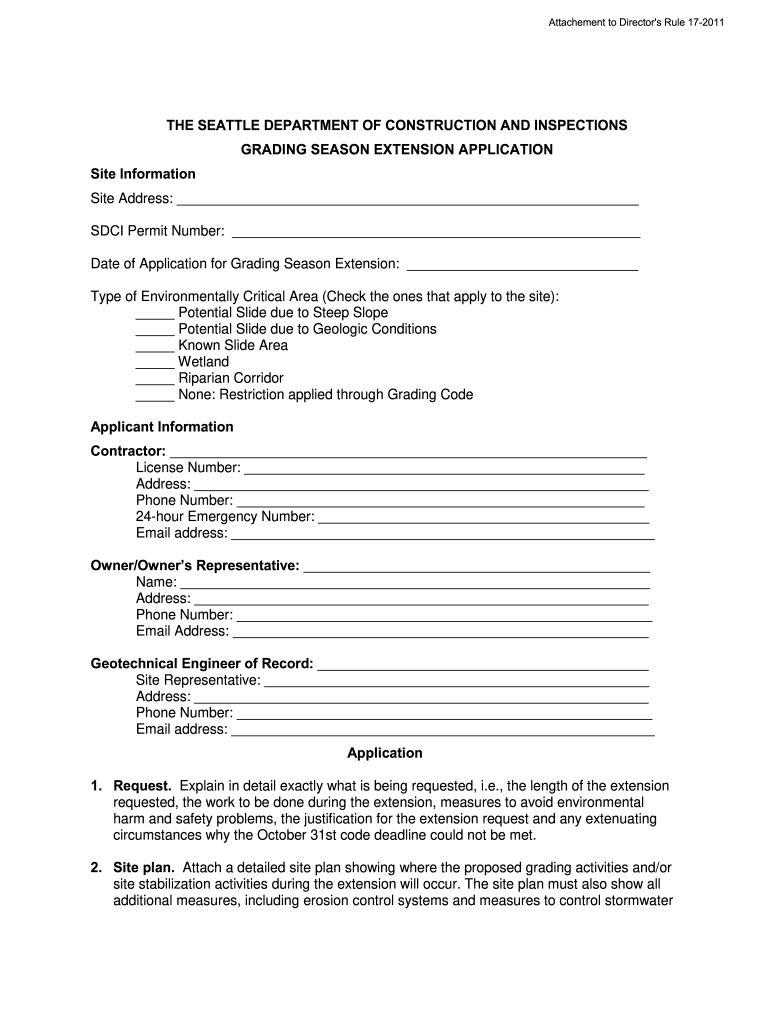
  1. Click ‘Get Form’ to open the seattle grading extension in the editor.
  2. Begin by filling in the 'Site Information' section. Enter the site address, SDCI permit number, and date of application for the grading season extension.
  3. In the 'Type of Environmentally Critical Area' section, check all applicable boxes that describe your site conditions.
  4. Proceed to 'Applicant Information.' Fill in details for the contractor, including name, license number, address, phone numbers, and email.
  5. Complete the 'Application' section by detailing your request. Clearly explain the length of extension needed and any safety measures you plan to implement.
  6. Attach a detailed site plan showing proposed grading activities and erosion control measures as required.
  7. Provide a schedule outlining specific dates for excavation and stormwater collection activities.
  8. Include a statement from your geotechnical engineer confirming their review and approval of your plans.
  9. Finally, ensure all parties (contractor, geotechnical engineer, owner) sign and date their agreements to comply with conditions outlined in the extension letter.

Start using our platform today to streamline your document editing process for free!

See more seattle grading extension versions

We've got more versions of the seattle grading extension form. Select the right seattle grading extension version from the list and start editing it straight away!
Versions Form popularity Fillable & printable
2011 4.8 Satisfied (287 Votes)
be ready to get more

Complete this form in 5 minutes or less

Get form

Got questions?

We have answers to the most popular questions from our customers. If you can't find an answer to your question, please contact us.
Contact us
In the United States, academic grading commonly takes on the form of five, six or seven letter grades. Traditionally, the grades are A+, A, A, B+, B, B, C+, C, C, D+, D, D and F, with A+ being the highest and F being lowest.
CityU uses a decimal grading system for undergraduate, graduate, and doctoral courses. Undergraduate: Passing grades fall within a range from 4.0 (high) to 0.7 (low). Failing grades are 0.6 and below. Graduate: Passing grades fall within a range from 4.0 (high) to 2.0 (low).
Grading System This is the current district information: Grades of A, A-, B+, B, B-, C+, C, C-, D+ and D indicate credit earned in a class. An E grade indicates course failure and results in no credit earned.
Use of grading systems that have equal levels (each letter grade equal to 20% of the 100 percentage scale: 80-100% = A; 60-79% = B; 40-59% = C; 20-39% = D; and 0-19% = F) which occurs naturally when using a 4-point grading system (4 = A; 3 = B, 2 = C, 1 =D; 0 = F) over a 100-point system increases equity in grading.

Security and compliance

At DocHub, your data security is our priority. We follow HIPAA, SOC2, GDPR, and other standards, so you can work on your documents with confidence.

Learn more
ccpa2
pci-dss
gdpr-compliance
hipaa
soc-compliance
be ready to get more

Complete this form in 5 minutes or less

Get form