Dhs 4796 eng-2026

Get Form
change report form dhs 4796 pdf Preview on Page 1

Here's how it works

01. Edit your change report form dhs 4796 pdf online
Type text, add images, blackout confidential details, add comments, highlights and more.

02. Sign it in a few clicks
Draw your signature, type it, upload its image, or use your mobile device as a signature pad.

03. Share your form with others
Send mn snap change report form via email, link, or fax. You can also download it, export it or print it out.

How to use or fill out DHS 4796 ENG with our platform

Form edit decoration
9.5
Ease of Setup
DocHub User Ratings on G2
9.0
Ease of Use
DocHub User Ratings on G2
  1. Click ‘Get Form’ to open the DHS 4796 ENG in the editor.
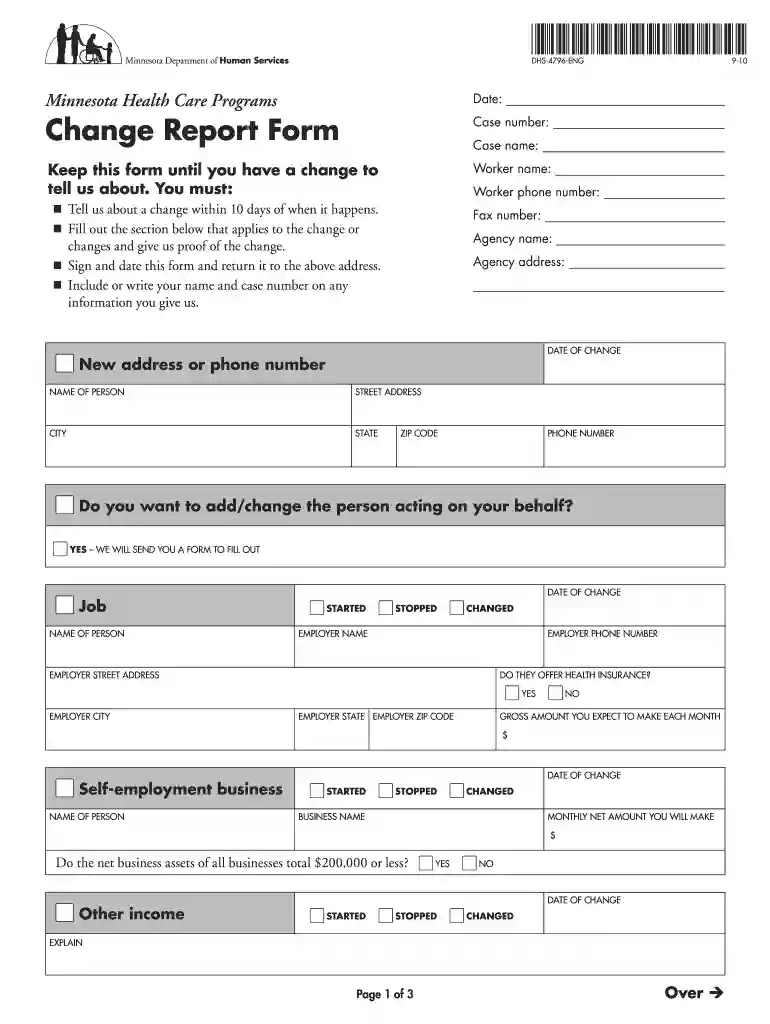
  2. Begin by entering the date at the top of the form. This is essential for tracking your changes.
  3. Fill in your case number, worker name, and contact details in the designated fields. Ensure accuracy for effective communication.
  4. Indicate any changes regarding your address or phone number in the appropriate section. Provide proof of these changes if required.
  5. If applicable, specify any employment changes, including job status and employer details. Be sure to include whether health insurance is offered.
  6. Complete sections on other income, medical expenses, and asset changes as necessary. Each section has specific fields that need to be filled out accurately.
  7. Finally, sign and date the form before submitting it back to your agency's address provided at the top.

Start using our platform today for free to streamline your document editing and form completion!

See more dhs 4796 eng versions

We've got more versions of the dhs 4796 eng form. Select the right dhs 4796 eng version from the list and start editing it straight away!
Versions Form popularity Fillable & printable
2010 4.9 Satisfied (38 Votes)
be ready to get more

Complete this form in 5 minutes or less

Get form

Got questions?

We have answers to the most popular questions from our customers. If you can't find an answer to your question, please contact us.
Contact us

According to eSignature laws, documents approved digitally have the same validity as those approved with pen and paper. You can eSign almost any business and personal documentation. Four types of paperwork still call for handwritten signatures only - wills and testamentary trusts, court orders and other court papers, state statutes governing divorce, adoption, or other family law, and notice of cancellation of utility services. If you follow the regulations and use a trustworthy and compliant software solution, like DocHub, you can eSign your dhs change report form without printing it.

You need only a web connection and a browser to fill out your household report form mn on an iOS phone. Open the DocHub website and authenticate. Then, add your file or choose it from the list in your dashboard. Then use our editing tools to fill out your form and preserve all your modifications. You can also send it to a specified recipient right away.

Our Human Resources team provides administrative services internally within the agency, overseeing strategic and operational planning, performance management, financial management, internal controls, budget planning, human resources, and information technology.
To figure out the average household income, gather all of the gross income of anyone over 15. Make sure you include any type of income, such as wages, tips, bonuses, retirement income, welfare payments. Social Security benefits, and others. Add these together to get the total household income.
43% of uninsured adults cited too expensive as the major reason for not having coverage, far exceeding reasons like dont need it, dont know how to get it and other reasons. 40% of Minnesota adults who needed healthcare during the year encountered one or more cost-related barriers to getting that care.

Security and compliance

At DocHub, your data security is our priority. We follow HIPAA, SOC2, GDPR, and other standards, so you can work on your documents with confidence.

Learn more
ccpa2
pci-dss
gdpr-compliance
hipaa
soc-compliance

People also ask

How Is Income Counted? MNsure uses modified adjusted gross income (MAGI) to determine the programs and savings you are eligible for. For most people, its identical or very close to adjusted gross income (AGI), which is a line on your federal tax return.
The state is known as the Land of 10,000 lakes, which is the highest number of any state in the United States. Minnesota is also famous for being the home of Mall of America, the largest shopping mall in the United States; and its outdoor activities, including hiking, camping, fishing, and winter activities.
You can report a change by phone, mail or in person. You may also submit a Change Report Form (DHS-4796) (PDF) to report a change.
The Health Regulation Division (HRD) of MDH protects the health and safety of Minnesotans by monitoring compliance with many of the laws and rules designed to protect them.
Social Services is the largest county department that provides critical social service supports including: child protection, licensing, foster care connections, pre-petition screening for civil commitment, adult protection, mental health, detox, case management, prevention, and chemical dependency services.

change of report form