




01. Edit your form online
Type text, add images, blackout confidential details, add comments, highlights and more.

Type text, add images, blackout confidential details, add comments, highlights and more.

Draw your signature, type it, upload its image, or use your mobile device as a signature pad.

Send it via email, link, or fax. You can also download it, export it or print it out.
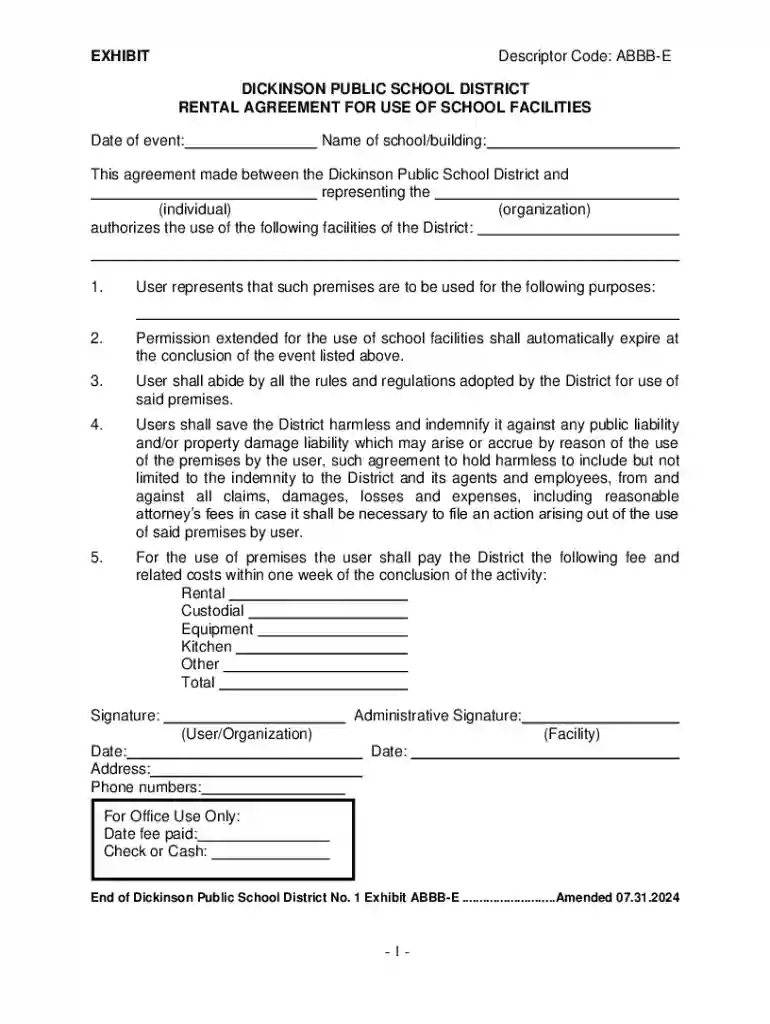
The Rental Agreement for Use of School Facilities is a legal document that establishes the terms and conditions under which an individual or organization can use a school facility for specific purposes. This agreement outlines responsibilities, permissions, and any financial obligations involved. It serves to protect both the school district and the renter by clearly defining the scope of use, indemnification clauses, and other essential provisions.
Completing the Rental Agreement for Use of School Facilities involves several key steps to ensure accuracy and compliance with the district's requirements.
Obtain the Form: Contact the school district office or visit their website to download the rental agreement form. Ensure you have the latest version.
Fill Out Personal and Organizational Information: Provide the necessary details about yourself and your organization. This typically includes names, addresses, and contact information.
Specify the Usage Details: Clearly define the purpose of the rental, the specific areas of the facility to be used, and the dates and times of use.
Agree to Terms and Conditions: Read the terms carefully. These include responsibilities, insurance requirements, and payment terms. Sign to acknowledge agreement.
Submit the Agreement: Depending on the district's process, submit the completed agreement via mail, email, or in person. Ensure to include any required fees or deposits.
Ranging from sports teams to business organizations, a variety of users rent school facilities.


Community Groups: Often use school auditoriums or gymnasiums for events or meetings.
Sports Teams and Leagues: Utilize school fields or courts for practices and games.
Non-Profit Organizations: Host workshops or fundraising events, benefiting from accessible facilities.
Local Businesses: Occasionally rent space for large-scale meetings or employee training sessions.

Several legal aspects must be considered when engaging in a rental agreement for school facilities.
Indemnification Clauses: Protects the school district from liabilities arising from the renter's use of the facility.
Insurance Requirements: Renters may need to provide proof of liability insurance to cover potential damages or injuries.
Compliance with School Policies: Renters must adhere to any district-specific rules, such as no consumption of alcohol or tobacco on the premises.
Although the principles of rental agreements are similar across states, specific requirements may vary.
Insurance Requirements: Some states may have specific insurance levels or types that the renter must maintain.
Application Processes: The process for obtaining and submitting the rental agreement may differ, with some states offering more digital solutions while others rely on manual submissions.
Payment Conditions: There may be state-specific rules regarding acceptable payment methods or deposit requirements.
Understanding key terms is crucial for effectively navigating the rental agreement.
Lessee and Lessor: The lessee is the individual or organization renting the facility, while the lessor is the school district providing the space.
Facility Use Fee: The cost associated with renting the space, which may vary depending on the facility type and duration of use.
Cancellation Policy: Details the conditions under which the agreement can be canceled and any associated penalties.
Real-world scenarios can illustrate how this rental agreement is applied.
Weekend Sports Tournament: A local soccer league rents a school field for a weekend tournament, requiring precise scheduling and adherence to safety guidelines.
Community Theater Production: A theater group uses a high school auditorium for rehearsals and performances, needing to coordinate with school schedules and policies.
Corporate Training: A tech company utilizes a school computer lab for employee training after hours, ensuring no disruption to normal school activities.
With the shift towards digital systems, compatibility with document editing platforms is essential.
Format Flexibility: DocHub supports formats like PDF and DOC, making it easy to fill out and manage rental agreements digitally.
Secure Sharing: Facilitates secure sharing and signing, ensuring all parties have access to completed documents while maintaining data privacy.
By covering these essential blocks, this content provides a comprehensive guide to understanding and utilizing the Rental Agreement for Use of School Facilities, ensuring thorough preparedness for any potential user.
At DocHub, your data security is our priority. We follow HIPAA, SOC2, GDPR, and other standards, so you can work on your documents with confidence.

Feb 23, 2018 You can deduct the rent you pay for equipment that you use for rental purposes. However, in some cases, lease con- tracts are actually purchase
By signing this form, renter accepts the event quote (if applicable) and terms and conditions as stated on the attached pages.
School facilities are available for community use after school hours, with rental fees. See the School Usage Rental Agreement form for details.


