Va cc 1426 form-2026

Get Form
virginia addendum pdf Preview on Page 1

Here's how it works

01. Edit your virginia addendum pdf online
Type text, add images, blackout confidential details, add comments, highlights and more.

02. Sign it in a few clicks
Draw your signature, type it, upload its image, or use your mobile device as a signature pad.

03. Share your form with others
Send it via email, link, or fax. You can also download it, export it or print it out.

How to use or fill out va cc 1426 form with our platform

Form edit decoration
9.5
Ease of Setup
DocHub User Ratings on G2
9.0
Ease of Use
DocHub User Ratings on G2
  1. Click ‘Get Form’ to open the va cc 1426 form in the editor.
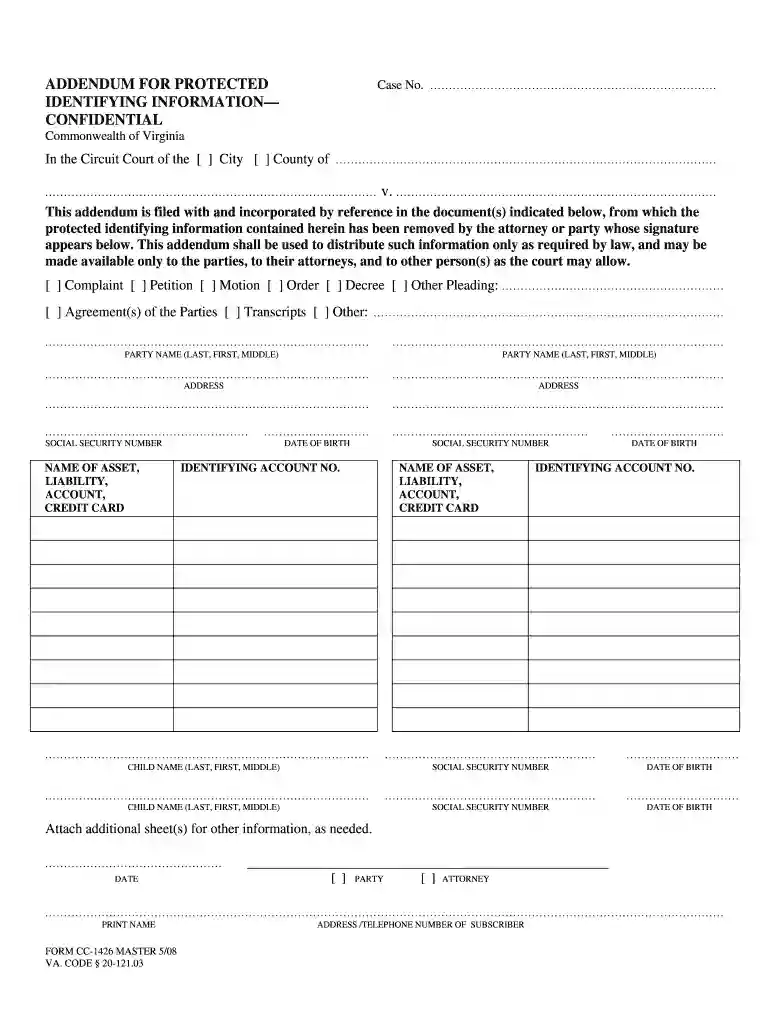
  2. Begin by filling in the 'Case No.' section at the top of the form. This is essential for identifying your case within the court system.
  3. Indicate whether your case is in a City or County by checking the appropriate box.
  4. In the 'Party Name' sections, enter the full names of all parties involved, ensuring accuracy to avoid any legal issues.
  5. Fill out the addresses for each party. This information is crucial for communication purposes.
  6. Complete the 'Date of Birth' and 'Social Security Number' fields for each party, as this information is often required for identification.
  7. List any assets, liabilities, accounts, or credit cards along with their identifying account numbers in the designated sections.
  8. If there are additional parties or information to include, attach extra sheets as needed and ensure they are referenced correctly.
  9. Finally, sign and date the form at the bottom. Select whether you are signing as a party or an attorney before printing your name.

Start using our platform today to fill out your va cc 1426 form online for free!

See more va cc 1426 form versions

We've got more versions of the va cc 1426 form form. Select the right va cc 1426 form version from the list and start editing it straight away!
Versions Form popularity Fillable & printable
2008 4.8 Satisfied (127 Votes)
be ready to get more

Complete this form in 5 minutes or less

Get form

Got questions?

We have answers to the most popular questions from our customers. If you can't find an answer to your question, please contact us.
Contact us

Signing paperwork on a mobile device is quick, simple, and doesn’t require software installation when you have an account with DocHub. Log in from any browser, fill in your empty fields with your data, and click on Sign → Create your signature. You can draw your electronic signature the same way you usually do on paper, add its image to your va cc 1426 form, or type in your name and stylize its look. No matter what option you select, your form will be valid.

You may find and modify your va cc 1426 form online by using DocHub. Its straightforward yet feature-rich design allows you to begin effective work immediately after you register your account. Create your account and add your file, and then our interface will guide you via our stress-free form completion experience.

The main purpose of an addendum is to formally add or clarify terms in a contract while keeping the original agreement intact. Instead of drafting a new contract, an addendum allows both parties to agree on changes efficiently.
As an addendum is an attachment to a contract, there are many different types of addendums. For example, if you have written a will but dont want to redo the will but only change certain parts, you can make an addendum to the will.
The CJIS Security Addendum was developed by the Attorney General of the United States and serves as a uniform addendum to any contract executed between a private contractor and a governmental criminal justice agency.

Security and compliance

At DocHub, your data security is our priority. We follow HIPAA, SOC2, GDPR, and other standards, so you can work on your documents with confidence.

Learn more
ccpa2
pci-dss
gdpr-compliance
hipaa
soc-compliance

People also ask

A confidentiality addendum template is a vital document for organizations that need to safeguard sensitive information. It outlines the terms for sharing confidential data and specifies obligations related to its protection.

Related links