Unum long term care claim form 2026

Get Form
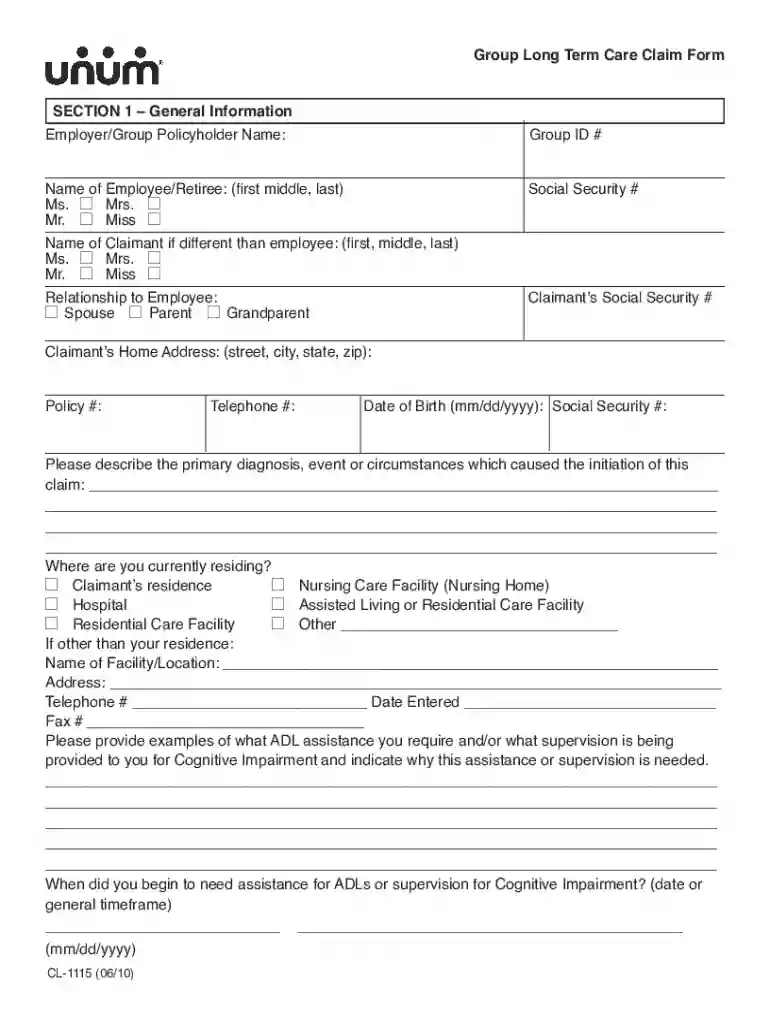
unum long term care claim form Preview on Page 1

Here's how it works

01. Edit your unum long term care claim form online
Type text, add images, blackout confidential details, add comments, highlights and more.

02. Sign it in a few clicks
Draw your signature, type it, upload its image, or use your mobile device as a signature pad.

03. Share your form with others
Send unum long term care claim form cl 1158 via email, link, or fax. You can also download it, export it or print it out.

How to use or fill out unum long term care claim form with our platform

Form edit decoration
9.5
Ease of Setup
DocHub User Ratings on G2
9.0
Ease of Use
DocHub User Ratings on G2
  1. Click ‘Get Form’ to open the unum long term care claim form in the editor.
  2. Begin with Section 1, providing general information such as the employer/group policyholder name, your name, and relationship to the claimant. Ensure all fields are filled accurately.
  3. Move to Section 2 and enter details about your primary care physician, including their name, address, and contact information. If applicable, list other physicians involved in your care.
  4. In Section 3, provide information about any hospital or facility stays related to your claim. Include names, addresses, dates of admission and discharge, and reasons for admission.
  5. Complete Section 4 by detailing who provided assistance during your loss of ADLs or cognitive impairment. Specify the type of care received and frequency.
  6. Finally, ensure Section 5 is completed with the Authorization to Release Information signed by you or a legal representative. This is crucial for processing your claim.

Start filling out your unum long term care claim form today using our platform for a seamless experience!

See more unum long term care claim form versions

We've got more versions of the unum long term care claim form form. Select the right unum long term care claim form version from the list and start editing it straight away!
Versions Form popularity Fillable & printable
2010 4 Satisfied (39 Votes)
be ready to get more

Complete this form in 5 minutes or less

Get form

Got questions?

We have answers to the most popular questions from our customers. If you can't find an answer to your question, please contact us.
Contact us

With DocHub, you can rapidly sign your long term care form or any other paperwork on iOS, even without setting up additional applications. You can access your DocHub account from any internet-connected browser and complete and sign your document in any preferred method with just a few clicks.

In addition to a comprehensive toolset for editing PDFs on mobile devices, DocHub allows you to sign your po box 7250 sioux falls sd along the way. Open our editor in your web browser, make changes using DocHub’s toolset, and finish your editing by eSigning the completed form.

You may purchase voluntary coverage for yourself and/or your spouse or domestic partner that helps to pay for care when you are no longer able to care for yourself. This includes community-based care, nursing home care and/or hospice care.
Common challenges claimants may experience include: Issues with medical records and information. It is not uncommon for Unum to disregard your doctors statements about your inability to work. In some cases, Unum will use a doctor that it chose to interpret your records to their benefit.
UNUM LTC offers the following plan features: Choose a monthly amount between $2,000 and $9,000 per month. Choose coverage for 3 years, 6 years or lifetime. Coverage levels range from 100% for nursing homes and assisted living facilities, to 50% for in-home professional care and/or adult day care.
be ready to get more

Complete this form in 5 minutes or less

Get form

People also ask

These are the general steps to take when filing a claim for long-term care insurance: Contact the insurance company to get a claim packet. Fill out the claim packet. Attend a phone interview. Wait for a response.
The easiest way to file a claim or leave with Unum is online or with the mobile app. If your claim is for Disability Insurance benefits, check with your HR department at work to find out whether you can file over the phone. For all other benefits, you can call 1-800-635-5597 to file your claim.
Visit unum.com/claims and log in or register to get started. You can file and manage all your claims on this site as well as upload required documentation, sign and submit forms, and much more. For added ease, you can download our mobile app.
The UB-04 form, previously called the CMS-1450 form, is the standard claim form used by an institutional healthcare provider to submit inpatient and outpatient medical claims for reimbursement from insurance companies when a provider qualifies for a waiver from the ASCA requirement for electronic submission of claims.

unum claim form pdf