







Definition and Meaning
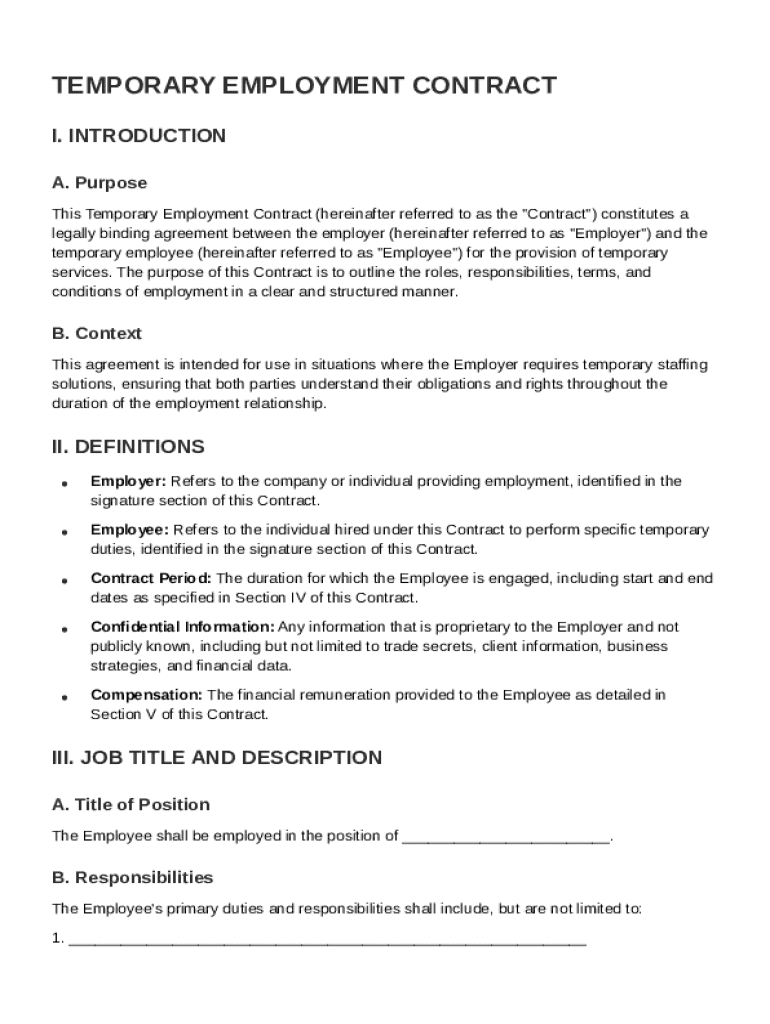
A Temporary Employment Contract is a legally binding document that establishes an agreement between an employer and a temporary employee. The contract charts out specific roles and responsibilities, ensuring clear communication between both parties. Within the context of document workflow solutions like DocHub, the "Temp Contract Template" serves as a structured guide to efficiently create and manage such agreements.
Typically, this template includes detailed information about the job title, term of employment, compensation, and key responsibilities, ensuring a transparent understanding of what each party expects. This helps in preventing misunderstandings and fosters a professional relationship built on trust and clarity.
How to Use the Temp Contract Template
Using the Temp Contract Template effectively involves several sequential steps to customize the document according to specific requirements. Begin by downloading or opening the template in a platform like DocHub, which allows seamless editing and signing of various file types, including DOC and PDF formats.
-
Import and Edit: Bring the template into the online editor. Modify sections such as job titles, employment duration, and compensation details according to the specific needs of the employment context.
-
Customization: Utilize DocHub's features to add text boxes, annotate, and include relevant images or logos where necessary.
-
Review and Comment: Before finalizing, review the document, making use of the platform’s collaborative tools. Leave comments if other stakeholders need to provide input.
-
Finalize and Sign: Ensure that all sections are accurately completed before obtaining electronic signatures. DocHub’s legally binding e-signature feature makes the signing process secure and straightforward.
-
Distribute: Once signed, distribute the finalized contract to relevant parties, ensuring that everyone involved has a copy for their records.
Key Elements of the Temp Contract Template
Several key components are integral to a thorough Temporary Employment Contract. Customizing these elements within the DocHub template ensures that the document is legally sound and tailored to the specific employment arrangement.
- Purpose and Definitions: Clearly states the essential functions of the temporary role and provides definitions for terms used within the contract.
- Compensation and Benefits: Outlines salary, hourly rates, or commission structures, along with any additional benefits or bonuses.
- Work Schedule: Details hours, workdays, and flexibility requirements to set clear expectations.
- Confidentiality Obligations: Defines the scope of confidential information and establishes procedures to protect sensitive data.
- Termination Conditions: Specifies the scenarios under which the contract can be terminated by either party, including notice periods and reasons for termination.
- Governing Law and Miscellaneous: Identifies which state’s laws govern the contract, which is crucial for resolving any legal disputes.
Each of these components ensures the document not only reflects the agreement but also protects both parties' interests.
Steps to Complete the Temp Contract Template
Completing a Temporary Contract Template can be done efficiently by following a structured process. Here’s a step-by-step guide to ensure thorough completion:
-
Identify Requirements: Clearly outline the job role and responsibilities. Gather necessary details such as start and end dates, compensation, and work hours.
-
Access the Template: Load the template into DocHub, utilizing its comprehensive suite of document editing tools.
-
Edit the Document: Adjust pre-filled sections to cater to the specific terms of employment. Use the text editor to add or amend clauses pertinent to employment details like job description and expectations.
-
Add Signature Fields: Create fillable signature fields at designated places for both employer and employee. This makes it easy to obtain e-signatures later.
-
Conduct a Review: Utilize DocHub’s collaborative features to share the document with stakeholders for review and input.
-
Sign and Save: Once reviewed, proceed to e-sign the contract and store copies securely for future reference.
This methodical approach ensures that crucial details are not overlooked and the document remains legally binding and enforceable.
Legal Use of the Temp Contract Template
Using a Temp Contract Template correctly is critical to ensuring its legality. Being a legal document, certain guidelines must be followed to uphold its validity, and platforms like DocHub facilitate this through secure editing and signing processes.
- Compliance with Employment Laws: Ensure all contract elements comply with both federal and state employment laws relevant to the job's location.
- E-Signature Legality: DocHub enables the use of legally binding electronic signatures, aligning with the ESIGN Act requirements, which is accepted nationwide.
- Privacy and Security: Leverage DocHub’s 256-bit SSL encryption to protect sensitive information, maintaining confidentiality and security.
Adhering to these legal standards ensures that the document is enforceable and protects the employer and employee’s rights.
Examples of Using the Temp Contract Template
The Temp Contract Template is versatile and suits various scenarios across numerous industries, helping businesses efficiently handle temporary employment arrangements.
- Retail Industry: Retailers can quickly onboard seasonal workers for busy holiday periods using the template to outline specific terms like sales targets and return policies.
- Healthcare Sector: Temporary staff such as nurses can have their contracts tailored for short-term assignments, specifying hours and departmental responsibilities.
- Information Technology Firms: Use the template for project-based workers, detailing project deliverables, deadlines, and proprietary technology use.
These real-world scenarios illustrate the template’s ability to adapt to different industries’ needs, providing clarity and ensuring compliance in temporary employment situations.
State-Specific Rules for the Temp Contract Template
Temporary contracts may be subject to varying legal requirements depending on the state. It’s crucial to tailor the template to meet these state-specific regulations.
- California: Requires specific language for at-will employment disclaimers and mandates adherence to strict overtime pay laws.
- New York: Has unique rules regarding temporary worker benefits and requires clear identification of employee rights.
- Texas: Necessitates adherence to minimal wage standards and specific non-compete clauses to be added based on state laws.
Ensuring alignment with these rules is paramount. Platforms like DocHub support customization to incorporate necessary state-specific requirements, making the template adaptable and lawful across different jurisdictions.
Software Compatibility
To maximize efficiency, the Temp Contract Template must be compatible with various software systems. DocHub ensures robust compatibility with a range of popular applications and tools.
- Google Workspace: Direct integration allows seamless import/export between Google Drive and Gmail, aiding in streamlined document management.
- Microsoft Office: Compatibility with DOC, PPT, and XLS file types allows easy editing of documents typically used in business environments.
- Cloud Storage Services: Users benefit from direct document imports from services like Dropbox and OneDrive, reducing the steps needed to access and begin editing.
By ensuring the template’s compatibility across various software environments, DocHub provides a user-friendly experience that supports diverse business needs.




