
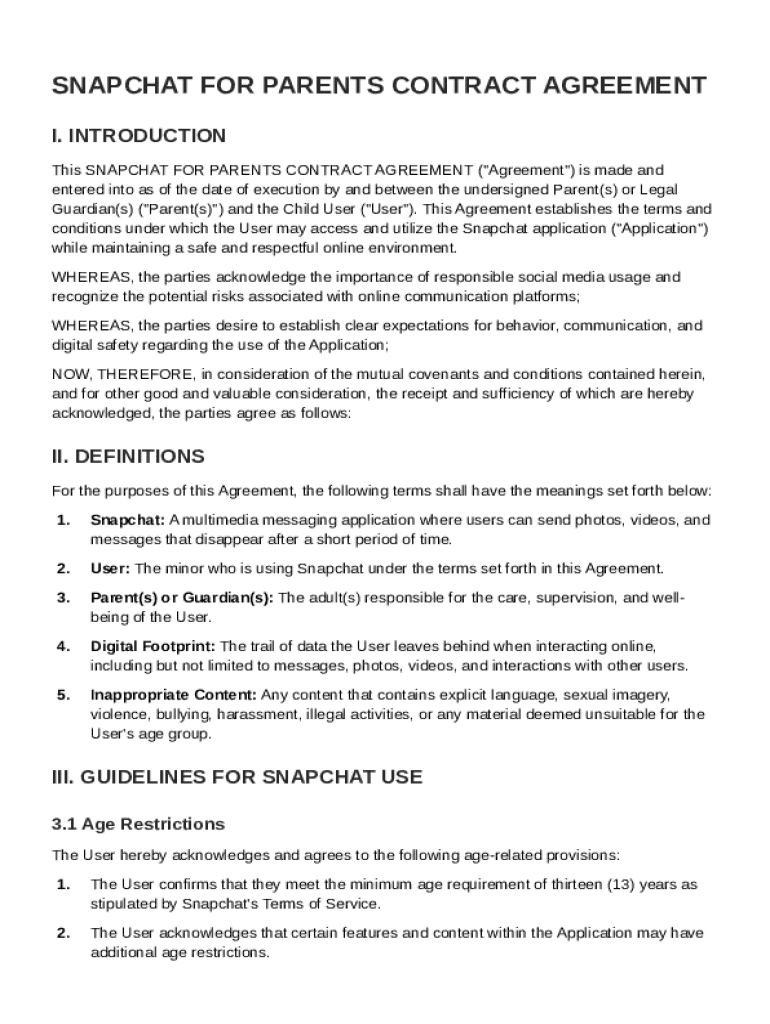







Definition & Meaning
The Snapchat For Parents Contract Template is a structured form intended to establish guidelines and expectations between parents and their children concerning the use of the Snapchat application. Its primary focus is on promoting responsible behavior, ensuring digital safety, and fostering parental involvement in monitoring social media interactions. By setting clear terms and conditions, the template serves as a tool to align understanding and agreement on acceptable usage, mitigating potential risks associated with digital communication platforms.
- Objective: Establish a mutual understanding between parents and children on the responsible use of Snapchat, focusing on digital citizenship.
- Scope: Covers age restrictions, privacy settings, communication protocols, and consequences for policy violations.
Key Elements of the Snapchat For Parents Contract Template
The template consists of several critical elements tailored to address various aspects of Snapchat usage and its implications for youth.
- Age Requirements: Clarifies the minimum age for Snapchat usage in accordance with the platform’s terms.
- Privacy Settings: Outlines recommended privacy configurations to protect personal information and limit exposure.
- Communication Rules: Establishes acceptable forms of communication and response times, promoting respectful engagement.
- Violation Consequences: Details actions to be taken if the agreement terms are breached, including restricted access or suspension.
Steps to Complete the Snapchat For Parents Contract Template
Completing the Snapchat For Parents Contract Template involves several straightforward steps designed to ensure parental consent and clarity on usage expectations.
- Review the Template: Parents and children should together read through the entire contract to understand each section.
- Customize Terms: Adjust any specific terms to fit family preferences, such as screen time limits or privacy settings.
- Discuss and Negotiate: Engage in open discussion about each clause to ensure agreement and address any concerns.
- Sign the Agreement: Both parties should sign the contract to formalize the commitment to the set terms.
- Implement Monitoring: Establish a plan for regular check-ins and monitoring to ensure adherence to the contract.
Who Typically Uses the Snapchat For Parents Contract Template
This template is utilized primarily by parents with minors who are active on Snapchat. It serves as a preventative measure to guide safe and appropriate digital interactions.
- Parents: Looking to set structured rules around Snapchat use.
- Minors: Adolescents eligible to use Snapchat, adhering to agreed-upon terms.
- Guardians or Caregivers: Those responsible for overseeing a minor’s social media activities.


How to Obtain the Snapchat For Parents Contract Template
Securing the contract template can typically be done through several channels, offering flexibility in how parents choose to access this resource.
- Online Platforms: Many websites host downloadable versions of parental control agreements, often for free.
- Educational Institutions: Schools or organizations may offer these templates as part of their digital citizenship resources.
- Community Workshops: Local parenting workshops sometimes distribute these templates as part of their curriculum.
Legal Use of the Snapchat For Parents Contract Template
While the contract primarily serves as an informal agreement within a family, understanding its legal standing and frameworks ensures proper use.
- Non-binding Nature: This template acts more as a moral guide rather than a legally enforceable document.
- Supported by ESIGN Act: If signed electronically, the agreement complies with requirements set by the ESIGN Act, giving it some weight in terms of adherence.
- Parental Authority: It underlines the authority a parent has over a minor’s digital activities.
Examples of Using the Snapchat For Parents Contract Template
Real-world scenarios provide insight into how the contract is used effectively across different circumstances.
- Age Appropriateness: A family with teenagers may employ the template to ensure their children are using Snapchat responsibly and adhering to age limitations.
- Behavioral Improvement: For children who previously demonstrated inappropriate online behavior, the contract acts as a behavioral corrective tool with stipulated consequences.
- Tech-Savvy Families: Families accustomed to digital tools may use the contract for ease in managing multiple social media accounts with different children.
Important Terms Related to Snapchat For Parents Contract Template
Certain terminologies are essential for understanding and properly implementing the contract.
- Digital Safety: Ensuring that online activities do not expose users to harm or risk.
- Consent: Both parties agree to terms willingly, highlighting an understanding of each facet.
- Parental Control: Mechanisms and tools used by parents to monitor and manage a child’s online presence.
State-Specific Rules for the Snapchat For Parents Contract Template
Although the general guidelines apply broadly, certain state regulations can influence the implementation of the contract.
- Age Limitations: Some states have specific laws regarding the acceptable age for social media account creation.
- Privacy Laws: Variations in state laws regarding privacy and data protection may necessitate added clauses in the contract.
Software Compatibility and Management Tools
Implementing the contract can be streamlined with the use of digital tools and platforms.
- DocHub Integration: Utilize platforms like DocHub to edit, share, and sign the contract efficiently.
- Cloud Storage: Options such as Google Drive enhance accessibility, ensuring the contract is stored securely and can be easily updated.
By laying out these comprehensive elements, the Snapchat For Parents Contract Template empowers families to navigate the complexities of digital communication, fostering a safe and responsible environment for minors engaging with social media.




