






Definition & Meaning
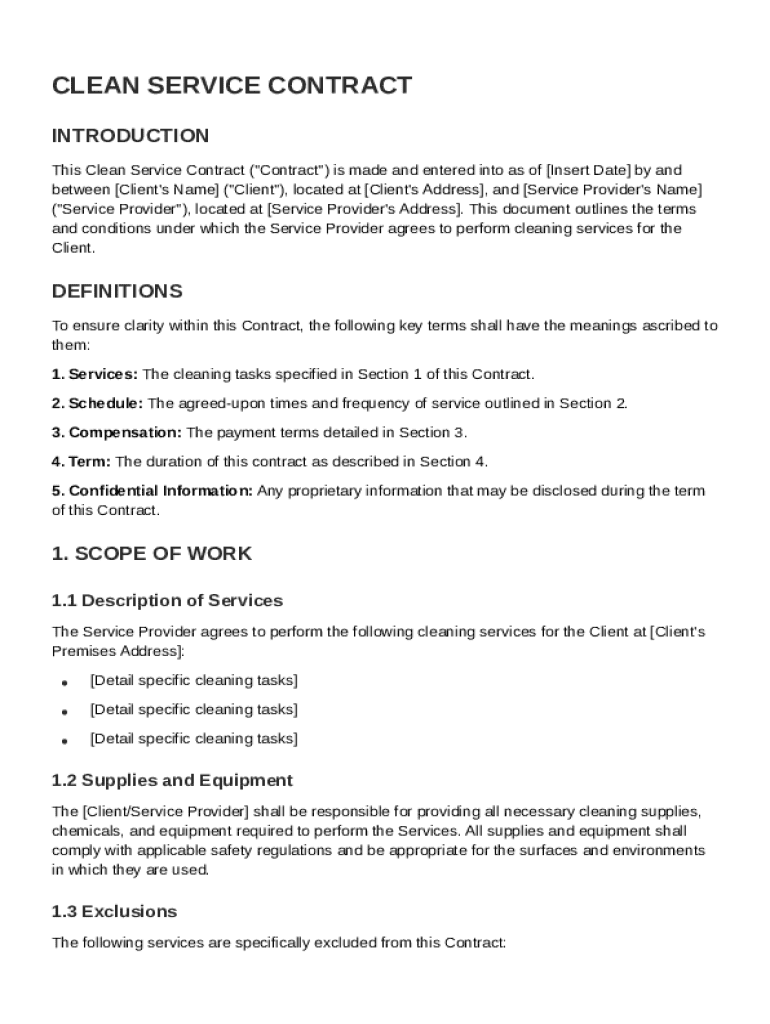
A Clean Service Contract Template is a detailed document that outlines the agreement between a client and a service provider for cleaning services. This template is designed to streamline the process of establishing a formal relationship between both parties by clearly defining the scope of work, responsibilities, and expectations. The document typically includes specifics about the services to be performed, the frequency and duration of the service, and the compensation terms. This contract serves as a protective measure for both parties, ensuring that the terms of service are clearly agreed upon, legally binding, and enforceable. By establishing these parameters, the Clean Service Contract Template helps prevent misunderstandings and disputes, providing clarity and security for both the client and the service provider.
Key Elements of the Clean Service Contract Template
The Clean Service Contract Template is composed of several critical elements to ensure comprehensive coverage and avoid legal issues. Here are the major components typically included:
-
Scope of Work: This section details the specific cleaning tasks that are to be performed by the service provider, including any special requirements or conditions stipulated by the client.
-
Service Schedule: Outlines the frequency and duration of the cleaning services, including specific dates and times when the services will be provided.
-
Compensation Terms: Details the agreed-upon payment for services rendered, including how and when payments will be made, and any penalties or late fees for delayed payments.
-
Liability Limitations: Ensures both parties understand their rights and responsibilities concerning damages or accidents during the provision of services.
-
Confidentiality Obligations: Protects sensitive information exchanged between the client and service provider, ensuring that confidentiality is maintained.
-
Dispute Resolution Procedures: Sets out the process for resolving any disagreements or conflicts that may arise during the term of the contract, often recommending mediation or arbitration as first steps.
-
Amendments and Modifications: Describes how changes to the contract terms can be proposed and agreed upon during the contract duration.
-
Force Majeure Clause: Addresses unexpected events that may prevent one or both parties from fulfilling their contractual obligations, detailing what happens in such scenarios.
Steps to Complete the Clean Service Contract Template
Successfully completing a Clean Service Contract Template involves several steps ensuring all necessary information is captured accurately.
-
Download the Template: Obtain the Clean Service Contract Template from a reputable source, such as DocHub, which provides user-friendly, customizable document options.
-
Participant Identification: Clearly identify both the client and service provider, including full names, contact information, and business addresses.
-
Service Details Specification: Outline the specific cleaning services to be provided, detailing any special requirements or standards to be met.
-
Define Compensation Terms: Specify payment schedules, amounts, and methods (e.g., monthly invoice, credit card, bank transfer).
-
Schedule and Duration Establishment: Include the frequency (daily, weekly, etc.) and duration (months, years) of the services to create a common expectation.
-
Review and Agreement: Both parties should review the contract in detail to ensure that all agreed terms are accurately documented.
-
Signatures and Dates: Obtain signatures from both the client and service provider to formalize the agreement, including the date on which the contract is signed.
Legal Use of the Clean Service Contract Template
Using a Clean Service Contract Template ensures legal protection and compliance for both parties involved. The template is structured to adhere to contract law, making it legally binding once signed. It's important to review the contract within the context of applicable local, state, and federal laws to ensure compliance with any specific legal requirements.
When utilizing this contract, both parties have the legal right to seek enforcement of the contract terms or remediation through legal channels if the agreement is violated. This may include seeking damages, specific performance, or other relief granted by courts of law or agreed-upon arbitration. The inclusion of clauses such as dispute resolution and confidentiality ensures that both parties are protected and have recourse in case of disputes or breaches.
State-Specific Rules for the Clean Service Contract Template
While the Clean Service Contract Template provides a broad framework, certain state-specific requirements may need to be included, depending on where the services are provided.
-
Licensing and Regulation Compliance: Some states may require cleaning service providers to obtain specific licenses or comply with particular regulations.
-
Tax and Labor Laws: Ensure that the contract complies with state-specific tax obligations and labor laws, such as minimum wage laws, worker's compensation insurance, and labor rights.
-
Consumer Protection Laws: States may have different legislations regarding consumer protection, which can affect contract terms related to cancellations, refunds, and service quality guarantees.
To ensure that the contract adheres to all legal requirements, it may be beneficial to consult a legal professional familiar with the local laws that apply to the cleaning services industry.
Who Typically Uses the Clean Service Contract Template
The Clean Service Contract Template is utilized by a diverse group of individuals and organizations seeking to solidify professional cleaning arrangements.
-
Residential Clients: Homeowners and tenants who require regular cleaning services can use the template to contract local cleaning services.
-
Commercial Entities: Businesses, such as offices and retail spaces, often utilize this contract to establish relationships with professional cleaning companies for regular maintenance and cleaning.
-
Cleaning Service Providers: Independent cleaners and cleaning companies use the template to formalize their service agreements with clients, ensuring clear communication of expectations and rights.
-
Property Management Companies: These entities frequently use cleaning service contracts to maintain the cleanliness and appeal of the properties they oversee.


Examples of Using the Clean Service Contract Template
Real-world scenarios illustrate how the Clean Service Contract Template can be effectively employed to meet various cleaning service needs:
-
A small business owner hires a cleaning service company for their office space. The template is used to outline the frequency of office cleaning, specific areas to be addressed, and the cost of services.
-
A homeowner contracts a cleaning service for a bi-weekly cleaning of their residence. The contract details include tasks such as vacuuming, dusting, and mopping, as well as payment arrangements.
-
An apartment complex contracts a cleaning company to handle common areas. The template specifies cleaning schedules for shared spaces like lobbies, laundry rooms, and hallways.
These examples demonstrate the versatility of the Clean Service Contract Template in providing clear, enforceable agreements tailored to the specific needs of a variety of clients and service providers.