






Definition & Meaning
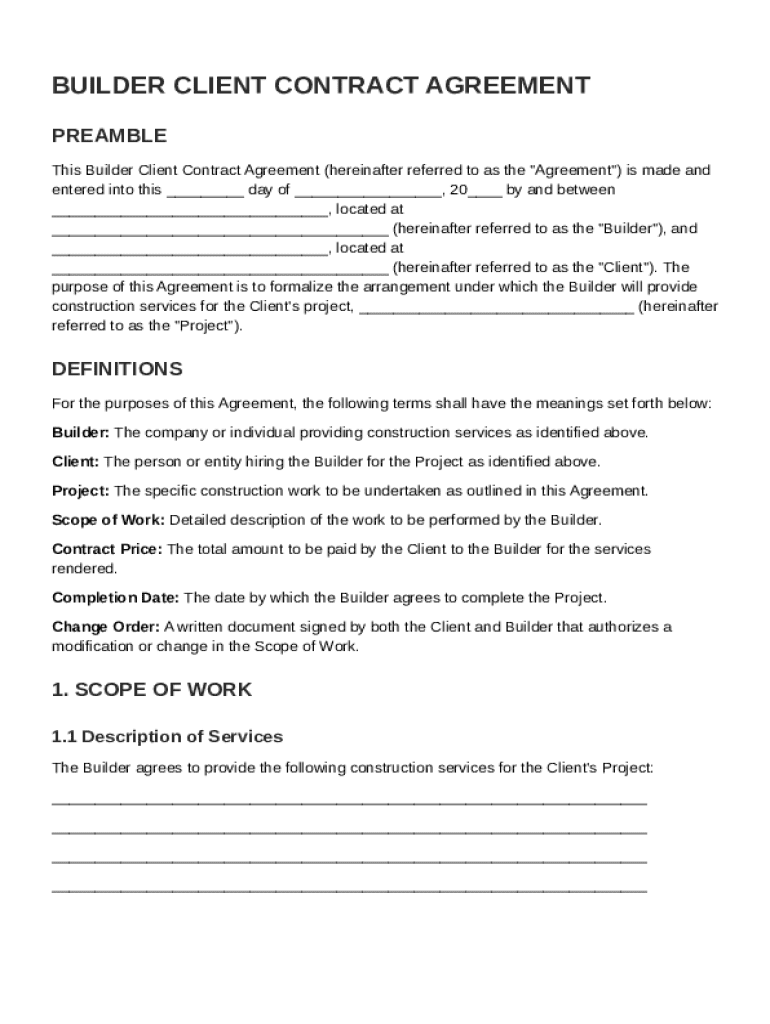
The Builder Client Contract Template is a standardized document that establishes the formal relationship between a builder and a client for a specific construction project. This contract outlines critical elements such as the scope of services to be provided, the price agreed upon for the work, and the schedule for payments. It also specifies the responsibilities of both parties, procedures for making changes to the work, and methods for resolving any disputes that may arise. By defining these elements, the template helps both the builder and the client understand their obligations and rights, reducing the risk of misunderstandings and conflicts.
Key Elements of the Builder Client Contract Template
Scope of Work
This section details the specific tasks the builder will perform, ensuring there is no ambiguity about what the client can expect. The scope of work typically includes:
- A detailed description of the construction services.
- A timeline for the completion of each phase of the project.
- Any equipment or materials that will be used.
Clarifying these elements sets the foundation for a successful project by aligning both parties' expectations.
Payment Terms
Payment terms are crucial to avoid disputes regarding financial matters. This part of the template covers:
- The total cost of the project.
- A breakdown of payment schedules, which might include an initial deposit, milestone payments, and final payment upon project completion.
- Accepted payment methods, such as bank transfers or checks.
By establishing clear payment conditions, this section helps maintain trust and transparency between the builder and the client.
Legal Use of the Builder Client Contract Template
Ensuring the contract complies with legal standards is essential. The Builder Client Contract Template is designed to be adaptable while meeting the legal requirements for construction agreements. It includes:
- Provisions for compliance with local building codes and regulations.
- Language that aligns with federal laws, such as the ESIGN Act, if electronic signatures are used.
- A clause specifying jurisdiction in case of legal disputes.
Integrating these legal considerations protects both parties and ensures the enforceability of the agreement.
Steps to Complete the Builder Client Contract Template
Filling out the Builder Client Contract Template can be straightforward when following these steps:
- Identify the Parties: Clearly list the builder’s and the client’s names, addresses, and contact information.
- Define the Project: Document the project location and a description of the work to be done.
- Outline Payment Details: Insert the agreed-upon payment amounts and schedules.
- Specify Responsibilities: Clarify each party's roles and obligations.
- Include Dispute Resolution Procedures: Detail how conflicts will be managed, such as through arbitration or mediation.
- Add Signatures: Ensure both parties review the document and provide their signatures to formalize the agreement.
Who Typically Uses the Builder Client Contract Template


Builders and Contractors
Builders and general contractors use this template to provide a standardized agreement format that clearly communicates the scope and terms of their services to clients. It helps ensure that they meet client expectations while protecting their legal and financial interests.
Homeowners and Property Developers
These clients use the contract template to formalize agreements with builders, ensuring clarity on project scope, costs, timelines, and quality expectations. This document provides a legal framework for addressing any issues or changes that may arise during construction.
Important Terms Related to Builder Client Contract Template
Understanding the terminology used in the contract can enhance clarity and prevent disputes. Key terms include:
- Change Order: A documented agreement that modifies the original scope of work.
- Retainage: A portion of the payment withheld until completion to ensure satisfactory performance.
- Substantial Completion: The stage at which the construction work is sufficiently complete, minus minor punch list items, and the property can be used as intended.
Each term carries specific implications that affect both the builder's and the client's roles and responsibilities in the contract.
State-Specific Rules for the Builder Client Contract Template
While the template provides a general framework, modifications may be necessary to comply with state-specific regulations, such as:
California
- Adherence to the Home Improvement Act, which mandates contractor licensing and provides specific rights to homeowners.
- Inclusion of a "Notice of Cancellation" clause, granting clients the right to cancel within a set period.
New York
- Compliance with the Lien Law, which requires detailed payment documentation to protect contractors' rights to file liens.
It is crucial to tailor the contract template to accommodate these and other state-specific legal requirements.
Examples of Using the Builder Client Contract Template
Residential Remodeling
A homeowner in Florida uses the template to outline a $50,000 kitchen renovation, detailing cabinetry, appliances, and material selections to avoid disputes over the final design.
Commercial Construction
A business entity in Texas employs the contract template for a $250,000 office build-out, specifying phased payment terms to align with project milestones.
By tailoring the template to the specific needs and constraints of the projects, both parties can ensure a smooth transaction and project execution.